App Review "Bypassing" NoVirusThanks EXE Radar Pro

It is advised to take all reviews with a grain of salt. In extreme cases some reviews use dramatization for entertainment purposes.

TheMalwareMaster

Level 21
Thread author
Verified
Honorary Member
Top Poster
Well-known
Forum Veteran
Jan 4, 2016
1,066
5,727
1,978
Europe
Please report this video to EXE radar developer (I'm not the author of this video). After asking this youtube channel of this yesterday evening, they immediatly uploaded a video.. I don't know if it's a bypass, so I used quotation marks. Happy easter to all :)
 
1- In default setting ERP allow powershell , so it is obvious the attack will work... Anti-exe are not AV , they aren't supposed to be used with default settings.
2- This version is abandoned, a new ERP is being developed.
 
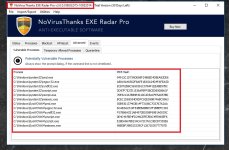
The free beta version from 2015, which most people seem to be using, has all the powershell executables on the vulnerable processes list, at default settings. This means you will get a prompt if malware tries to execute powershell. Same goes for cmd.exe.
The author of the video argues that such settings would be impractical in a corporate environment. This might be true, for corporations, but it is not a problem for home users.
 
The free beta version from 2015, which most people seem to be using, has all the powershell executables on the vulnerable processes list, at default settings. This means you will get a prompt if malware tries to execute powershell. Same goes for cmd.exe.
The author of the video argues that such settings would be impractical in a corporate environment. This might be true, for corporations, but it is not a problem for home users.
Where he say that?
 
yep , but ERP isn't corporate tool, it can't handle SUA which is the basic in corporate environment.
We hope that shortcoming will be fixed in new version.

I have run ERP in SUA, and sometimes it works fine, but sometimes it acts strange. I never could quite figure that out.
 
Looking at this video it appears that he removed cmd.exe and powershell.exe from the Vulnerable Process List. He disabled cmd.exe and powershell.exe alerts to make ERP hypothetically "work" in a corporate environment.

Also, on his YouTube channel in the comments of this video he states "But if you whitelist cmd.exe and powershell.exe, a skilled attacker is most likely going to be able to bypass it."
 
Looking at this video it appears that he removed cmd.exe and powershell.exe from the Vulnerable Process List. He disabled cmd.exe and powershell.exe alerts to make ERP hypothetically "work" in a corporate environment.

Also, on his YouTube channel in the comments of this video he states "But if you whitelist cmd.exe and powershell.exe, a skilled attacker is most likely going to be able to bypass it."
He used old stable version 10032014, we can see it at the beginning. old stable didn't have powershell & cmd as vulnerable processes if i recall well.
 
Very nice explanation Mr. Umbra and Mr. Lockdown. I see that its in the vulnerable process alright :) Is there anything that we should add to be more protected Sirs?

52768922017-04-16_234114.jpg


Thank you :)
 
Someone needs to ask him point-blank if he removed cmd.exe and powershell.exe from the Vulnerable Process List so as not to generate any ERP alerts when those processes execute a script. On the other hand, if they are not run using their Shells (cmd.exe, powershell.exe) but instead run via a dll or some other means, ERP might not generate an alert when they execute a script.
 
Someone needs to ask him point-blank if he removed cmd.exe and powershell.exe from the Vulnerable Process List so as not to generate any ERP alerts when those processes execute a script. On the other hand, if they are not run using their Shells (cmd.exe, powershell.exe) but instead run via a dll or some other means, ERP might not generate an alert when they execute a script.
The version of ERP he used doesn't have powershell as vulnerable processes , so the attack isn't blocked.
 

Attachments

  • ERP.jpg
    ERP.jpg
    180.2 KB · Views: 649
Last edited by a moderator:
  • Like
Reactions: Solarquest
Please report this video to EXE radar developer (I'm not the author of this video). After asking this youtube channel of this yesterday evening, they immediatly uploaded a video.. I don't know if it's a bypass, so I used quotation marks. Happy easter to all :)


Guys don't panic. Look at Panda's bypassed video comment section. They are a Cylance and CB reseller as well. Finally, the actual weakness is in Windows 7 and it's Powershell version 1.0 or 2.0 - all product will fail as they will use all types of powershell attack tools and will always bypass...if not file based, fileless will work as well, after I mentioned about "Invoke Obfuscation" powershell method Carbon Black won't be able to block as well, look at their answers....they still need to combine with Logrhythm or CyberShark to detect. Don't worry guys....trust your own product. Look at this video then you will understand...no security product at this moment can 100% protect you against advanced powershell attack especially fileless based attack. If only their video ran on Windows 10, disable Powershell 2.0, enable Windows Defender, enable your product...if run the exact same attack from the current video of your product...it will fail to bypass..but of course, if they were to reproduce another video running on windows 10, they will surely leverage the attack to another level.

If your product is running on Windows 10 or server 2016, disable Powershell 2.0, running fully on Powershell version 5, setup logging in Events, GPO, setup Logrhythm/Cybershark or other similar tools, install your product ensure support AMSI, Enable Windows Defender and secure it.. then you are protected from the most advanced powershell attack...except invoke Obfuscation Powershell Attack which needs close monitoring on your networks and system event.

 
Last edited:

You may also like...