Question Can I change the "Device Setup Region" in Windows 11 without reinstalling the operating system?

Please provide comments and solutions that are helpful to the author of this topic.

lokamoka820

Level 41
Thread author
Verified
Top Poster
Well-known
Mar 1, 2024
3,079
3
9,934
3,969
Banana Republic
I need to change the "Device Setup Region" in Windows 11, but I read that I have to do a clean installation. Is this true, or is there a way to change it without reinstalling?

There is some discussion about using Microsoft's System Preparation Tool (sysprep) to change it. Is this a safe process, or will it reset my customizations on the taskbar, etc.?

Code:
%WINDIR%\system32\sysprep\sysprep.exe

Thank you.
 
Is not changing region in settings sufficient?

Capture.JPG
 
Yes, you can change the Device Setup Region without a full reinstall by using the sysprep tool mentioned in your post.

It is NOT safe for your customizations.

This process forces your computer back to the "Welcome to Windows" setup screen. Your taskbar pins, Start menu layout, and system preferences will be reset to factory defaults.

You will likely be forced to create a new user account when the PC reboots. Your old files will still be on the disk (in C:\Users\), but your old account may not work correctly afterwards.

How to do it (If you accept the risk)

Running Sysprep (The GUI Way)

You don't need the black Command Prompt window. You can click your way there.

Press Win + R on your keyboard.

Paste this path and hit Enter: C:\Windows\System32\Sysprep

Right-click sysprep.exe and choose Run as administrator.

Configure the Tool (Important)

System Cleanup Action
Select Enter System Out-of-Box Experience (OOBE).

Generalize Check this box (Required to reset the Region ID).

Shutdown Options Select Reboot.

Click OK.

The PC will think for a while, then restart into the "Welcome to Windows" setup screen. Select your New Region there. When it asks for a user account, you will likely have to make a new one.
 
So will English (UK) be installed automatically? Isn't there something special about choosing English (World)?
It was reported by some users that using English (World) in install allow uninstalling of some pre-installed apps with Windows, but I did not try before.
 
  • Like
Reactions: Sorrento
I can't believe I had to change the device's region setting to the European Union to be able to turn off System Restore and prevent it from coming back with every Windows update.
The is an easier way; after deleting the already existing restore point and turning off system restore in settings, go to services and disable volume shadow service.
 
I believe that only EU users have control over Windows settings, while other users are controlled in some way.
I have read about changing to EU to uninstall Edge (in LTSC after some update it became uninstallable without changing the region), but it is the first time to know it can have advantage regarding other settings.
 
  • Like
Reactions: lokamoka820
I have read about changing to EU to uninstall Edge (in LTSC after some update it became uninstallable without changing the region), but it is the first time to know it can have advantage regarding other settings.
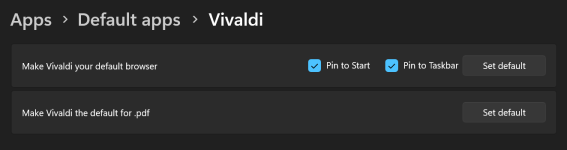
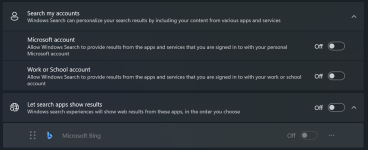
I find different settings when I want to change something, and I am not familiar with all the changes yet. For example, I can disable Bing search from the settings instead of modifying the system registry, and I am not sure if the default app settings look like this for all regions or only in the European Union.

Screenshot_5.pngScreenshot_6.png
 
I find different settings when I want to change something, and I am not familiar with all the changes yet. For example, I can disable Bing search from the settings instead of modifying the system registry, and I am not sure if the default app settings look like this for all regions or only in the European Union.

View attachment 295710View attachment 295711
May be the reason I could not find necessity for changing the region is the LTSC is stripped of most additional features in GAC Windows.
 
I've never had System Restore turned on with my 100% US localized copy of Windows 11. I can't speak to other regions, though.
According to Windows version; in Windows 10 it is turned off after install and does not turn itself on, but in Windows 11 it turns itself on after install and after updates, even if I turn it off.
 
According to Windows version; in Windows 10 it is turned off after install and does not turn itself on, but in Windows 11 it turns itself on after install and after updates, even if I turn it off.
The problem is that Windows 11 performs about three system restores with each update, and the time between them is only a few seconds, which is really chaotic.
 
  • Like
Reactions: Parkinsond