CaptnAmerca's security config 2016

Windows Edition
Home
User Access Control
Always notify
Real-time security
Avira Pro
MalwareBytes Anti-Exploit Pro
Periodic malware scanners
MalwareBytes Anti-Malware Pro
Malware sample testing
I do not participate in malware testing
Browser(s) and extensions
Firefox (w/ uBlock Origin, Disconnect, FlashBlock)
Flash, JavaScript upon request.
Maintenance tools
Sandboxie (Paid)
SmartScreen = ON

CaptnAmerca

Level 1
Thread author
Verified
Mar 17, 2016
21
43
30
46
Dunedin, FL
OK, this is the system setup. The computer, an HP Pavillion all-in-one is only about 2 months old, and I'm trying to bolster the defenses so it will continue to last for another 10-15 years.

It's tempting to just buy every security product I can find, but that's probably overkill, and almost certainly there will be conflicts.

I almost always browse the internet in a Sandboxie browser. I've been looking at adding Shadow Defender to the lineup as well.

I don't do any gaming, but I'm guilty of downloading the occasional file via qbittorrent. It downloads to the sandbox, where I scan it with MBAM before recovering.

I have no idea where to start for mobile security on my Android phone and my Kindle Fire HD.

I've already had to reinstall Windows once due to a Windows update that made booting up impossible. Very annoying, and very time-consuming to restore everything, especially with a newborn in the house. I would really like to avoid that again so I'm looking hard for a good backup system.

I humbly submit all this to the glorious experts of this web forum. If I left out any info, or am not being clear about something, please ask. I'm a novice in the security world.

Thanks in advance.
 
Maybe adding Malwarebytes Anti-Exploit as more protection. I also HIGHLY recommend having a login password and enabling smart screen. UAC isn't that good in my onion but turning it to at least default is a good idea.

Yeah, the password seems like an obvious oversight. Even though it's a home computer, with only one other adult in the house, it's probably still a good idea. I can get on that right away.

Not sure what smart screen is referring to. Are you talking about the Internet Explorer setting?
 
Hello, you have to do some little things that can make your pc more secure :
-Add a password
-Enable UAC
-Add on-demand scanners (like hitman.pro, Zemana antimalware, Malwarebytes....)
-Use a password manager (Online = Lastpass, Offline = keepass)
-Use an anti-exploit (Malwarebytes anti-exploit)
-Use CCleaner and Privazer to clean junks
-Use Ublock origin and remove adblock : Ublock is much better and lighter as adblock.
So good work :)
 
Avira + Malwarebytes Antimalware + Sandboxie, this is also the combo that I was using when I first came to MalwareTips. ;)

I would recommend to to specify the version of the security softwares that you are using to make your config more clear. For example, you could implicitly specify whether you are using Avira Free or Avira Pro, MBAM Free or MBAM Pro, Sandboxie Free or Sandboxie Paid.

Not sure what smart screen is referring to. Are you talking about the Internet Explorer setting?

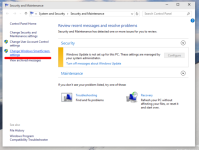
As far as I know, in Win8.1 and Win10, Microsoft has made smart screen a system-wide protection tool. It will alert the user when an unrecognized program from the Internet is executed. You can enable it by clicking the link shown in the following figure.
Windows-10-action-center-600x454.png
 
Last edited:
Good call.

I'm not sure how to edit the config part of the OP, but it's Avira Pro, MBAM Pro and Sandboxie Paid.

I generally don't use the free versions of security programs. It's such a small cost.
 
Shadow Defender is definitely a worth program to your system, just don't take too much to exclude to folders and other stuffs. Just place your important documents as virtualization meant for testing purposes.

You may add another adblocker if you want like Ublock Origin or Adguard as the blocking rate can increase very well against advertisements.
 
Weekend Update:

- Added login password
- Set UAC to maximum (Always Ask)
- Enabled SmartScreen Filter
- Removed AdBlockPlus, replaced it with uBlock Origin
- Installed MalwareBytes Anti-Exploit Pro (paid version)


Still to do (notes to self, but opinions are welcome):

- Research and install a Password Manager. (Lastpass and KeePass have been suggested)
- Install Shadow Defender (once every thing is installed, scanned, and running smooth)
- Registry Cleaner? (is this a necessary tool? Conflicting opinions on effectiveness)
- Research VPN subscription as part of mobile phone security (WiFi)
- Research effective mobile phone security programs for Android, Kindle Fire HD
 
Weekend Update:

- Added login password
- Set UAC to maximum (Always Ask)
- Enabled SmartScreen Filter
- Removed AdBlockPlus, replaced it with uBlock Origin
- Installed MalwareBytes Anti-Exploit Pro (paid version)


Still to do (notes to self, but opinions are welcome):

- Research and install a Password Manager. (Lastpass and KeePass have been suggested)
- Install Shadow Defender (once every thing is installed, scanned, and running smooth)
- Registry Cleaner? (is this a necessary tool? Conflicting opinions on effectiveness)
- Research VPN subscription as part of mobile phone security (WiFi)
- Research effective mobile phone security programs for Android, Kindle Fire HD
Brilliant update, what do you think of uBlock Origin compared to AdBlock Plus?
 
- Research and install a Password Manager. (Lastpass and KeePass have been suggested) : lastpass = free cloud , Keepass = free local , make your choice ^^
- Install Shadow Defender (once every thing is installed, scanned, and running smooth) : good move
- Registry Cleaner? (is this a necessary tool? Conflicting opinions on effectiveness) : just use the one in Ccleaner