

A URL experiment
Opt-out
Opt-In & Give Feedback
Source: Helping people spot the spoofs: a URL experiment
In Chrome 86, we’re likewise going to experiment with how URLs are shown in the address bar on desktop platforms (animation below). Our goal is to understand -- through real-world usage -- whether showing URLs this way helps users realize they’re visiting a malicious website, and protects them from phishing and social engineering attacks.

Opt-out
If you find yourself in the experimental group, and you’d like to view the full URL for a given site, you’ll have two options. First you can hover over the URL, and it will expand fully. Second, you can right-click on the URL, and choose “Always show full URLs” in the context menu (screenshot below) [..]
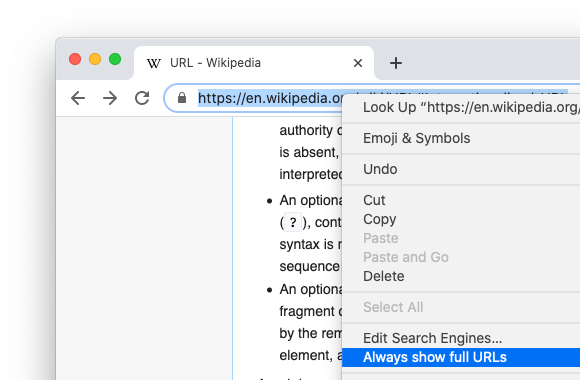
Opt-In & Give Feedback
You can file bugs or feature requests on our bug tracker.If you’re not randomly assigned to this Chrome 86 experiment, and you’d like to try it out, please install Chrome Canary or Dev channel, open chrome://flags in Chrome 86, enable the following flags, and re-launch Chrome:
- #omnibox-ui-reveal-steady-state-url-path-query-and-ref-on-hover
- #omnibox-ui-sometimes-elide-to-registrable-domain
- Optionally, #omnibox-ui-hide-steady-state-url-path-query-and-ref-on-interaction to show the full URL on page load until you interact with the page.
Source: Helping people spot the spoofs: a URL experiment


