Solved Chrome redirect to Yahoo

Irvan

New Member
Thread author
Oct 15, 2017
13
0
4
Indonesia
Ok, just like another thread i've seen SOLVED, mine is not so different but still after doing so much work these past 2 days with so much tutorial from internet, i still got nothing. My google chrome got directed to yahoo everytime i search something from new tab or from google(.)com. But the problem doesn't occur on incognito mode and another browser, and if i try it on guest mode the problem doesn't occur too, so its just happen on new tab, i've try to reinstalled couple time too.
btw before redirected to yahoo.com, it looks like it want to connect to an address with the name of "d-and-h(.)com" hope this helps and I hope u guys can help me
 

Attachments

Hello,


FRST.gif
Fix with Farbar Recovery Scan Tool

icon_exclaim.gif
This fix was created for this user for use on that particular machine.
icon_exclaim.gif

icon_exclaim.gif
Running it on another one may cause damage and render the system unstable.
icon_exclaim.gif

Download attached fixlist.txt file and save it to the Desktop:

Both files, FRST and fixlist.txt have to be in the same location or the fix will not work!

  • Right-click on
    FRST.gif
    icon and select
    RunAsAdmin.jpg
    Run as Administrator to start the tool.
    (XP users click run after receipt of Windows Security Warning - Open File).
  • Press the Fix button just once and wait.
  • If for some reason the tool needs a restart, please make sure you let the system restart normally. After that let the tool complete its run.
  • When finishes FRST will generate a log on the Desktop, called Fixlog.txt.

Please attach it to your reply.


When fix is done, you need to upload Date|Time zip archive from your Desktop via this link:

Submit a Malware Sample

Let me know when its done.
 
okay thank you sir
i have fix it and here is my fixlog and i have submit my DATE|TIME zip too.
btw the problem still presist, hope u can help me more..
 

Attachments

This should fix it:


FRST.gif
Fix with Farbar Recovery Scan Tool

icon_exclaim.gif
This fix was created for this user for use on that particular machine.
icon_exclaim.gif

icon_exclaim.gif
Running it on another one may cause damage and render the system unstable.
icon_exclaim.gif

Download attached fixlist.txt file and save it to the Desktop:

Both files, FRST and fixlist.txt have to be in the same location or the fix will not work!

  • Right-click on
    FRST.gif
    icon and select
    RunAsAdmin.jpg
    Run as Administrator to start the tool.
    (XP users click run after receipt of Windows Security Warning - Open File).
  • Press the Fix button just once and wait.
  • If for some reason the tool needs a restart, please make sure you let the system restart normally. After that let the tool complete its run.
  • When finishes FRST will generate a log on the Desktop, called Fixlog.txt.

Please attach it to your reply.
 

Attachments

ok sir i have try to fix it with your new fixlist, but after the program finish, the problem still presist.
here is the fixlog
 

Attachments

FRST.gif
Fix with Farbar Recovery Scan Tool

icon_exclaim.gif
This fix was created for this user for use on that particular machine.
icon_exclaim.gif

icon_exclaim.gif
Running it on another one may cause damage and render the system unstable.
icon_exclaim.gif

Download attached fixlist.txt file and save it to the Desktop:

Both files, FRST and fixlist.txt have to be in the same location or the fix will not work!

  • Right-click on
    FRST.gif
    icon and select
    RunAsAdmin.jpg
    Run as Administrator to start the tool.
    (XP users click run after receipt of Windows Security Warning - Open File).
  • Press the Fix button just once and wait.
  • If for some reason the tool needs a restart, please make sure you let the system restart normally. After that let the tool complete its run.
  • When finishes FRST will generate a log on the Desktop, called Fixlog.txt.

Please attach it to your reply.


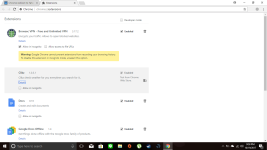
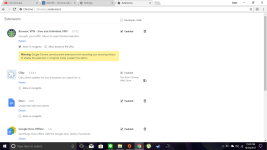
Try to remove that extension after this fix.
 

Attachments

[ok i have try ur new fixlist but still i cant remove the extension, what should i do?

UPDATE
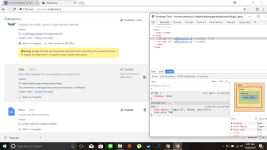
i try this video and have delete the folder with the same id but still the extension still there. I will use some of ur fixlist Mr.TwinHead


UPDATE 2
yah nothing happen even after i delete just like in the video, or try to delete it from regedit with find next .. hope u still can help
 

Attachments

  • 2017-10-20.png
    2017-10-20.png
    112.4 KB · Views: 7
  • Fixlog.txt
    Fixlog.txt
    511 bytes · Views: 1
Last edited:
FRST.gif
Scan with Farbar Recovery Scan Tool

Please re-run Farbar Recovery Scan Tool to give me a fresh look at your system.
  • Right-click on
    FRST.gif
    icon and select
    RunAsAdmin.jpg
    Run as Administrator to start the tool.
    (XP users click run after receipt of Windows Security Warning - Open File).
  • Make sure that Addition.txt option is checked.

    2873ryc.png

  • Press Scan button and wait.
  • The tool will produce two logfiles on your desktop: FRST.txt and Addition.txt.
Please attach report into your next reply.
 
here u go sir

UPDATE
Wait i just turned off my computer couple hours ago and just turn it on to see ur reply and post the comment above but after that i try to search with google and its work! Is it mean my malware has gone? Because i check the extension the clikz is still there, is it safe now?
 

Attachments

Last edited:
It is still not good, I think search might return.

Can you zip this file and send it to me?

C:\Windows\System32\Tasks\Microsoft\Windows\GroupPolicy\{3E0A038B-D834-4930-9981-E89C9BFF83AA}

You can use the same link for uploads above.
 
FRST.gif
Scan with Farbar Recovery Scan Tool

Please re-run Farbar Recovery Scan Tool to give me a fresh look at your system.
  • Right-click on
    FRST.gif
    icon and select
    RunAsAdmin.jpg
    Run as Administrator to start the tool.
    (XP users click run after receipt of Windows Security Warning - Open File).
  • Make sure that Addition.txt option is checked.

    2873ryc.png

  • Press Scan button and wait.
  • The tool will produce two logfiles on your desktop: FRST.txt and Addition.txt.
Please attach report into your next reply.