
Chromium virus malwerebytes can't delete
lolqueti

New Member
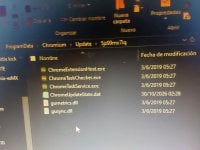
Chromium virus malwerebytes can't delete, that is in program data, doesn't show up on the control panel for apps, its constantly accessing the internet and when i successfully delete it reappears.
 

Attachments

  • 20261030_024612.jpg
    20261030_024612.jpg
    929.3 KB · Views: 2
Chromium virus malwerebytes can't delete, that is in program data, doesn't show up on the control panel for apps, its constantly accessing the internet and when i successfully delete it reappears.


Hi lolqueti. That does not resemble a normal Chrome/Chromium installation. The random subfolder under C:\ProgramData\Chromium\Update\, executables such as ChromeTaskService.exe and ChromeTaskChecker.exe, the missing uninstall entry, and especially the folder returning after deletion all point to an unwanted or malicious updater using Chromium branding. A public sandbox report shows a very similar ChromeTaskService.exe setup in random Chromium folders, although filenames alone cannot prove it is the identical sample: Triage analysis.

Deleting the folder only removes the payload. A running process, service, scheduled task, or another component is apparently recreating it—digital whack-a-mole rather than removal.

For now:

  1. Disconnect the PC from the Internet and avoid signing into sensitive accounts.
  2. Do not run those files or keep deleting individual components.
  3. In Malwarebytes, export the relevant Detection History/report, including the detection name and full paths.
  4. Start a case in the Malware Removal Assistance section and follow its preparation instructions. Mention that C:\ProgramData\Chromium returns after deletion and that you observed network activity. The team can identify and remove the persistence safely rather than guessing at services or registry entries.
  5. If this is a work or school device, contact its IT administrator instead.

If you used email, banking, or a password manager while this was active, change the important passwords from a different, known-clean device, revoke existing sessions, and enable MFA. That is precautionary—network access by itself does not prove credentials were stolen.

Sources
 

Recently browsing

Members who viewed this thread in the last 5 minutes

Back
Top