

Advice Request Comodo Internet Security Setup/configuration thread

  • Thread starter Thread starter Deleted member 178
  • Start date Start date
Please provide comments and solutions that are helpful to the author of this topic.

Does this thread helped/informed you?


  • Total voters
    94
Status
Not open for further replies.
This is ok if you want to set CF like anti-exe.
What is your settings under Auto-Container?
I have all unrecognized applications set to run virtually/restricted.
I was trying to follow CS instructions, just wanted to make sure I got it right.
 
  • Like
Reactions: AtlBo
I want to see more contribution and activity over this thread to help millions of users like me understand how to configure CFW properly and achieve maximum security on their system. A million thanks for our hero @Umbra for all of his great effort over MT (y) I wish him a very good luck with his job and life ;)
I don't think there's a need since cruelsister's settings should be the easiest and thinking is slow and expensive. The lack of prompts should minimize that.
 
I don't think there's a need since cruelsister's settings should be the easiest and thinking is slow and expensive. The lack of prompts should minimize that.
IMHO somewhere in-between CS settings and Umbra settings should hit the sweet spot for a lot of people.
 
  • Like
Reactions: Rebsat and AtlBo
I want to see more contribution and activity over this thread to help millions of users like me understand how to configure CFW properly and achieve maximum security on their system. A million thanks for our hero @Umbra for all of his great effort over MT (y) I wish him a very good luck with his job and life ;)
Thank You :)
 
@Umbra Did Comodo fix the disappearing rules issue? I only ask because I remember you saying you'd never use it until they did, I'm hoping they've either fixed it or given us a way to quickly get our rule back.
 
  • Like
Reactions: Rebsat and AtlBo
@Umbra Did Comodo fix the disappearing rules issue? I only ask because I remember you saying you'd never use it until they did, I'm hoping they've either fixed it or given us a way to quickly get our rule back.

Rules seem to be fixed here but I was having a problem with Comodo crashing. Then again, this system has had memory usage issues for a long time which I think must be graphics related and Google Chrome...only 512 mb of video RAM on the card I am using. Also, found out the hard drive needed replacing recently and no issues since then at all. v10 does look stable but maybe just a little bit jittery I guess. @shmu26 is correct. Reimporting settings works well also.
 
@Umbra Did Comodo fix the disappearing rules issue? I only ask because I remember you saying you'd never use it until they did, I'm hoping they've either fixed it or given us a way to quickly get our rule back.
i couldn't wait to see if they fixed it, my job requires me to be updated about it so i can inform users using both EAM with CFW. But for the moment, it didn't appeared.
 
Maybe someone can give me insight on this one:
When you run HIPS in training mode, does it make allow rules for a whole set of actions for a given process?
And what about if you "unblock" a process from blocked applications? What does it actually allow?
I looked at the rules of some processes, and I couldn't understand how so many actions became allowed.

What is the best way to get your system ready to run in paranoid mode? I mean, a method so you don't have to click 32 times to allow registry changes and 7 times for file changes, for every silly Windows process that pops up.
 
  • Like
Reactions: AtlBo
Okay, another question:
I trimmed my trusted vendors list down to stuff that I actually have installed.
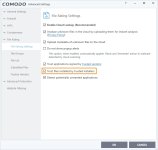
Then I went and installed Sandboxie. I saw no alert prompt, except for firewall, and after installation, I saw Invincea in the TVL. What just happened?
 
  • Like
Reactions: oldschool and AtlBo
Okay, another question:
I trimmed my trusted vendors list down to stuff that I actually have installed.
Then I went and installed Sandboxie. I saw no alert prompt, except for firewall, and after installation, I saw Invincea in the TVL. What just happened?

Maybe this:
tr.jpg
 
When you run HIPS in training mode, does it make allow rules for a whole set of actions for a given process?
And what about if you "unblock" a process from blocked applications? What does it actually allow?

Not sure about training mode as I never used it. Unblocking from the Unblock Applications actually goes so far as to change the process file rating to trusted AND add an allow rule for each, Firewall and HIPS (except start a process which I think is set to ask) and then an ignore rule in containment. This is what I have seen, and you can test with any unrecognized portable app if you like.

If you could say what you have seen from training mode so far, maybe I could help some. Is it supposed to create rules but not enforce them...is that the idea?
 
  • Like
Reactions: kylprq
Then I went and installed Sandboxie. I saw no alert prompt, except for firewall, and after installation, I saw Invincea in the TVL. What just happened?

Do you have Cloud Lookup on? Maybe this is the case where cloud lookup will override "Unrecognized" and add the vendor to the TVL if there is a directive on the cloud to allow the file/process. Sounds like the same thing I have heard several times before.

I'm still not using Cloud Lookup because I would like the opportunity to create rules for new processes. The addition to the TVL is basically a blanket allow, even if allow rules aren't created by Cloud Lookup. I am sure in the Files List the file of the process is assigned the "Trusted" rating due to the vendor's presence in the whitelist via CL.
 
Not sure about training mode as I never used it. Unblocking from the Unblock Applications actually goes so far as to change the process file rating to trusted AND add an allow rule for each, Firewall and HIPS (except start a process which I think is set to ask) and then an ignore rule in containment. This is what I have seen, and you can test with any unrecognized portable app if you like.

If you could say what you have seen from training mode so far, maybe I could help some. Is it supposed to create rules but not enforce them...is that the idea?
It creates allow rules and when you switch to another mode it applies them.
The behavior you are describing for unblocking a process sounds a little like what I saw. I saw that it allowed most actions, but not to start a process, also not to modify the registry or protected files.
 
  • Like
Reactions: AtlBo
Okay, after playing with Comodo Cloud I tried Comodo FW and have to say Virtualisation speed is okay (Chrome virtualised, Firefox not on Windows7 Desktop). Does someone know there is a setting to allow Virtualised Applications access to the clipboard (like the sandbox of Comodo Cloud AV has)?
 
Last edited:
The fact that the clipboard can not be shared in cis virtual space was also discussed at comodoForum. It will be possible to share it as selective type in the near future.

I remember saying that the Commodo side said it was a "specification" that can not be shared, but I think that we could share it before updating.
 
Status
Not open for further replies.