Comodo signature Bug

Status
Not open for further replies.

Andrew999

Level 24
Thread author
Verified
Top Poster
Well-known
Forum Veteran
Dec 17, 2014
1,363
11,264
2,268
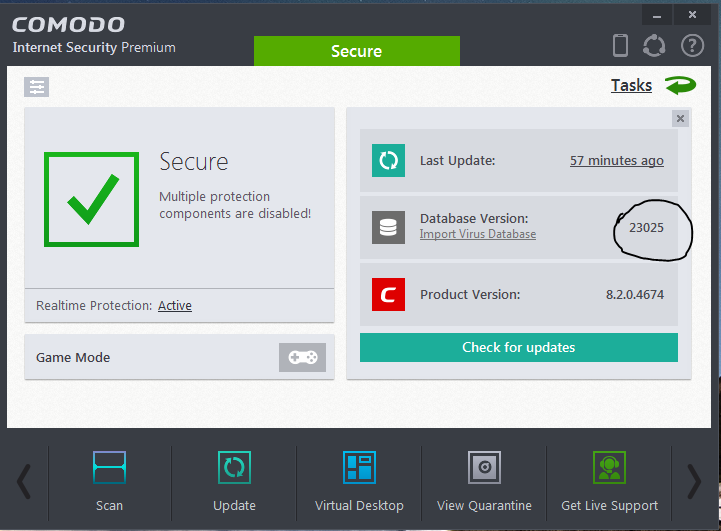
I have had Comodo for about 2 weeks and when I update the signature database it has a update everytime I check is that normal it is like it is not installing the signatures properly and the signature database is always on 23025 and hasn't changed. Does anyone have the same problem
upload_2015-8-23_21-50-15.png
 
  • Like
Reactions: Logethica
Latest Comodo Virus definitions - Link

Latest Database Version: 23069
Release Date (all times GMT): 23-Aug-2015 00:59:13
Number of Definitions Added Today: 25393
Total Definitions: 42584285​

Comodo virus definitions can be updated manually, if the automatic update does not work - More information
 
  • Like
Reactions: Kent
I think the OP is saying that he's updating the database of Comodo but it seems that Comodo isn't properly installing the updates. Instead of updating the database, Comodo stays with the signature version number 23025.
 
  • Like
Reactions: Logethica
@Andrew999 - this one can be difficult to determine what is causing it. Broken updates is common problem with most softs, including Windows. In your case it can be anything from corruption somewhere on system\CIS to bad CIS rule(s).

Try Run cleanmgr and see if that fixes it. To be honest, I doubt it.

Check firewall rules and make sure Comodo Internet Security is set to "Outgoing Only" or "Allowed Application."

I always try to disable and then reenable the security configuration. For example, deactivate Proactive Security, activate Comodo Internet Security, then reactivate Proactive Security.

Disable firewall and see if that fixes issue. Also try other modules, AV, HIPS, Sandbox...

In any case, I suggest some easy things to be done first - instead of the whole Comodo uninstall\reinstall rigmarole.

 
Last edited by a moderator:
Hmm.. seems the database version isn't refreshing properly. Have you considered to reinstall the AV component?
 
HJLBX has mentioned few things to try...

Also try to run diagnostics from the help above in the main GUI i.e "?".
 
Status
Not open for further replies.