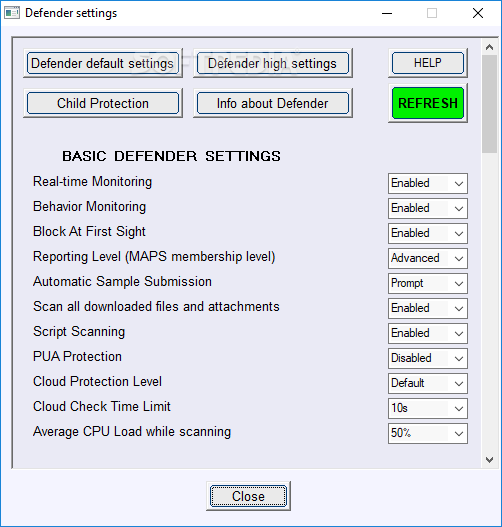
ConfigureDefender utility for Windows 10/11

I've set SmartScreen to Block for Explorer on our kids' devices, but not for Internet Explorer. I consider that fine and unneeded. Am I right?

Yes. The Internet Explorer option is for legacy systems (ignored on new systems).
 
@Andy Ful question configuredefender: in this win10_VM (VMware 17.6) after updating today I noticed that Defender icon is not appearing in the taskbar. chatGPT said to look for SecurityHealthSystray.exe in \program files\windows defender but it is not there! I found it in \windows\system32 & it runs and puts icon in taskbar. Then chatGPT suggested a powershell cmd to change the path, but access denied. ChatGPT now thinks that configuredefender (WHHL) are the cause of both. I think not. IIRC the icon was in taskbar before today's windows update (but I'm not running this VM every day so :unsure: Thoughts welcome or just ignore it.
 
Hi @Andy Ful if Smart App Control enabled, is it still worth it to use Configure Defender on the High preset, or will not make that much of a difference?

When SAC is enabled, ConfigureDefender High settings can add protection against:
  • attacks with signed malware,
  • some popular attacks with fileless payloads,
  • abusing Microsoft Office applications or Microsoft Outlook,
  • abusing Adobe Acrobat.
 
When SAC is enabled, ConfigureDefender High settings can add protection against:
  • attacks with signed malware,
  • some popular attacks with fileless payloads,
  • abusing Microsoft Office applications or Microsoft Outlook,
  • abusing Adobe Acrobat.
Got it thanks.

One other question for you. I am more familiar with DefenderUI since I have used that more in the past. With ConfigureDefender, do I have to keep opening it every boot-up to ensure the settings are kept, or is this more of a set it and forget it approach? I only ask because DefenderUI ran constantly in the background, while I don't see that with ConfigureDefender.
 
Got it thanks.

One other question for you. I am more familiar with DefenderUI since I have used that more in the past. With ConfigureDefender, do I have to keep opening it every boot-up to ensure the settings are kept, or is this more of a set it and forget it approach? I only ask because DefenderUI ran constantly in the background, while I don't see that with ConfigureDefender.
@KnownStormChaser fwiw, here DefenderUI keeps its settings ok -- I have not noticed its settings change. I think it runs in background ref its taskbar right-click features
 
With ConfigureDefender, do I have to keep opening it every boot-up to ensure the settings are kept, or is this more of a set it and forget it approach?

It works similarly to the built-in configurator in Security Center.
 
Yes.

I don't see the point of anyone using DefenderUI. Why have a superfluous background process running when using a set configuration?
Well (fwiw) I use both on different VMs, I like (or am used to) DefenderUI's GUI, and I use its ASR Rules settings occasionally. It seems to use very little resources. I find it easier to maneuver around in DefenderUI's GUI than in ConfigureDefender's.
 
Configure Defender, DefenderUI, and DefenderUI Pro; all adjust the Microsoft Defender's hidden settings. It improves protection. DefenderUI and DefenderUI Pro show protection alerts; they install on the system. DefenderUI Pro also has some of CyberLock's features. Configure Defender simply adjusts the Microsoft Defender's hidden settings; it is portable.
 
I like both. DefenderUI is just a different way of showing the options available including some others like Microsoft Defender scan options including priority and the DefenderGuard automatically re-actives Realtime, Cloud and Firewall. The Pro versions adds some CyberLock/VS light features so you can't run DefnderUI Pro along withCL/VS. You do have to turn off Tamper Protection to change the toggle on a few of the options though I can't recall which ones at the minute but I think it was for turning off realtime protection and the threat actions. I like them both and neither seem to affect the performace. Use the one you like.

1765641206604.png
1765641274281.png