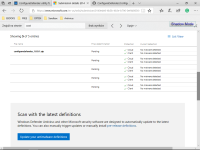
Do some of these layers apply only to Enterprise users?The importance of 'Cloud Protection Level' and 'Cloud Check Time Limit' can be seen here:
Detonating a bad rabbit: Windows Defender Antivirus and layered machine learning defenses
Do some of these layers apply only to Enterprise users?The importance of 'Cloud Protection Level' and 'Cloud Check Time Limit' can be seen here:
Detonating a bad rabbit: Windows Defender Antivirus and layered machine learning defenses

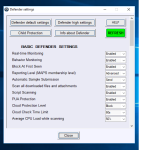
WAM = Warn = W a r nCare to be more specific about what - child protection - is?
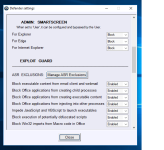
And also, what does - WAM - mean, that is an option under Admin:Smartscreen?


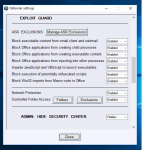
In Windows Pro and Enterprise editions 'Big Data Analytics' is also supported by Advanced Threat Protection (paid subscription service).Do some of these layers apply only to Enterprise users?

New link to ConfigureDefender ver. 1.0.0.1
ConfigureDefender/ConfigureDefender_1.0.0.1.zip at master · AndyFul/ConfigureDefender · GitHub
The file contains the ConfigureDefender_x32.exe (Windows 32-bit) and ConfigureDefender_x64.exe (Windows 64-bit).

That's interesting, because I just scanned the file now with WD manual scan, and it came out clean. Maybe it is whitelisted by now? On Virus Total it has a detection rate of 1/67 and the false positive is not coming from Microsoft. It is from Antiy-AVL, whatever that is. (I never heard of them.)Hi Andy,
great great tool - as usual. Just want to mention, that my WD deleted the zip file right after download because of a heavy threat: Trojan:Win32/Fuerboos.C!cl.
I know, that your tools are safe but it seems WD does not like your configuration efforts
Thanks.Hi Andy,
great great tool - as usual. Just want to mention, that my WD deleted the zip file right after download because of a heavy threat: Trojan:Win32/Fuerboos.C!cl.
I know, that your tools are safe but it seems WD does not like your configuration efforts
It is normal. Hard_Configurator and ConfigureDefender change Windows security settings. So, if I do not upload the executables to Microsoft for manual analysis, they are recognized as dangerous. I will send the ConfigureDefender files to Microsoft today.That's interesting, because I just scanned the file now with WD manual scan, and it came out clean. Maybe it is whitelisted by now? On Virus Total it has a detection rate of 1/67 and the false positive is not coming from Microsoft. It is from Antiy-AVL, whatever that is. (I never heard of them.)

If it would be in the GUI, inexperienced people would be enabling advanced protections, and the Microsoft forums would be flooded with desperate requests for support because X Y and Z is not working.Great tool... all these options should be present in the WD GUI though...


Please use the version 1.0.0.1
ConfigureDefender/ConfigureDefender_1.0.0.1.zip at master · AndyFul/ConfigureDefender · GitHub
I have just sent the files for manual analysis to Microsoft. So, we have to wait a couple of days.
Do you have any security software that blocks or restricts powershell? For instance, Hard_Configurator? It won't work without powershell.
Comodo Firewall definitely has powershell protection, under the advanced tab or whatever they call it. I am surprised you got no alert, but try disabling Comodo and see what happens?...only Comodo Firewall but no alert from him.
Comodo Firewall definitely has powershell protection, under the advanced tab or whatever they call it. I am surprised you got no alert, but try disabling Comodo and see what happens?
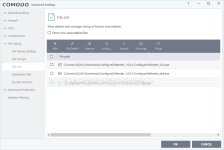
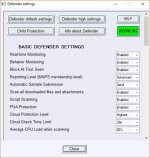
I added this alert, because some security software can block or restrict PowerShell. Hard_Configurator allows ConfigureDefender to work, but it is possible to configure SRP in such a way that will block PowerShell actions in ConfigureDefender. OSArmor in default settings does not block PowerShell actions in ConfigureDefender, so they can work together.
WAM = Warn = W a r n
Child protection setup can be seen in the attachments below.