ConfigureDefender utility for Windows 10/11

What triggers this command-line? Is it related to the WD task in the Task Scheduler?
Look at the folder:
C:\ProgramData\Microsoft\Windows Defender\Platform\
Is the version 4.18.2004.6-0 the last one? I have got it 21.04.2020, and my current version is 4.18.2005.4-0.
Please try the command-line in CMD with Admin privileges:
Code:
cd C:\ProgramData\Microsoft\Windows Defender\Platform\4.18.2004.6-0\
MpCmdRun.exe -signatureupdate
If it would not work, then something probably spoiled WD or Windows Updates.
 
What triggers this command-line? Is it related to the WD task in the Task Scheduler?
Look at the folder:
C:\ProgramData\Microsoft\Windows Defender\Platform\
Is the version 4.18.2004.6-0 the last one? I have got it 21.04.2020, and my current version is 4.18.2005.4-0.
Please try the command-line in CMD with Admin privileges:
Code:
cd C:\ProgramData\Microsoft\Windows Defender\Platform\4.18.2004.6-0\
MpCmdRun.exe -signatureupdate
If it would not work, then something probably spoiled WD or Windows Updates.
I'm not sure. There's always an error like this when update fails for some reason.
This is what I'm getting after applying the command line. It stays like this, no change, nothing is downloading.
1.PNG
 
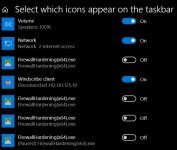
Hey Andy, here's a puzzle for you, why so many instances of these in "Taskbar settings - Select which icons appear on the taskbar"?

There are 8 for Firewall Hardening and 4 for Configure Defender, almost seems like every time I open up the gui another instance appears.

View attachment 240154
I too have 4 x occurrences of CD
It seems that these applications are remembered by Windows when running from different locations. You can use CCleaner or simple tool Notification Area Cleaner (works also on Windows 10) to reset the notification area cache:

One can clean the notification area cache by using CMD commands:
Code:
reg delete "HKCU\Software\Classes\Local Settings\Software\Microsoft\Windows\CurrentVersion\TrayNotify" /v IconStreams /f
reg delete "HKCU\Software\Classes\Local Settings\Software\Microsoft\Windows\CurrentVersion\TrayNotify" /v PastIconsStream /f
taskkill /im explorer.exe /f
start "Shell Restarter" /d "%systemroot%" /i /normal explorer.exe
echo finished
 
I think that adding an icon to the notification area is not necessary for portable applications.
It can be annoying because these portable applications run from random folders. So, I will remove this feature in ConfigureDefender and FirewallHardening in the next versions.
 
Thanks Andy, I had CD on desktop, moved to folder and same thing, keeps reproducing everytime its opened.

I put all of @Andy Ful executables in Windows folder and I never have any problems. Plus, they're protected by default.
 
Thanks Andy, I had CD on desktop, moved to folder and same thing, keeps reproducing everytime its opened.
In two days I will upload the new standalone version of ConfigureDefender (fixed notification area issue) together with NotificationAreaReset tool (to clear the notification area cache).
For now, the new executables wait for whitelisting by Microsoft and Avast.
 
I put all of @Andy Ful executables in Windows folder and I never have any problems. Plus, they're protected by default.
Nice solution, I will give it a try to see what happens.

In two days I will upload the new standalone version of ConfigureDefender (fixed notification area issue) together with NotificationAreaReset tool (to clear the notification area cache).
For now, the new executables wait for whitelisting by Microsoft and Avast.
Thanks Andy, the reset tool worked fine, but as I mentioned earlier, notifications kept coming back.
 
Nice solution, I will give it a try to see what happens.

Also, I pin the exe shortcut to the taskbar so it is easily accessible and my desktop stays clean. Just remember this is for any of Andy's standalone programs.
 
So I pinned Configure Defender to taskbar, opened CD, checked taskbar notification area, same issue. So Oldschool, are you saying you don't have this issue because you put in a Windows folder? I will try and see what happens but it seems to me that this is not a solution that Andy would be happy with.

Threw it into a C:Windows folder, no change. Not a big issue to me, either Andy fixes it or not.
 
Last edited:
When using the standalone version of ConfigureDefender - it works slightly different from the ConfigureDefender executable included in H_C.
Standalone CD = wrapper + CD 64-bit + CD 32-bit

If one uses CD 64-bit or CD 32-bit without a wrapper (like in H_C), then there is no issue, because it always runs from a single location (one entry in notification area cache).
The issue is related to the wrapper which runs CD (32-bi or 64-bit) in a random folder (for security reasons).
When the executable uses notification area in the system tray, then Windows adds new entries if they have different paths - that is a case of standalone CD (random paths are usually different).
I fixed the issue by removing the ability to add the icon to the notification area for CD 32-bit and CD-64-bit.
 
 
I highly appreciate the fact that the creator of BleepingComputer.com (and also anti-malware expert) has written a nice review about ConfigureDefender. :)
 
Last edited:
The issue is related to the wrapper which runs CD (32-bi or 64-bit) in a random folder (for security reasons).
I'm using version 3.0.0.0 without the notification issue.

I highly appreciate the fact that the creator of BleepingComputer.com (and also anti-malware expert) has written a nice review about ConfigureDefender. :)
Maybe they got the idea for the review because CD has been recommended to some users on their forum. ;)
 
I'm using version 3.0.0.0 without the notification issue.
...
The issue is normally invisible. But, it can be seen as follows:
right-click on the taskbar >> Taskbar Settings >> Select which icons appear on the taskbar
You will probably see several instances of ConfigureDefender and maybe some other entries of unused/uninstalled applications. One can get rid of unnecessary entries by resetting the cache.