Cryptowall & Co pay or not ?

  • Thread starter Thread starter LabZero
  • Start date Start date
L

LabZero

Thread author
This topic is very controversial: I am documented a lot and I did not find any evidence of users who have paid and have recovered their files, but even to users who have paid and have not recovered. I therefore arrived at the following conclusions:

If anyone, after paying, had not recovered files, most likely they would trace on the net – anyone, after a bad experience, would tell the next to avoid the same fate.

Hackers really should give the private decryption key, the user who pays the ransom, why else would tell on the net to have lost money, advising against the other victims to pay the ransom. This would result in less revenue for hackers.

Hackers have no interest to make files of victims forever inaccessible: their purpose is to make money. As a criminal who asks for money in Exchange for the freedom of a hostage: the criminal has no interest in keeping him hostage, just wants the money.

I believe, therefore, that the payment of the ransom – although feeding the activities of these criminals – network could really allow file retrieval: there I do not put the hand on fire and I also read your comments.

Hello
 
I agree, if you had/have lost valuable files or photos you would do anything to get them back. The LA Police Dept paid the ransom after their computers were infected, they lost everything, so they paid. I now keep everything on encrypted, write protected USB's, I never keep any files on my laptop. It's very sad we now have to live like this. As Eric Schmidt said "The Internet is the first thing that humanity has built that humanity doesn't understand, the largest experiment in anarchy that we have ever had."
 
  • Like
Reactions: LabZero
I'll smash my system with a 200 Kg sledge hammer before paying any ransom...

I don't recommend that to anyone.

Perhaps "reset and forget" is a better attitude for the typical home user.

Business owners... they probably need to hire MalwareTips Experts @ $375 per hour - per MT Tech. :D
 
  • Like
Reactions: LabZero and frogboy
I would never pay them the money, these criminals are making millions with their creations, and I for one would not add to their bank balance. I think I would buy a new laptop; I would not feel secure on one that had been compromised. The hospital where I work, a nurse nearly downloaded and opened a pdf file. Even we get spam. I think they sent her on an IT awareness course.
 
I try to keep everything I need or really want backed up in 2 or 3 places. Hopefully my info is quasi safe. They will get no money from me in any case.
 
Hi,

Firstly I would like to say that paying the ransom to any hacker will just keep them motivated and more determined to continue with what they are doing. If they don't make any money from anyone, evenually they should learn the lesson that they aren't going to make any money and stop with it. Paying the ransom will just make them more determined to redo it over and over, with them thinking they will become richer (earn more money) through scaring and depressing people after their files had been encrypted and pushed into paying a price which may increase after a certain deadline.

Secondly, another reason why I normally recommend people to not pay the ransom is because the hacker cannot be trusted. How can you trust someone who is active in producing malicious software and has already encrypted your files? You can't. Paying the ransom can result in you gaining nothing in return. Don't be fooled.

People have paid the ransom before and had their files recovered. People have paid the ransom and not had their files back. It's a 50/50 chance you can be ripped off or get your files back after handing over what the hacker wants.

Even if that 1 file free decryption they usually give you works, that doesn't mean they will actually let you decrypt your other files.

Of course there are situations when you will need your encrypted files back. Currently, you cannot break RSA encryption without that private key. If you have personal documents, research/work related content and you really need them back... Your only option may be related to either paying the ransom or waiting until there is a cure one day (if a cure ever will exist).

You should always keep a backup of your personal documents and/or anything that is important and you need in the case of an ransomware infection. Don't be one of those people who think, "I'm an advanced user. I will never get a ransomware. I know exactly what I am doing all the time and would never end up executing a program which turns out to a result of my files encrypted". If you are, then you may be in some trouble if you ever do become infected with a ransomware infection on your system, since you'd made no backup.

Cheers. ;)
 
I use Kingston DataTraveler 4000 G2 hardware encrypted USB's they are very good. They can withstand hacking attempts, brute force attack and if you enter the password incorrectly 10 times the data is erased.
 
  • Like
Reactions: yongsua
Any recommended write-protected USB software for me? Thanks :)
You can make the drive read-only.

To do this, follow my steps (and I have added screenshots for you):

1). Insert your USB device into the USB port. Wait until it's recognized by Windows.

Q17iR.jpg

2). In Windows Explorer, right click your USB device and choose Properties

9u8Yl.jpg

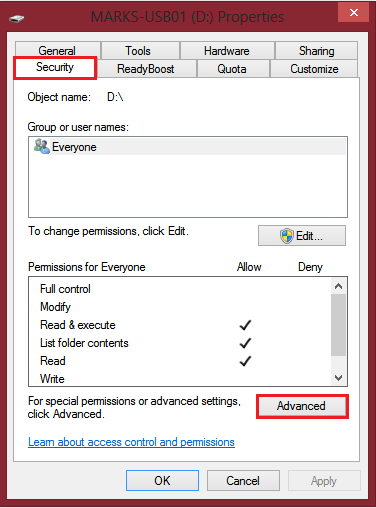
3). In the Properties window which will appear, navigate to the Security tab.

4). At the bottom should be a area saying "Permissions for Everyone" along with a set of actions which are set to either Allow or Deny. Under this is a button called "Advanced". Click this.

Axa49.jpg

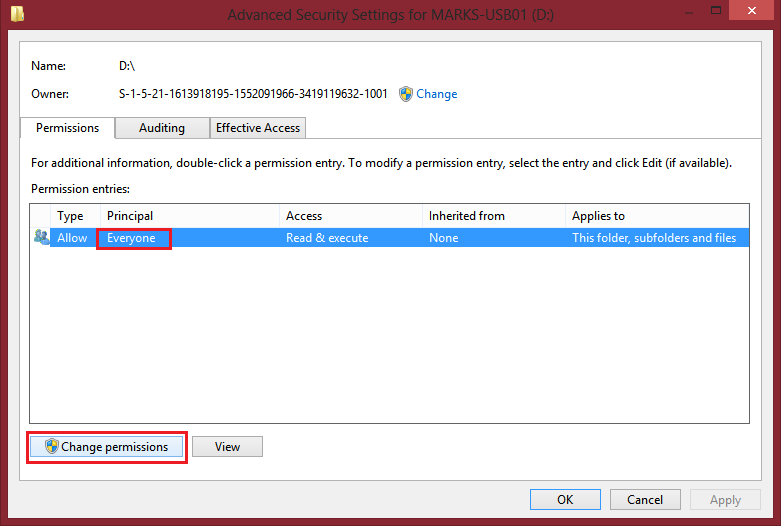
5). Another window will appear. Select the item which the Principal is set to Everyone and then click Change Permissions.

hSbxL.jpg

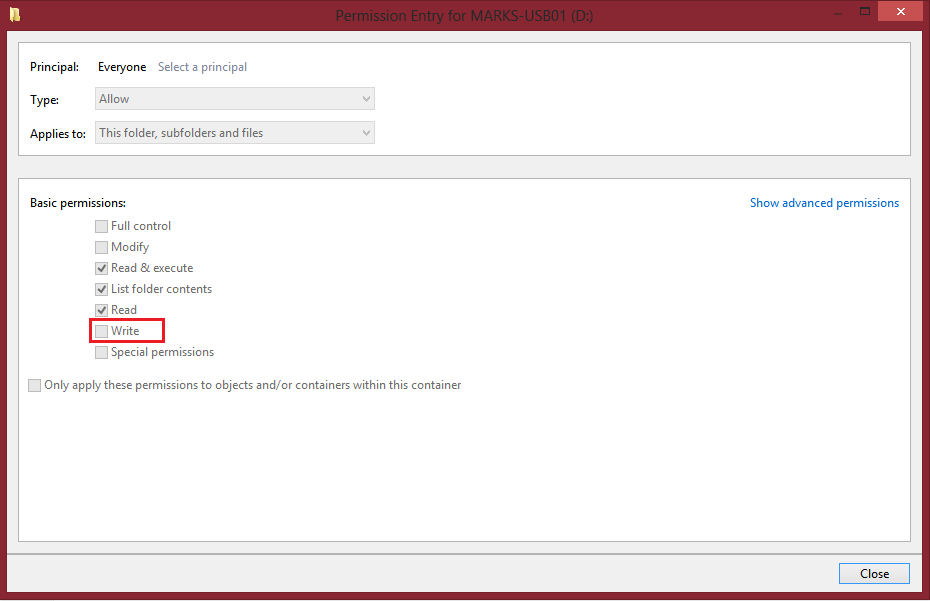
6). Another window will then appear. You can then uncheck the "Write" permission. After unchecking this, other checkboxes may automatically uncheck themselves. Ignore and do not change this.

TdM70.jpg


(Mine cannot be changed as I have already made it read-only (write protected)).

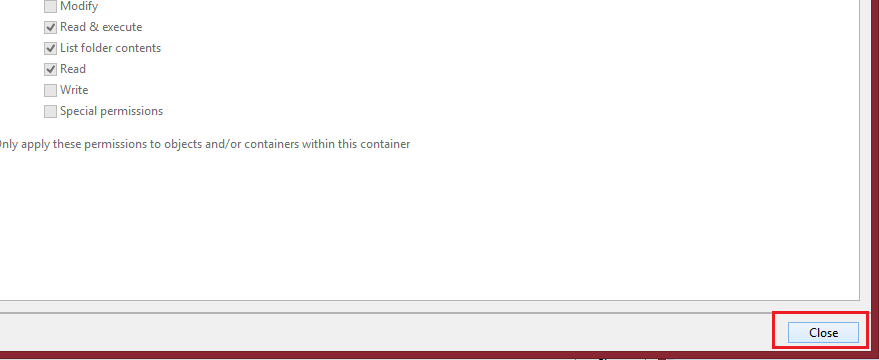
7). After your changes, click Close and then Apply Changes (Apply Changes is on the window before the one where you choose the edits, but you must first click Close on the window in which you modify the permissions with the checkboxes).

JxABW.jpg

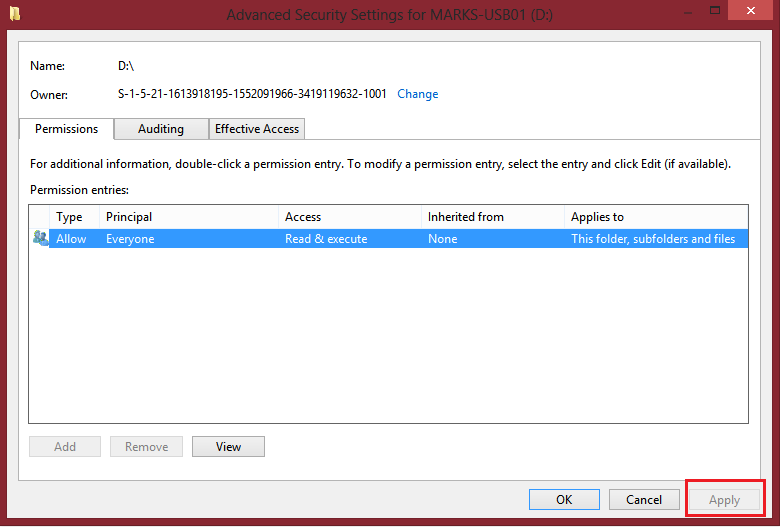
(My Write checkbox is already disabled so I cannot modify permissions, for you to start you can change them)

1OT7Z.jpg


(After making changes and then clicking Close on the other dialog, this Apply button will be enabled for you to click).

After making the changes, test it by trying to modify any objects on the drive already or by trying to move objects onto the drive.

NOTE: After making this change you won't just be able to change the permissions again like this. Allowing them just like that would be a security risk.

@Tony Cole suggestion is also good, consider using his advice over this. It's up to you. I think after 10 times the data being wiped with an incorrect password using the software he mentioned is a good feature as it also protects your data from hackers. Just make sure to have a backup elsewhere say on case you want write-protected drive to store files and not have them cleared out with incorrect guesses.

Cheers. ;)
 
Don't pay.

Always be prepared with a backup plan. If you haven't already, set one up. Google Drive, Microsoft OneDrive, Apple iCloud all provide backup and sync of your data, for Windows, Android & ChromeOS, Mac & iOS.

Same applies to mobile/tablet devices, utilise the cloud and offline backup, so in the case your device is stolen you can activate the killswitch to wipe your device.

No one sets out on a road trip with an empty tank of fuel.
 
Simple logic, even if the hackers give you or not the decryption key to access again the files, remember that you've entered a sensitive information (credit cards) and can be use from such malicious action.

Also ransomware or rogue/fake programs are not 100% bullet proof to be indestructible as there's always a solution to fix for their loop hole.

But different situation when in real life that involves ransom money.
 
  • Like
Reactions: LabZero
If you get caught by FBI, say hello to the prison.
I could be wrong... I've never paid a ransom... But, are you sure? I have never seen an incident where someone is sent to prison/charged money with the law for paying the ransom.
 
  • Like
Reactions: LabZero
Don't pay.

Reason :

>
If you pay the ransom, it's the same thing as you're supporting criminal to keep creating new ransom.

> It's strictly prohibited.

> If you get caught by FBI, say hello to the prison.

> If you haven't backed-up any data - Better lose your data than lose your money and you family, aight?
The comment amounts disinformation/FUD. I guess the police department that just recently paid a ransom to get their files back are all facing prison time.
 

You may also like...