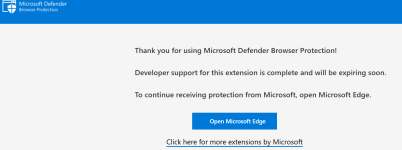
Unmaintained Depreciated Microsoft Browser Protection extension

LinuxFan58

Level 7
Thread author
Nov 30, 2025
332
939
567
Recognize this? Installed a security extension in your browser, because you have perfected your setup, because the downside of a (near) perfect setup is that there is nothing left to tweak or improve!

Happened to me: so I installed the M$ browser protection while development should have been stopped. Just for fun to check out how effective this (over) aged extensions still was ... TO MY SURPRISE ...

it did surprisingly well when throwing malware, phishing and fake shops (scams) at it!
Its name Microsoft Defender Browsing Protection.

So Idecided to add it to my work profile (which are mostly M$ cloud services, so I don' t mind M$ learning what websites I am visiting for work).

Anyone still using it on a Chromium (non Edge) based browser (like me on Brave)?
 
Last edited by a moderator:
it did surprisingly well when throwing malware, phishing and fake shops (scams) at it!
Its name Microsoft Defender Browsing Protection.


So Idecided to add it to my work profile (which are mostly M$ cloud services, so I don' t mind M$ learning what websites I am visiting for work).

Anyone still using it on a Chromium (non Edge) based browser (like me on Brave)?

@LinuxFan58 Please remember for the future, as I informed you already once recently via forum notification, the following forum rule:
Excessive text formatting (bold, caps, font size) is not allowed. Use text formatting to highlight short passages only.
 
@LinuxFan58 Please remember for the future, as I informed you already once recently via forum notification, the following forum rule:


Excessive, unjustified formatting unnoticed

 
Yes Sir

I remember not allowing to make jokes of my second best forum friend anymore, not formatting, but your message is understood!
You should remember for all of Forum Rules, otherwise Warning Points like 10% are one way that forum people remember easier...
 
Excessive, unjustified formatting unnoticed

Well, that are only small parts of the full content in larger font size, that is allowed, according to Forum Rules:
Use text formatting to highlight short passages only.
 
  • Like
Reactions: Sorrento
I always thought that this extension needed Microsoft Defender to work with it, and I never thought that using it on Linux was possible, good to know.
Yes, it is independent from MD.
MD SS kicks in when after file download.
But Edge SS offers an advantage over using MS browser protection in Chrome; it can block file download.
 
@LinuxFan58 Please remember for the future, as I informed you already once recently via forum notification, the following forum rule:

@silversurfer (& @LinuxFan58) -- for my clarification, please, your link is to forum rules, good, it lists 7 numbered rules, then under those 7, I see several screens listing 14 headings of examples or further explanations, but all of those are unnumbered. fwiw it was not obvious to me what rule or example was violated or that the offending post was in violation of "Excessive text formatting (bold, caps, font size) is not allowed. Use text formatting to highlight short passages only." The closest "rule" (ie example) that I found is "Excessively communicating the same phrase, similar phrases, or pure gibberish" -- perhaps I missed something (it happens) :unsure: Maybe post 1 was edited by the time I read it??
 
  • Like
Reactions: Sorrento
"Excessive text formatting (bold, caps, font size) is not allowed. Use text formatting to highlight short passages only."
yes I did see that in the explanations to the rules, imo post 1 was a short passage of CAPS, never occurred to me it was offensive / prohibited until I read @silversurfer post. imo (fwiw) the MT folks should run the rules URL thru AI LLM and number all the specific examples. I thought that before LLMs were online.
 
@silversurfer (& @LinuxFan58) -- for my clarification, please, your link is to forum rules, good, it lists 7 numbered rules, then under those 7, I see several screens listing 14 headings of examples or further explanations, but all of those are unnumbered. fwiw it was not obvious to me what rule or example was violated or that the offending post was in violation of "Excessive text formatting (bold, caps, font size) is not allowed. Use text formatting to highlight short passages only." The closest "rule" (ie example) that I found is "Excessively communicating the same phrase, similar phrases, or pure gibberish" -- perhaps I missed something (it happens) :unsure: Maybe post 1 was edited by the time I read it??

Of course, I have edited the OP #1 here in the thread, before it looks like that:
it did surprisingly well when throwing malware, phishing and fake shops (scams) at it!
Its name Microsoft Defender Browsing Protection.


So Idecided to add it to my work profile (which are mostly M$ cloud services, so I don' t mind M$ learning what websites I am visiting for work).

Anyone still using it on a Chromium (non Edge) based browser (like me on Brave)?


yes I did see that in the explanations to the rules, imo post 1 was a short passage of CAPS, never occurred to me it was offensive / prohibited until I read @silversurfer post. imo (fwiw) the MT folks should run the rules URL thru AI LLM and number all the specific examples. I thought that before LLMs were online.

To check the rule(s) I mentioned, scroll down to the end of the page: Forum Rules

Important Notes​

  • This policy is not language-restrictive. The language that falls under this policy will always be subject to the repercussions listed, whether it is inappropriate in English or any other language.
  • Your posts are public and will not be deleted unless they are against the forum rules or contain personal information.
  • Other general rules include:
    • All your posts must be made in English with proper spelling and punctuation.
    • Your posts should be relevant to the thread subject.
    • Don't post just to increase your number of posts. Avoid short sentences or single-word posts. If you have nothing relevant to say on a certain matter then don't post.
    • Do not bother making posts with only one or two words (e.g., "cool" or LOL) or a smile, or post simply to have the first reply in a thread. Such posts waste everyone's time and will be deleted. Posts saying "I agree", "1", "this", "me too", or the equivalent are also routinely removed, so don't post them. If you aren't interested in a thread, skip the thread; don't post to tell us you aren't interested.
    • Excessive text formatting (bold, caps, font size) is not allowed. Use text formatting to highlight short passages only.
    • Foul language is not allowed. Do not try and avoid moderation by replacing letters, i.e with a *.
    • No blatantly juvenile toilet humor. Simple rule. Moderator's judgment applies here. Talk about what you do to relieve yourself, although popular (for some odd reason) is not needed here.
    • Posts similar to “I'm leaving because..." or "Should I leave?"- are considered drama and they're not allowed.
 
I am using Microsoft Browser Protection extension on Chrome, it is the lightest security extension at just 240 KB in size. A forum member here has also tested various extensions and their performance impact, he found that the system impact is so small that it is difficult to measure. It has not been updated since a year but it is not needed as everything is server based and it is nice that it is a lean and mean beast instead of a bloated mess. Link:

 
1770609004001.png