Security News DigiCert: Misissued code signing certificates

Parkinsond

Level 63
Thread author
Verified
Top Poster
Well-known
Dec 6, 2023
5,159
15,745
6,169
Possession of an initialization code, combined with an approved order, is sufficient to obtain the resulting certificate (see Contributing Factors discussion below). Since the threat actor was able to obtain these two pieces of information for a finite set of approved orders, they were able to obtain EV Code Signing certificates across a set of customer accounts and CAs.


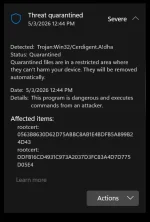
cerdigent-high-severity-malware-detected-v0-78rxyn3bkwyg1.webp
 
If you can not trust DigiCert, we are done for.
On 2026-04-02, a threat actor contacted DigiCert's support team via a customer chat channel and delivered a ZIP file disguised as a customer screenshot. The file contained a .scr executable with a malicious payload. CrowdStrike and other security measures successfully blocked four delivery attempts. A fifth attempt compromised ENDPOINT1, a machine used by a support analyst; this delivery attempt was detected and contained by our Trust Operations team on 2026-04-03. Following an immediate internal investigation based on the telemetry data at hand, it was assessed that the incident had been contained.
It is the customer team employee fault.
 
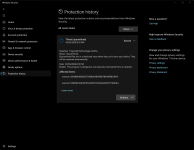
Thanks. MD just removed the same certificates from my system on a quick scan about an hour ago.
Security intelligence Version: AV: 1.449.425.0, AS: 1.449.425.0, NIS: 1.449.425.0
Engine Version: AM: 1.1.26030.3008, NIS: 1.1.26030.3008
Brave and Gemini LLMs seem to lean into these as being false positives, though—Gemini links to the Secure Boot Certificates Rollout:

This timing coincides with a broader Microsoft push to update Secure Boot certificates (moving from 2011 to 2023 versions) ahead of a June 2026 deadline. It is possible the automated cleanup or identification logic for these legacy certificates has been overly aggressive or misconfigured.

Gemini recommends the following actions:

Recommended Actions​

  1. Verify the Alert Name: Check if your Defender logs show the name Cerdigent. If so, it confirms you are seeing the same issue reported by many others today.
  2. Hold on Manual Deletions: If you have not already "cleaned" the items, you may want to wait for Microsoft to release a corrected intelligence update (which usually happens within hours of such widespread false positives).
  3. Check for Updates: Run a manual check for "Security Intelligence" updates in Windows Security to see if a newer version resolves the detection.
  4. Monitor Connectivity: If Defender has already removed these, you might experience issues with certain websites or software signatures that rely on these specific DigiCert roots, though Windows often recovers these via the Automatic Root Update service.
Note: Unless you are seeing actual suspicious executable files (.exe, .dll) running from temp folders alongside these alerts, there is no immediate cause for alarm. This is currently viewed as a "bad signature" event.
 
Last edited:
Gemini recommends the following actions:
It should have recommended EnableCertPaddingCheck to make sure revoked certificates are untrusted ASAP. Thus the reason I do not trust AI.
Code:
reg add "HKLM\Software\Microsoft\Cryptography\Wintrust\Config" /v "EnableCertPaddingCheck" /t REG_DWORD /d "1" /f
reg add "HKLM\Software\Wow6432Node\Microsoft\Cryptography\Wintrust\Config" /v "EnableCertPaddingCheck" /t REG_DWORD /d "1" /f
 
Reddit is flooded with posts regarding this subject.
Yeah i read them but florian is a more bankable source for info on this rather than some unknown reddit posters.
This topic is not on reddit though.
Maybe @Trident can give us more info.
 
Microsoft Defender triggered widespread false positive alerts after a faulty security update caused it to flag two legitimate DigiCert root certificates as malicious, potentially disrupting SSL/TLS validation and code-signing operations across enterprise environments worldwide.

 
From CyberSecurityNews above:

Microsoft acknowledged the issue and moved swiftly to roll out corrective definition updates, with version .430 cited as a key fix that began restoring the quarantined certificates on affected machines.

Security observers noted that the restoration appeared to be rolling out automatically across managed endpoints, suggesting Microsoft deployed a silent remediation alongside the corrected signature update.

Administrators in environments with restricted update policies were advised to manually verify the presence of certificates using certutil and to check the Advanced Hunting logs in Microsoft Defender for Endpoint to confirm the restoration.
"Microsoft" in the quote appears to be a volunteer mod.

Also from the CSN above:

He also recommended a quick command-line check for affected systems: certutil -store AuthRoot | findstr -i "digicert" .
which on my system, got this:

certutil -store AuthRoot | findstr -i "digicert"
...
Issuer: CN=DigiCert Trusted Root G4, OU=www.digicert.com, O=DigiCert Inc, C=US
Subject: CN=DigiCert Trusted Root G4, OU=www.digicert.com, O=DigiCert Inc, C=US
...
Issuer: CN=DigiCert Assured ID Root CA, OU=www.digicert.com, O=DigiCert Inc, C=US
Subject: CN=DigiCert Assured ID Root CA, OU=www.digicert.com, O=DigiCert Inc, C=US

which likely means the MD update, along with possibly another "silent" update, has already fixed the issues without any action. All that's left are "Severe" flaggings in the Protection History and fodder for morning coffee.