I have used Fort firewall with both enabled; my hardware lacks virtualization.I believe it is the second setting. If you enable it, you won't be able to use Fort Firewall.
I have used Fort firewall with both enabled; my hardware lacks virtualization.I believe it is the second setting. If you enable it, you won't be able to use Fort Firewall.

Ok. Start with Pro++, only downgrade if it breaks something. It doesn't break anything for me. I had more false positives with OISD, although rare.

Have you check your bios settings? Or is your laptop is not Win11-certified? Even my too old acer laptop has virtualisation.I have used Fort firewall with both enabled; my hardware lacks virtualization.
It is i5 3rd gen production of 2012; may be it is burried deep in bios settings, but I do not intend to enable even if was there.Have you check your bios settings? Or is your laptop is not Win11-certified? Even my too old acer laptop has virtualisation.

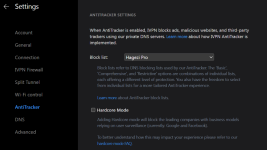
I was able to reproduce. The only thing I saw being blocked on the BD community is,Pro++ through IVPN on the BD forum, broke the ability to call out, tag someone with @, the user name wouldn't pop up until I used Pro. Maybe it works differently in and through that VPN?
View attachment 299495
www.googletagmanager.com github.com
McAfee does not scan files on access which makes it lighter.How in hell have they improved the performance of McAffee? I have used Webroot, Panda, Eset, norton and Trend Micro. Mcafee is the lightest among them.
I know this, but I am talking about the overall performance. It does not slow system startup. It does not slow the launch of apps. It does not slow app installation.McAfee does not scan files on access which makes it lighter.
It is still receiving updates.Tinywall is abandonware. Dev said he wasn't going to copntinue on Wilders. Has it been forked?

It is in the maintenance mode. Anyone can contribute a code and the dev will implement it, plus provide some fixes, if needed. But the development is stalled.Tinywall is abandonware. Dev said he wasn't going to continue on Wilders. Has it been forked?
github.com
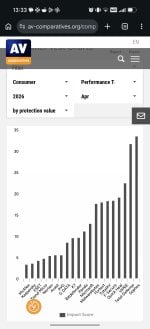
AV Comparatives Performance April 2026How in hell have they improved the performance of McAffee? I have used Webroot, Panda, Eset, norton and Trend Micro. Mcafee is the lightest among them.

The results are using default settings.
Mcafee seems to scan files on access. I plugged in my USB drive which has AMTSO tests stored in a folder. Once I opened the folder, McAffee detected the test files.The results are using default settings.
Avast is midway but I get a better performance by installing only 3 components and can get more by disabling scan file on access like McAfee.
Avast:McAffee does show many pop us. After each system restart, it ask you to run a "Smart Scan" which asks you to get Mcafee Optimiser. Moreover, when you open the GUI, it keeps asking you to enable the bundled sh*t.
This reminds me very much of Avast.

Yea Avast should be proud.