Question Download Sentinel a browser extension for Chrome which warns for risky downloads

Please provide comments and solutions that are helpful to the author of this topic.

LinuxFan58

Level 15
Thread author
Nov 30, 2025
710
2,617
1,367
Hi a few days back I posted about having vibe codes an extension, I have not send it to Chrome webstore, but will do so when I manage to get a mechanisme working which does not need tabs permission. This is the release candidate of en extension to help protect against risky downloads.

What it does

The extension uses an internal list of Windows/Mac/Linux executables, compressed files and LEGITIMATE domains often used to spread malware.

When an executable or compressed file is downloaded which does not come from a (user determined( whitelist,

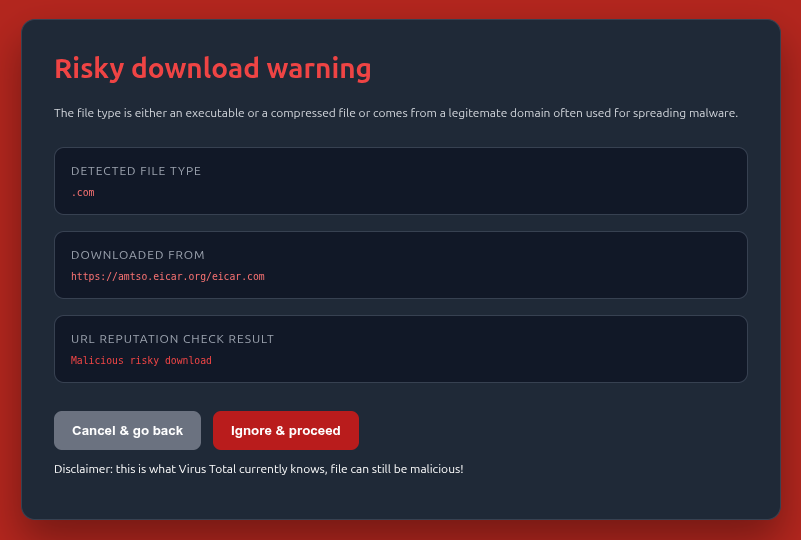
It shows a warning page and checks the download URL reputation on Virus Total and updates the warning page. The user can decide to cancel & go back or ignore & proceed

The same check is performed for ANY downloaded file coming from a domain which is often used to spread malware.

On boarding
Download the zip file and load it as unpacked extension.
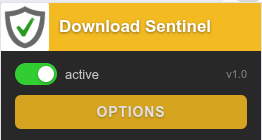
Click on the icon and choose options
- get a free Virus Total License key and copied into the options page
- enter up to 10 websites which you don't want executables and compressed file to block
- enter the background color for the warning page (not everyone likes red :- ) )

Click on icon
1781545124817.png


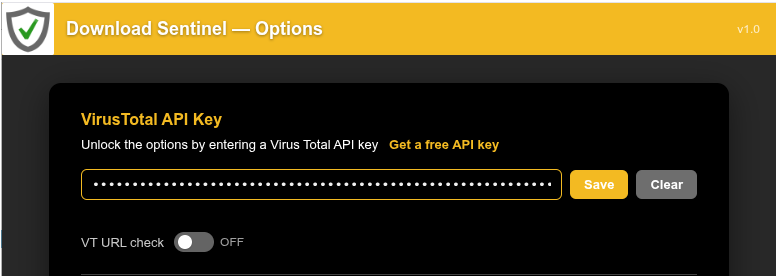
Enter your API key
1781545156401.png


Banner colors green and enter up to domains to exclude (whitelist)
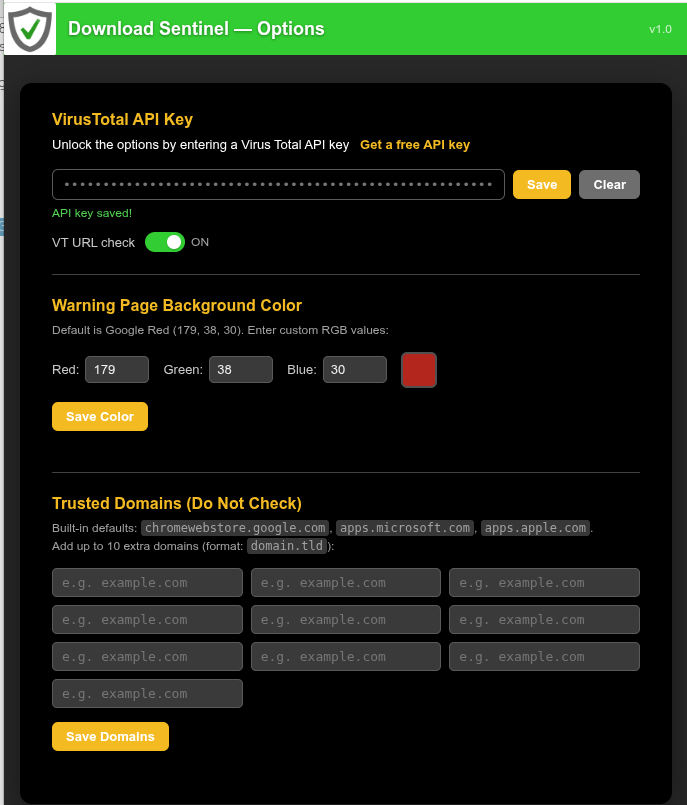
1781545279008.png


Use the extension (e.g. download winrar)
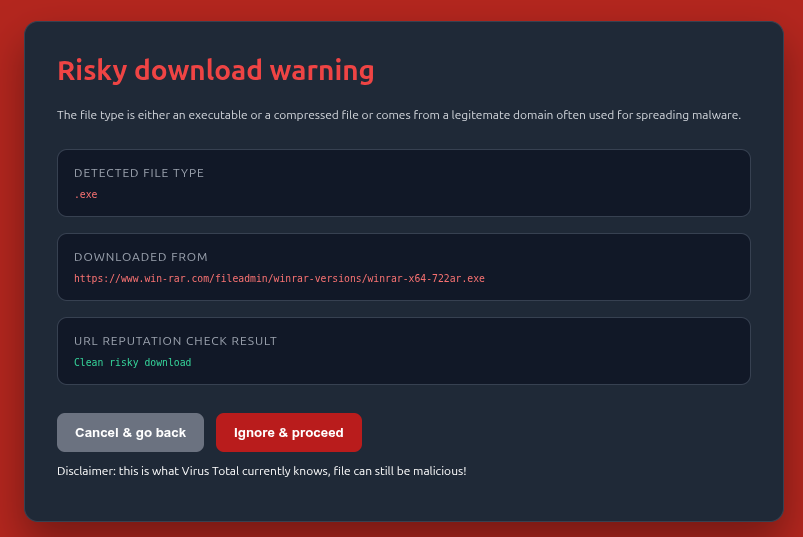
1781546960544.png


OPSWAT EICAR drive by download test
1781546982510.png
 
Last edited:
Hi a few days back I posted about having vibe codes an extension, I have not send it to Chrome webstore, but will do so when I manage to get a mechanisme working which does not need tabs permission. This is the release candidate of en extension to help protect against risky downloads.

What it does

The extension uses an internal list of Windows/Mac/Linux executables, compressed files and domains often used to spread malware.

When an executable or compressed file is downloaded which does not come from a (user determined( whitelist,

It shows a warning page and checks the download URL reputation on Virus Total and uodates the warning page. The user can decide to cancel & go back or ignore & proceed

The same check is performed for ANY downloaded file coming from a domain which is often used to spread malware.

On boarding
Download the zip file and load it as unpacked extension.
Click on the icon and choose options
- get a free Virus Total License key and copied into the options page
- enter up to 10 websites which you don't want executables and compressed file to block
- enter the background color for the warning page (not everyone likes red :- ) )

Click on icon
View attachment 298201

Enter your API key
View attachment 298202

Banner colors green and enter up to domains to exclude (whitelist)
View attachment 298203

Use the extension (e.g. download winrar)
View attachment 298207


OPSWAT EICAR drive by download test
View attachment 298208
Your concept is reasonable for a “risk warning” extension, and the overall workflow (intercept download → pause → show interstitial → allow cancel/continue) is one of the safer patterns because it keeps the user in control.

Key security and design points to consider

  • Avoid absolute claims: In the Web Store description and UI text, avoid wording like “protect/protects” or “blocks malware.” VirusTotal and lists can only provide risk signals and will produce false positives/negatives. Safer phrasing is “warns about potentially risky downloads” or “adds an extra confirmation step.”
  • File-type coverage: If you only focus on “executables + archives,” you may miss common real-world droppers such as .js, .vbs, .ps1, .bat/.cmd, .lnk, .msi, .iso, .img, and macro-enabled Office formats. Even if you don’t block them, consider at least warning on them (with a clear “why”).
  • Domain-based warnings: “Domains often used to spread malware” is inherently noisy because domains can be compromised temporarily, parked, or reused. Strongly consider:
    • Showing the exact domain and full download URL on the warning page
    • Adding a per-domain “trust/allow” option (with easy removal in settings)
    • Timestamping and versioning your internal list so users know how fresh it is
  • VirusTotal limitations and privacy:
    • The free/public API is rate-limited; you’ll need to handle 429 responses gracefully, cache lookups, and avoid re-querying the same URL repeatedly.
    • Be clear to users that URLs queried against VirusTotal may be logged/retained by VirusTotal. Don’t upload files automatically unless the user explicitly opts in (and if you ever do, disclose it prominently).
    • Treat “0 detections” as “no matches” rather than “safe.”

How to do the warning flow without needing “tabs” permission

In many cases you can avoid the broad “tabs” permission by not reading tab data and not injecting into pages.

A typical Manifest V3 approach is:

  • Use chrome.downloads permission and listen to downloads events (for example: onCreated / onChanged).
  • When a download matches your risk rules, call chrome.downloads.pause(downloadId).
  • Open your own extension page (for example warning.html) using chrome.tabs.create({ url: chrome.runtime.getURL('warning.html?...') }). Creating a tab generally does not require “tabs” permission as long as you are not querying existing tabs or reading their URLs/titles.
  • On the warning page, let the user choose:
    • Cancel: chrome.downloads.cancel(downloadId) (and optionally erase)
    • Proceed: chrome.downloads.resume(downloadId)

What usually forces the “tabs” permission is trying to read/inspect arbitrary tabs, query tab URLs, or modify existing tabs broadly. If you keep your UI inside extension pages and avoid tab inspection, you can often stay with a minimal permission set.

Chrome Web Store / review pitfalls to avoid

  • No remote code execution patterns (no remotely hosted scripts; no dynamic “eval”; no obfuscation).
  • Ask only for the permissions you truly need (likely “downloads”, “storage”, and possibly “notifications”).
  • Disclose VirusTotal usage clearly and provide a privacy policy, especially if any URLs are sent to third parties.
  • Be careful with the wording “internal list of malware domains” unless you can cite a source or document your methodology, because reviewers/users may treat that as a claim that needs justification.

Practical next step

Before submitting to the Web Store, it’s worth verifying (1) your extension still behaves correctly when the MV3 service worker is suspended (state should be persisted, not only in memory), and (2) the “pause → warning → resume/cancel” flow works consistently for different download sources and file sizes.
 
;)(y)

Interesting,very useful for users of the Brave browser, which has weaker download protection than Chrome or Firefox:

Download protection in Brave is more limited than the one in Chrome and Firefox due to the fact that we do not send any URLs to the server, so this information cannot be used to determine the risk associated with a given file. In practice this means that Chrome and Firefox will block more malicious files than Brave.

https://support.brave.app/hc/en-us/articles/15222663599629-Safe-Browsing-in-Brave

Here's a very interesting link for anyone interested in testing it out:

Safe Browsing Testing Links

First question:

How does the extension behave when used in conjunction with Google Safe Browsing's download protection?

Second question:

How does it perform in the Speedometer 3.1 test?
 
@Bot

These are the executable file types
"bat","chm","cmd","com","cpl","exe",¨dll¨,"hta",
"jse","js","lnk","msc","msi","msp","mst",
"pif","ps1","ps1xml","ps2","ps2xml","psc1",
"psc2","scr","vb","vbe","vbs","wsf","wsh",
"appimage","awk","bash","bin","csh","deb",
"ksh","out","php","pl","pm","py","pyc", "pyo","rb","rpm","run","sed","sh","tcl",
"tcsh","zsh","elf","jar","java","dmg","jnlp",
"action","app","applescript","command",
"mpkg","pkg","scpt","tool","workflow"

These are the compressed file types
"zip", "rar", "7z", "tar", "gz", "tgz", "bz2", "xz", "iso",
"cab", "msi", "msix", "msixbundle", "appx", "appxbundle",
"deb", "rpm", "apk", "snap", "flatpak", "appimage",
"dmg", "pkg", "mpkg", "xip"

These are the legitimate domains often used for spreading malware
"000webhostapp.com","appspot.com","bitbucket.io","blogspot.com",
"canva.site","carrd.co","codeberg.page","controlc.com","ddns.net",
"duckdns.org","firebaseapp.com","fly.dev","framer.app","framer.website",
"gist.github.com","github.io","gitlab.io","glitch.me","googleusercontent.com",
"hastebin.com","herokuapp.com","hopto.org","netlify.app","no-ip.org",
"notion.site","onrender.com","pages.dev","paste.ee","pastebin.com",
"railway.app","replit.app","roblox.com","servehttp.com","sites.google.com",
"sourceforge.net","surge.sh","typedream.app","vercel.app","web.app",
"webflow.io","weebly.com","workers.dev","wixsite.com","wixstudio.com",
"wordpress.com","zapto.org",¨raw.githubusercontent.com"

The extension does ONLY check the download URL (not the domain) reputation WHEN there is a
1. An executable (including scripts) OR compressed file download triggered
or
2. ANY download from a domain which is often used for malware spreading

I am not using the words malware domains, I am using the word LEGITIMATE domain often used for malware spreading
 
Last edited:
@Sampei.Nihira

Brave's safe browsing is also using the APIv5 online (realtime) cloud lookup. Why is it weaker dan Firefox?

Safe Browsing works normally. With new APIv5 it sends a part of the URL to Google Safe Browsing via a privacy filter (which hides your IP), when the website is supsicious the full URL is send (that is a better privacy policy than Edge Smartscreen has).

1781549302204.png
 
Last edited:
;)(y)

Interesting,very useful for users of the Brave browser, which has weaker download protection than Chrome or Firefox:


https://support.brave.app/hc/en-us/articles/15222663599629-Safe-Browsing-in-Brave

Here's a very interesting link for anyone interested in testing it out:

Safe Browsing Testing Links

First question:

How does the extension behave when used in conjunction with Google Safe Browsing's download protection?

Second question:

How does it perform in the Speedometer 3.1 test?
Thanks for the link. I thought my "Emsisoft Browser Security" extension was useless because it never showed me an alert, but I think the reason is that I don't visit harmful websites. 👍

2026-06-16 02_00_07.png
 
Any idea why osprey doesnt block them? even this page is counted as suspicious by alphamountain?

No idea, but probably the most valid reason is that it is designed to respond to website navigation not downloads.

Do you have many extensions with broad permissions like Osprey (e.g. browsing history, tabs, change content, etc, they sometimes interfere)?. Have you tried enabling in frame navigation check in Osprey? Osprey also has a minimum count of 2 to show a warning, maybe only AlphaMountain marked it as malicious?
 
Last edited: