


Hi, Download sentinel (open source see GitHub - Kees1958/DownloadSentinel: A Chrome extension which warns users when a risky download is initiated) version 1.4 is available in the chrome webstore.
What is new?
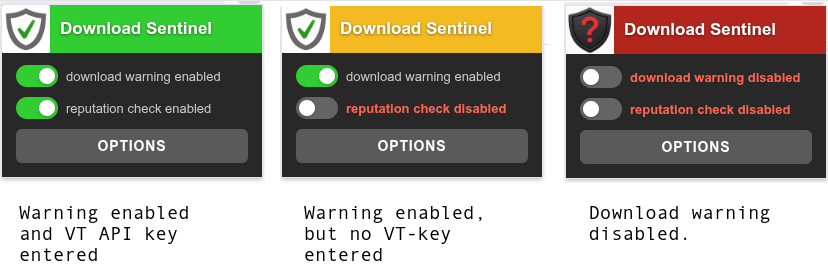
User interface stayed as simple as it was
Options page has a new FP reduction filter
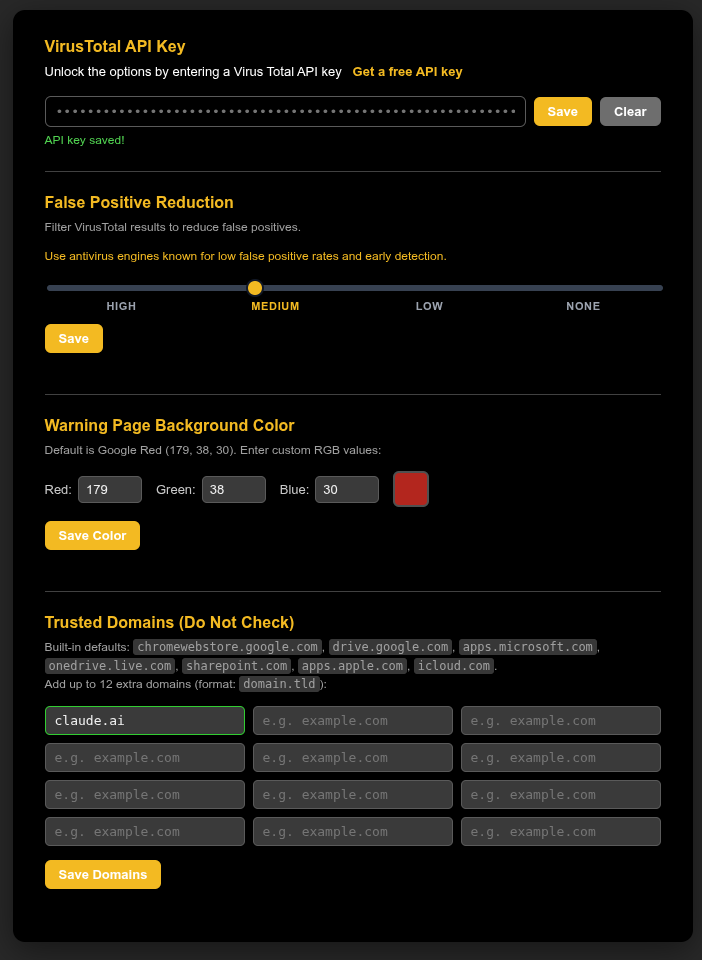
When you move the slider a hint line explains what HIGH-MEDIUM-LOW-NONE is. On my Github repo I have a list of AV-engines which is used in what FP surpression mode: DownloadSentinel/DownloadSentinel_FP_Engines.xlsx at main · Kees1958/DownloadSentinel
Warning page has some variations to deal with different situations
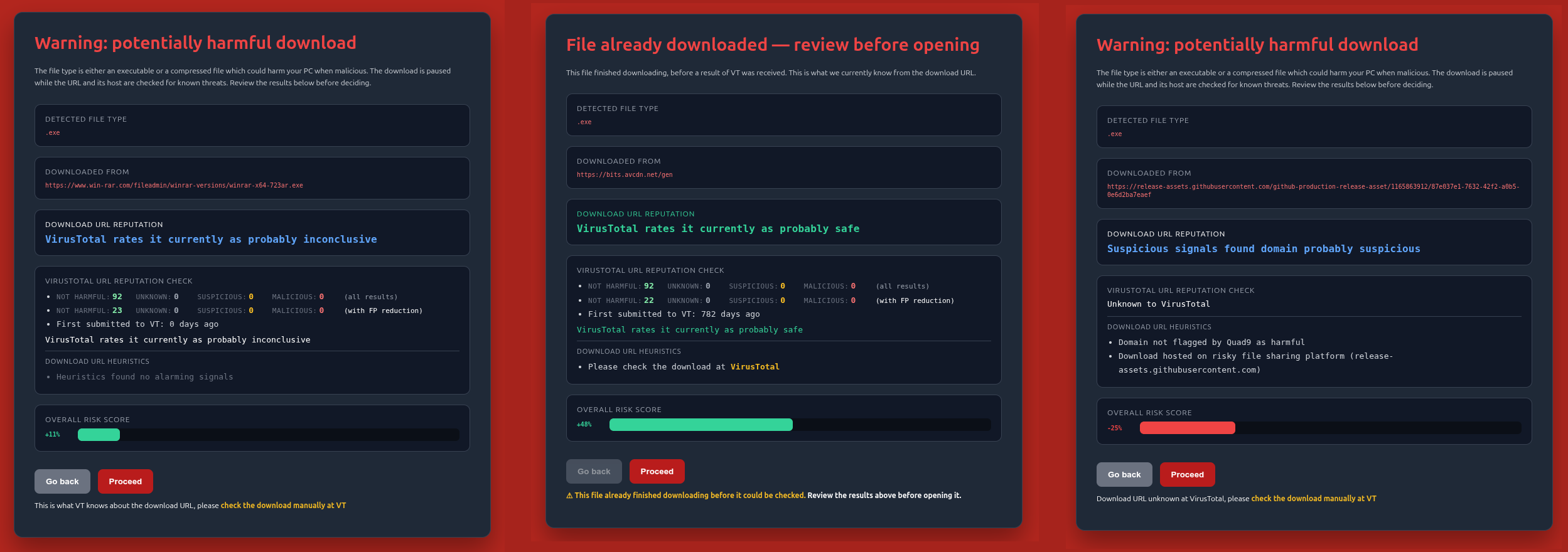
First one (on the left) is a ¨normal" VT reputation URL result, with as remarkable signal that it is an update which is new (first submitted to VT 0 days), that is why it gets a low (only 11% confidence positive rating) and is reported as probably inconclusive (again with the disclaimer that this is what VT currently knows and it is good practice to check the download itself manually at VT).
The middle one is an example of a legitimate tiny executable which can´t be intercepted, hence Download Sentinel provides a post download warning, with the advice to check the download first at VT before opening.
The last on (on the right) is a an example of an ever changing download, which is unknown by Virus Total, but because it is downloaded from a legitimate websites (thanks @Sampei.Nihira for finding this one ) the heuristics notices some anomalies and reports it as probably suspicious (with a low confidence score of -25%).Many AntiVirus bendors won't burn their hands on a download obfuscated or redirected to a legitimate website which is also used for malware distribution. When their online protection mechanism can´t classify as known trusted or known bad, it is (or parts of it is) send to their cloud servers where it is dissected by AI and analyzed in a sandbox, When it is malware it generates a hash or family variant fingerprint to protect other users. Question is: do you want your family members to install this software while it is half chance (good or bad) or would you rather tell them to wait until you are at home to see whether it is a false positive?
I wanted a simple application which family members could use when the home/family admin requested free VT API-keys as a second (or third) safety-net after your DNS build-in malware protection and browser build-in download protection or for people using a Browser which dows not use Google Safe Browsing (like Ungoogled Chromium) or discourages it (like Brave). For the last group (I am on Linux using Brave lite) I made a very privacy respecting extension. This is why I only use VT for Download URL reputation and am using Chrome build-in mechanisms not needing broad permissions (extension can't access your history or page content).
Run a Speedometer benchmark with this extension (with and without using browser restarts) and a similar extension made by a company and you will see the minimal impact it has (you can also click on the extension icon and view what access is needed)
When find issues, just report them in this thread.
What is new?
- It has a new False Positive reduction filter, which can be set in the options page (only when you enter your free personal API key from VT).
- The wording in warning pages is more carefull, always pointing out that is the current state of knowledge about a download URL and that careful users should check the download themselves at VT (only checking the reputation of the download URL has substantial privacy advantages, because the content is not shared). As a fallback this extension also performs some heuristics as explained here (link in Shadowra's thread).
- Turns out malware uses some tactics which the chrome on-download trigger does not handle well without additional logic added to deal with special situations
a) using redirects, sadly these are also used by big corporations to put downloads behind a login or measure marketing success
b) using tiny downloads which (e.g. an installer or a script), which are downloaded before VT URL reputation lookup has finished.
c) obfuscated download with a lot of parameters (to make it look new, increasing the chance that ViusTotal does not known the download URL
User interface stayed as simple as it was
Options page has a new FP reduction filter
When you move the slider a hint line explains what HIGH-MEDIUM-LOW-NONE is. On my Github repo I have a list of AV-engines which is used in what FP surpression mode: DownloadSentinel/DownloadSentinel_FP_Engines.xlsx at main · Kees1958/DownloadSentinel
Warning page has some variations to deal with different situations
First one (on the left) is a ¨normal" VT reputation URL result, with as remarkable signal that it is an update which is new (first submitted to VT 0 days), that is why it gets a low (only 11% confidence positive rating) and is reported as probably inconclusive (again with the disclaimer that this is what VT currently knows and it is good practice to check the download itself manually at VT).
The middle one is an example of a legitimate tiny executable which can´t be intercepted, hence Download Sentinel provides a post download warning, with the advice to check the download first at VT before opening.
The last on (on the right) is a an example of an ever changing download, which is unknown by Virus Total, but because it is downloaded from a legitimate websites (thanks @Sampei.Nihira for finding this one
) the heuristics notices some anomalies and reports it as probably suspicious (with a low confidence score of -25%).Many AntiVirus bendors won't burn their hands on a download obfuscated or redirected to a legitimate website which is also used for malware distribution. When their online protection mechanism can´t classify as known trusted or known bad, it is (or parts of it is) send to their cloud servers where it is dissected by AI and analyzed in a sandbox, When it is malware it generates a hash or family variant fingerprint to protect other users. Question is: do you want your family members to install this software while it is half chance (good or bad) or would you rather tell them to wait until you are at home to see whether it is a false positive? I wanted a simple application which family members could use when the home/family admin requested free VT API-keys as a second (or third) safety-net after your DNS build-in malware protection and browser build-in download protection or for people using a Browser which dows not use Google Safe Browsing (like Ungoogled Chromium) or discourages it (like Brave). For the last group (I am on Linux using Brave lite) I made a very privacy respecting extension. This is why I only use VT for Download URL reputation and am using Chrome build-in mechanisms not needing broad permissions (extension can't access your history or page content).
Run a Speedometer benchmark with this extension (with and without using browser restarts) and a similar extension made by a company and you will see the minimal impact it has (you can also click on the extension icon and view what access is needed)
When find issues, just report them in this thread.
Last edited:


 but honestly just like
  they played rubbish and didn't deserve to win. Insipid performance by both.


