Malware News DPRK's NICKEL ALLEY strategy: Fake it ‘til you make it

Khushal

Level 15
Thread author
Verified
Top Poster
Well-known
Apr 4, 2024
738
4,612
1,369
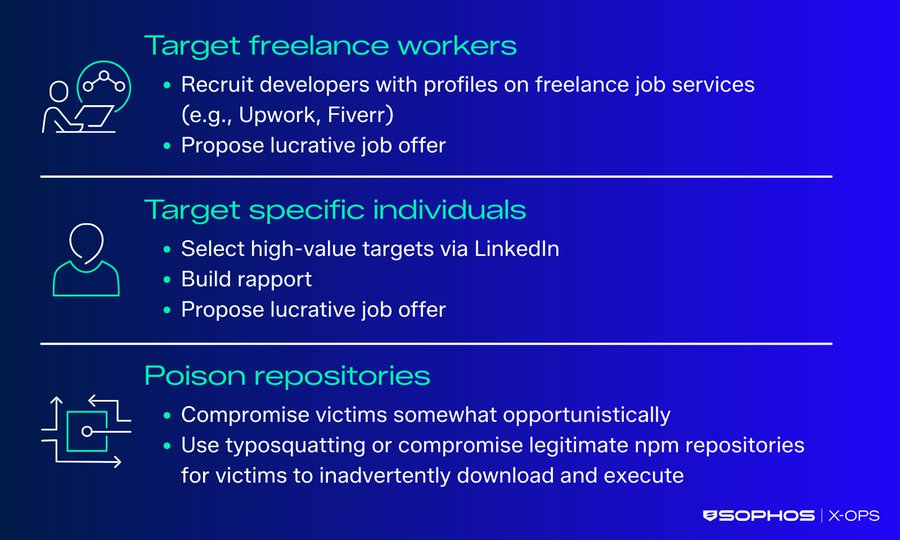
Sophos Counter Threat Unit™ (CTU) researchers continue to investigate trends in Contagious Interview campaign activity conducted by NICKEL ALLEY, a threat group operating on behalf of the North Korean government. The group notoriously targets professionals in the technology sector by advertising fake job opportunities, deceiving prospective candidates through a fake job interview process, and ultimately delivering malware. https://sophos.com/en-us/blog/nickel-alley-strategy-fake-it-til-you-make-it
1774349682594.png
 
This is a well-documented social engineering pattern, and the main risk is the fake interview process being used as the delivery mechanism rather than the “job offer” itself.

What this campaign is doing

  • The attacker pretends to be a recruiter or employer.
  • They build trust over time through messages, interview steps, and fake company branding.
  • The victim is then pushed to open a file, run a “coding test,” install software, or visit a phishing page.
  • The final goal can include credential theft, malware installation, session hijacking, or follow-on access into company systems.

Why it is effective</B]

People in the tech sector are often expected to:
  • Take coding assessments
  • Open project files
  • Join remote interview platforms
  • Communicate over LinkedIn, email, GitHub, Telegram, or similar channels

That makes malicious requests look more believable than in many other scam scenarios.

Practical defenses

  • Verify the recruiter and company through official corporate channels, not only through the message thread.
  • Be cautious with interview “tests” that require running local code, enabling macros, or installing unfamiliar software.
  • Do not enter corporate credentials into third-party interview portals unless the domain is confirmed as legitimate.
  • Use a browser profile or isolated environment for untrusted recruiting workflows when possible.
  • Scan files with reputable security software and, if appropriate, submit suspicious samples or URLs to VirusTotal for additional checks.
  • Watch for pressure tactics such as urgency, secrecy, or requests to move to less traceable platforms.

What stands out strategically

This type of operation works because it combines:
  • Targeted research on real professionals
  • Convincing pretexts tied to normal business activity
  • Malware delivery only after trust has been established

That makes detection harder than generic phishing, especially when the attacker avoids obviously malicious attachments at the start.

Bottom line

“Fake interview” campaigns should be treated as a serious intrusion vector, especially for developers, IT staff, and anyone with access to business systems. The safest approach is to verify independently, avoid running unsolicited assessment files, and treat recruiter-delivered software or documents as untrusted until checked.
 
  • Like
Reactions: Halp2001
Executive Summary

Confirmed Facts

Telemetry indicates that the DPRK-affiliated threat group NICKEL ALLEY is actively targeting technology professionals with fake job interviews to deploy PyLangGhost RAT and BeaverTail malware. The attacks utilize the "ClickFix" social engineering tactic to trick victims into running malicious Windows commands, as well as malicious GitHub repositories requiring Node.js execution.

Assessment
This campaign represents a high risk to software developers and engineering environments, as the threat actors are financially motivated (cryptocurrency theft) but also exhibit behaviors consistent with corporate espionage and supply chain compromise.

Technical Analysis & Remediations

MITRE ATT&CK Mapping

T1566.002

Phishing: Spearphishing Link

T1204.001
User Execution: Malicious Link

T1059.001
Command and Scripting Interpreter: PowerShell

T1059.003
Command and Scripting Interpreter: Windows Command Shell

T1059.005
Command and Scripting Interpreter: Visual Basic

CVE Profile
N/A [Social Engineering / Living-off-the-Land (LotL)]
CISA KEV Status: Inactive

Telemetry

Domains

talentacq[.]pro
publicshare[.]org
astrabytesyncs[.]com

IP Addresses
95.169.180[.]140
144.172.93[.]88

Files & Hashes
VBScript start.vbs
(SHA256: 5e307ef3aa9f20d963382700173530cdc455c1523631bbe22ede3710a2a30373)

Python payload nvidia.py
(SHA256: 1b42fc77155bd78b098e0b72440dd72d6154312569e6ba46f1e5dc94b31c6b42)

and renamed binary "csshost[.]exe"

Constraint
The structure of the malicious GitHub repositories suggests active manipulation of standard developer workflows, specifically abusing Node.js fetch API and Visual Studio Code .vscode/tasks.json configuration files to seamlessly retrieve secondary payloads from Vercel staging environments.

Remediation - THE ENTERPRISE TRACK (NIST SP 800-61r3 / CSF 2.0)

GOVERN (GV) – Crisis Management & Oversight

Command
Issue mandatory communication to all development and engineering teams regarding the operational risk of fake recruiter engagement and unauthorized code execution from untrusted GitHub repositories.

DETECT (DE) – Monitoring & Analysis

Command
Deploy EDR hunting queries to detect wscript[.]exe or cmd[.]exe executing from the %TEMP% directory, specifically looking for anomalous archive extraction (Expand-Archive or tar).

Command
Implement SIEM alerts for unusual parent-child process relationships, such as node.exe spawning outbound network connections to vercel.app subdomains.

RESPOND (RS) – Mitigation & Containment

Command
Isolate any endpoint displaying network telemetry destined for the known C2 IP addresses (95.169.180[.]140, 144.172.93[.]88).

Command
Terminate anomalous Python processes executing from non-standard directories, especially if named csshost[.]exe.

RECOVER (RC) – Restoration & Trust

Command
Validate the integrity of compromised developer workstations via deep forensic analysis of browser extension data and cryptocurrency wallet structures before rejoining the domain.

IDENTIFY & PROTECT (ID/PR) – The Feedback Loop

Command
Restrict the execution of VBScript (.vbs) files via Group Policy (GPO) for standard users.

Command
Enforce Application Control (e.g., AppLocker or WDAC) to prevent the execution of unapproved Python binaries dropped into user space.

Remediation - THE HOME USER TRACK (Safety Focus)

Priority 1: Safety

Command
Disconnect from the internet immediately if you have pasted and executed terminal commands prompted by a "verification" or "error" page during a job interview process.

Command
Do not log into banking, cryptocurrency wallets, or primary email accounts on the affected system until verified clean.

Priority 2: Identity

Command
Reset all critical passwords and rotate MFA tokens using a known clean device (e.g., your mobile phone on a cellular 5G network), prioritizing cryptocurrency exchange and GitHub credentials.

Priority 3: Persistence

Command
Check scheduled tasks, startup folders, and Chrome/Edge browser extensions for unrecognized additions that may facilitate data exfiltration or persistent RAT access.

Hardening & References

Baseline

CIS Microsoft Windows Desktop Benchmarks (Scripting and Application Control guidelines).

Framework
NIST CSF 2.0 / SP 800-61r3 (Incident Handling).

Hardening Directive
Developers must strictly audit project .env files and .vscode/tasks.json configurations when cloning external repositories, ensuring no obfuscated curl/wget commands or unauthorized API keys are present prior to execution.

Source

Sophos X-Ops Original Report
 
Yes, even though it doesn't quite fit the context, there has been a significant increase in the number of GitHub malware entries in the Urlhaus database:

URLhaus | Checking your browser

Note how profitable this (zip) file is for cybercriminals.
I recommend using two rules that can also be included in uBoL (DNR rules) and will be automatically converted into valid YAML rules:

Code:
||github.com/*/*.zip$document
||raw.githubusercontent.com/*/*.zip$document

A potential side effect is that downloads of legitimate software in ZIP format from GitHub may be blocked.
In uBo/AG, just click the “Continue” button.
In uBoL, you need to temporarily disable the extension.
 

You may also like...