Advanced Plus Security ErzCrz Security Config 2025

Last updated
Jun 15, 2025
How it's used?
For home and private use
Operating system
Windows 11
Other operating system
N/A
On-device encryption
BitLocker Device Encryption for Windows
Log-in security
    • Biometrics (Windows Hello PIN, TouchID, Face, Iris, Fingerprint)
Security updates
Allow security updates and latest features
Update channels
Allow stable updates only
User Access Control
Always notify
Smart App Control
Off
Network firewall
Enabled
About WiFi router
Sky Router with built-in IPV4/IPv6 Firewall
Real-time security
ESET Security Essentials
CyberLock
RansomwareGuard
Firewall security
Other - Internet Security (3rd-party)
About custom security
ESET Security Essentials - Default Settings
Cyberlock - ON - Firewall Rules for Unsafe Items. SmartFirewall Recommended, Require Captcha to exit.
RansomwareGuard
Periodic malware scanners
Malwarebytes On Demand
Emsisoft
Malware sample testing
I do not participate in malware testing
Environment for malware testing
N/A
Browser(s) and extensions
Primary: Edge with Osprey, uBlock Origin Lite & ESET
Secondary: Firefox with uBlock Origin & Osprey Browser Extension & ESET
Secure DNS
Provided by ISP Sky Shield though occasionally Cloudflare DNS over HTTP.
Desktop VPN
None. Browsing primarily on home private network.
Password manager
Keepass 2.x
Maintenance tools
Windows built-in Disk Clean-up and Storage Sense.
File and Photo backup
AOMEI Backupper Pro - Monthly Full Backups & Weekly Differential Backups
Subscriptions
    • None
System recovery
Lenovo Built in Recovery, AOMEI Backupper Pro Recovering Environment & Bootable USB
Risk factors
    • Browsing to popular websites
    • Working from home
    • Making audio/video calls
    • Opening email attachments
    • Buying from online stores, entering banks card details
    • Downloading software and files from reputable sites
    • Gaming
    • Streaming audio/video content from trusted sites or paid subscriptions
Computer specs
Notable changes
See First Post Spoilers
08.02.2026 - 2026 setup - ESET Security Essentials, CyberLock, RansomwareGuard
----------------------------------------
Disclaimer we use date format DD/MM/YYYY here in the UK
What I'm looking for?

Looking for minimum feedback.

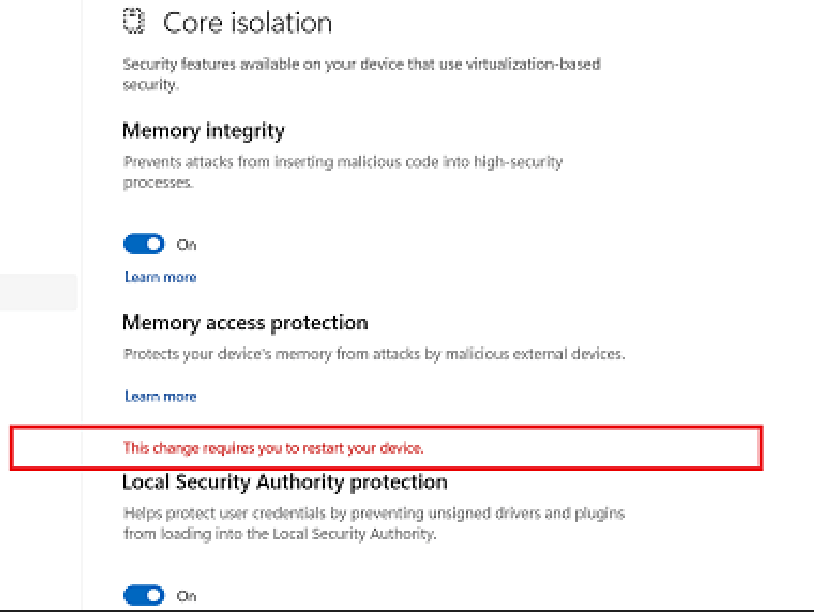
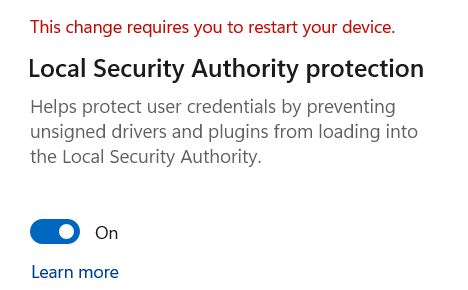
Had Local Security Authority Protection warning this morning. It was turned off. Turned it on and restarted twice but had to dismiss the warning message in the end and pagece still says "This change requires you to restart your device" but at least it's enabled. A new feature or something else going on?? Win 11
1677262707107.png
 
Had Local Security Authority Protection warning this morning. It was turned off. Turned it on and restarted twice but had to dismiss the warning message in the end and pagece still says "This change requires you to restart your device" but at least it's enabled. A new feature or something else going on?? Win 11

View attachment 273131
I have the same issue. It's mentioned here Redirecting
The fix, which I haven't tried, is here: Enable or Disable Local Security Authority (LSA) Protection in Windows 11 Tutorial
I'm hoping that MS fixes this with a future update.
 
I have the same issue. It's mentioned here Redirecting
The fix, which I haven't tried, is here: Enable or Disable Local Security Authority (LSA) Protection in Windows 11 Tutorial
I'm hoping that MS fixes this with a future update.
Ah okay thanks! It had me going there for a minute this morning LOL.

EDIT: The RunAsPPL entry was there in the registry but not the RunAsPPLBoot. Adding this entry fixed the issue.

Registry entries from your Enable/Disable link:

[HKEY_LOCAL_MACHINE\SYSTEM\CurrentControlSet\Control\Lsa]
"RunAsPPL"=dword:00000002
"RunAsPPLBoot"=dword:00000002
 
Last edited:
Been a bit manic at this end. Reverted to complete default MD setup a bit undecided about what to go with lately. Probably Comodo's announcement of future updates has me thinking about that again and not been using the Emsisoft subscription I won much. Just kind of in limbo security wise. Bear (or bare) with me :D

I probably just need to stick with the basics of CD on High at the moment or until I do a fresh install for SAC which isn't happening soon.
 
Last edited:
EDIT: The RunAsPPL entry was there in the registry but not the RunAsPPLBoot. Adding this entry fixed the issue.
Was it 1 or 2? I am wondering, whether RunAsPPLBoot entry is required. I am using (more secure?) RunAsPPL=1 and since it is UEFI locked, it should be enabled at boot? :unsure:
 
  • Like
Reactions: oldschool
Was it 1 or 2? I am wondering, whether RunAsPPLBoot entry is required. I am using (more secure?) RunAsPPL=1 and since it is UEFI locked, it should be enabled at boot? :unsure:
I think it was 2 and still is.
 
@TairikuOkami
I think it was 2 and still is.
Yes. I think both key values are the default value 2 when you enable LSA in Windows Security. The bug in Windows 11 22H2 is that the 2nd key isn't created and users get the "This change requires ..." message even after restarting machine. At least that's how I understand it.

For those who aren't so computer savvy, like myself, I found these detailed directions (Method 2) for manually adding the new key so I wouldn't have to rely on a .reg file.
 
Last edited:
  • Like
  • +Reputation
Reactions: Nevi and ErzCrz
I'm typically indecisive and a bit at a crossroads. I think I should really take advantage of that Emsisoft AV subscription and stick with that for now. It's a good product and even though it uses 600+meg of ram, it doesn't really affect my system performance with 16gb on board. Will update config tomorrow.
 
I'm typically indecisive and a bit at a crossroads. I think I should really take advantage of that Emsisoft AV subscription and stick with that for now. It's a good product and even though it uses 600+meg of ram, it doesn't really affect my system performance with 16gb on board. Will update config tomorrow.
I'm pretty sure the high RAM usage is just temporary just like with pretty much every Bitdefender Engine-based AV. I installed G-Data and had 1gb RAM usage. Now after like 3 days, it dropped down to 400 mb. Just do a full scan and dont shut down your PC for a night.
 
I'm pretty sure the high RAM usage is just temporary just like with pretty much every Bitdefender Engine-based AV. I installed G-Data and had 1gb RAM usage. Now after like 3 days, it dropped down to 400 mb. Just do a full scan and dont shut down your PC for a night.
Thanks. It's settled into the 400s now. I really want to use CF but have to do a fair bit of whitelisting and allow rules. Will pick it back up again when I've had time to some more research on that ;)
 
  • Like
Reactions: Kongo
Done a lot of bouncing around between security configs this year. Trying to go back to a more simplistic route with H_C and MD or just CF and MD. Fort Firewall also a possibility if you can default block outgoing.

CF takes some tweaking apart from cruelsister settings. Firewall rules for 443 outgoing windows host apps and ports 53, 5353, 1900 & 443 outbound rules as default CF web browser preset doesn't include HTTPS, DNS, SSDP or IPv6 Neighbourhood Solicitation but maybe that's as I'm filtering IPv6 along with IPv4.

Anyway, will update the config when I settle on one :)
 
Getting lots of spam lately. No new haveibeenpwned breaches must just be that time of year. The usual you've been watching... some fake tinder and other random stuff. Thankfully domain host provider spam filter is quite effective and Thunderbird catches what's missed. Does always make me paranoid but in reality it's just data from old breaches and my protection levels cover things ;)

CFW working okay though saw it not registering in Security Centre a few times but it's still doing it's job at least containing malware in simple tests. I like Emsisoft which will block malware connections and full scans taking less than 5 minutes so maybe just go with that if there's further CFW issues.
 
CFW working okay though saw it not registering in Security Centre a few times but it's still doing it's job at least containing malware in simple tests.
I like the CFW, but I hate it when the Security Center keeps reporting that the firewall is disabled and when it was the CIS that the AV is outdated and this is old this bug, although it is not so often these notifications. Me if I do not fail memory the build 6888 did not have this. I thought it was only with me that this occurred.😞
 
  • Like
Reactions: ErzCrz
Getting lots of spam lately.
I was getting barraged with spam texts on my phone, multiple times a day. It took weeks of continual reporting and then they tailed off, to be very sporadically replaced by texts in Chinese. After more reporting they seem to have stopped.
 
  • Wow
Reactions: ErzCrz
CFW ... not registering in Security Centre a few times
I like the CFW, but I hate it when the Security Center keeps reporting that the firewall is disabled
I refuse to use anything with these kinds of bugs, even though they're minor they drive my OCD wild. 😄 Which is why I'm sticking with Windows Security.
 
  • Like
  • Applause
Reactions: Nevi and ErzCrz
I refuse to use anything with these kinds of bugs, even though they're minor they drive my OCD wild. 😄 Which is why I'm sticking with Windows Security.
Yes, I have a hard time committing to Comodo fully until the apparent 2024 update that we're meant to see this summer. I'm trying out the H_C Beta 2 at the moment.
 
  • Like
Reactions: Nevi and oldschool
Quick update to config. Using Hard_Configurator Beta 3. Oh and a few swaps of ticks relating to PC use.

That issue I thought was H_C related regarding Thunderbird slow server issue turned out to be a email server issue and not directly related to H_C,CD,FWH.

Anyway, played around a fair bit with Comodo but had to add a lot of allow rules and I'm just sticking with MD/H_C until at least this "summer release" happens or I get more clarification about Firewall rules relating to svchost and windows apps connecting out to port 443.
 

You may also like...