ESET - Implement Protected Folders via HIPS

SeriousHoax

Level 55
Thread author
Verified
Top Poster
Content Creator
Well-known
Forum Veteran
Mar 16, 2019
4,434
34,951
5,380
Bangladesh
ESET Nod 32/Internet Security/Smart Security

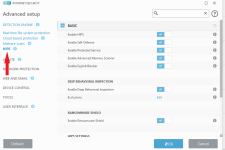
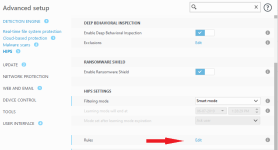
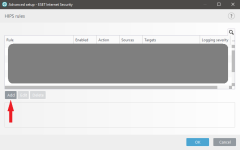
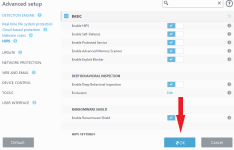
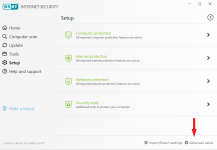
1. Open ESET. Go to Setup -> Advanced setup -> HIPS -> In the HIPS SETTINGS sections click on the "Edit" button on the right side of Rules. On the new window, click on Add to create a new HIPS rule.
1.PNG2.PNG3.PNG4.PNG
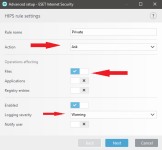
2. Now, put any name you wish in the Rule name section. For Action select "Ask", in Operation affecting toggle "Files". Choose a Logging severity if you want to record logs and click Next. Instead of "Ask" you can also choose "Block" if you wish to simply block all kinds of modification of the folder. In that case toggle "Notify user" below to receive notification.
5.PNG
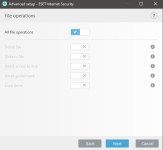
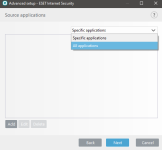
3. Then select All applications -> Next -> All file operations -> Next.
6.png7.PNG
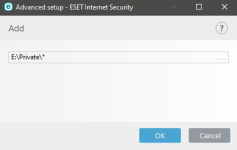
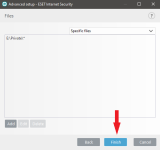
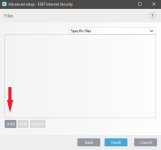
4. Click on Add, here you have to specify the folder you wish to protect. You can manually type/paste the location or click on the three dots on the right to browse the folder. It is a must to put backward slash and * after the folder name. Eg: E:\Private\*
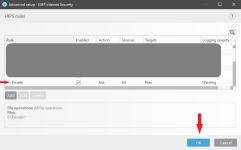
Only selecting the folder would protect the folder itself only, not the contents inside. Here, * refers to all the contents inside the folder. You can add as many folders as you want. Now click, OK -> Finish -> OK -> OK.
8.PNG9.PNG10.PNG11.png13.PNG
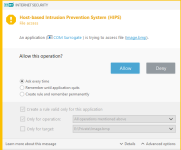
5. Now if you or any program tries to create, delete, modify any item in that folder, ESET is going ask for your permission to decide. You can either Allow, Deny or select "Remember until application quits" before clicking Allow or Deny.
12.PNG
Enjoy :)
 
With these rules does the timeout on the ASK rule apply as in other aspects of ESET? Isn't it 60 seconds before it allows?
Yes the 60 seconds rule apply for all types of HIPS rules so the same here also. ESET don't want you to take a nap or close your eyes while using your PC 😂
 
I may try it. It's a delicate balance not to become too annoying, because then my help becomes a nuisance and potentially gets ignored/rejected.
Yes it's a tricky situation. Also this ESET rules requires more than once clicking Allow for a single task like putting new files in the folder. With extra power comes extra responsibility 😂
 
I once heard that ESET BB was weak. Do you know if that changed with the last eset releases?
It really doesn’t do a whole lot. They rely mostly on their dynamic signatures which are fantastic. With custom HIPS rules like these you can lock things down to compensate for the signature misses and weak BB. But, honestly if you aren’t engaging in risky behavior you probably don’t need to. Depends on how locked down you want your system and your appetite for risk.
 
It really doesn’t do a whole lot. They rely mostly on their dynamic signatures which are fantastic. With custom HIPS rules like these you can lock things down to compensate for the signature misses and weak BB. But, honestly if you aren’t engaging in risky behavior you probably don’t need to. Depends on how locked down you want your system and your appetite for risk.
ty! I guess ESET would be unbeatable if they could improve their BB
 

You may also like...