


Advanced Security Faybert Security Configuration 2022
- Thread starter Faybert
- Start date
You are using an out of date browser. It may not display this or other websites correctly.
You should upgrade or use an alternative browser.
You should upgrade or use an alternative browser.
- Last updated
- Mar 22, 2022
- How it's used?
- For home and private use
- Operating system
- macOS 15 Sequoia
- On-device encryption
- Log-in security
- Biometrics (Windows Hello PIN, TouchID, Face, Iris, Fingerprint)
- Security updates
- Allow security updates and latest features
- User Access Control
- Always notify
- Smart App Control
- Network firewall
- Real-time security
- Kaspersky Free
- Firewall security
- Microsoft Defender Firewall
- About custom security
- Default settings
- Periodic malware scanners
- HitmanPro and Norton Power Eraser
- Malware sample testing
- I do not participate in malware testing
- Browser(s) and extensions
- Secure DNS
- None.
- Desktop VPN
- Bitdefender VPN
- Password manager
- Bitwarden
- Maintenance tools
- Wise Care 365
- File and Photo backup
- OneDrive and Google Drive.
- System recovery
- Macrium Reflect Free
- Risk factors
- Browsing to popular websites
- Opening email attachments
- Buying from online stores, entering banks card details
- Logging into my bank account
- Downloading software and files from reputable sites
- Gaming
- Streaming audio/video content from trusted sites or paid subscriptions
- Computer specs
- What I'm looking for?
Looking for minimum feedback.


Removing Microsoft Edge and adding Firefox and Opera, in my tests they were the fastest to open the page.


How do you know which browser opens the page faster???Removing Microsoft Edge and adding Firefox and Opera, in my tests they were the fastest to open the page.

Opera, GX or?Removing Microsoft Edge and adding Firefox and Opera, in my tests they were the fastest to open the page.
From my day-to-day experience, and it also has an extension called Page load time, with it you can know how long your browser takes to open a website completely.How do you know which browser opens the page faster???
Traditional Opera, the GX version I don't like because it takes time to update the chromium version.Opera, GX or?
Yeah I sort of recall something similar last time I tested it. It was slower with it's release of updates. Other then that, it had features I normally never used. I'm satisfied enough with the stable version.Traditional Opera, the GX version I don't like because it takes time to update the chromium version.

Use the Network section of developers tools instead to measure the time. That might give you a more accurate result. Though it's possible that the extension is showing the same value to you, but the extension itself can have an impact.From my day-to-day experience, and it also has an extension called Page load time, with it you can know how long your browser takes to open a website completely.
I downloaded the extension faybert mentioned, found it interesting. Can you teach me how to test like you said? @network section of developers tools@?Use the Network section of developers tools instead to measure the time. That might give you a more accurate result. Though it's possible that the extension is showing the same value to you, but the extension itself can have an impact.
F12 > Network, then browse the website.I downloaded the extension faybert mentioned, found it interesting. Can you teach me how to test like you said? @network section of developers tools@?
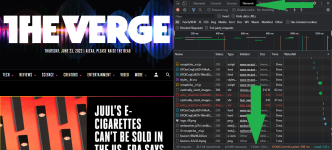
I've already done the comparison and the results are almost identical, but thanks for the tip.Use the Network section of developers tools instead to measure the time. That might give you a more accurate result. Though it's possible that the extension is showing the same value to you, but the extension itself can have an impact.

I find Edge to be faster than Firefox. However as always, YMMV.
This depends a lot on the system, settings and etc, which can be fast for me, may be slow for you, this happens with browsers and programs, normal.I find Edge to be faster than Firefox. However as always, YMMV.
*Removed Bitdefender Free after 5 months of use, it was a good experience. Added Kaspersky Free.
*Removed the Speed Dial FVD extension and in its place added Group Speed Dial.
*Opera removed and added Edge.
*Removed the Speed Dial FVD extension and in its place added Group Speed Dial.
*Opera removed and added Edge.
You may also like...
-
 Advanced Plus Security Aries91's Security Configuration 2026
- Started by aries91
- Replies: 14
-
 Security News UK fines LastPass over 2022 data breach impacting 1.6 million users
- Started by Gandalf_The_Grey
- Replies: 1
-
 Security News WhatsApp Rolls Out Lockdown-Style Security Mode to Protect Targeted Users From Spyware
- Started by Parkinsond
- Replies: 0
-
 Advanced Plus Security Devjit’s Gaming PC 2026
- Started by devjitdutta2025
- Replies: 44
-
Advanced Security Aries91's Security Configuration 2025
- Started by aries91
- Replies: 7