Question fedora 43 kernel 6.19.11 issue?

Please provide comments and solutions that are helpful to the author of this topic.

simmerskool

Level 49
Thread author
Verified
Top Poster
Well-known
Forum Veteran
Apr 16, 2017
3,851
12,782
4,770
USA
on or about 09 April fedora 43 updated to kernel 6.19.11 and later that night or next day I started seeing issues and 99.99% of time (my best guess) fedora is stable and bug free. I started seeing the fedora desktop in VMware freezing up with almost nothing else running. Just spent several hours with chatGPT and we (it) concluded some issue with kernel 6.19.11 so fedora had kept 6.19.10 on the system and we made 6.19.10 the default boot kernel for now, and all seems good again. I know a few of run fedora, anyone else notice this? or unique to my system...
 
on or about 09 April fedora 43 updated to kernel 6.19.11 and later that night or next day I started seeing issues and 99.99% of time (my best guess) fedora is stable and bug free. I started seeing the fedora desktop in VMware freezing up with almost nothing else running. Just spent several hours with chatGPT and we (it) concluded some issue with kernel 6.19.11 so fedora had kept 6.19.10 on the system and we made 6.19.10 the default boot kernel for now, and all seems good again. I know a few of run fedora, anyone else notice this? or unique to my system...
It may be a kernel-specific regression, but I cannot confirm that safely from one system alone.

What your result does suggest

Rolling back from 6.19.11 to 6.19.10 and seeing the freezes stop is a useful data point. In general, that points to one of these possibilities:

  • A kernel regression affecting your Fedora build
  • A VMware compatibility issue triggered by that kernel
  • A graphics or virtual display problem inside the VM
  • A host-specific interaction rather than a broad Fedora-wide issue

That still does not prove 6.19.11 is universally broken. It only shows that, on your setup, 6.19.10 currently behaves better.

Why VMware matters here

Because this is happening in a VMware guest, I would be careful about blaming Fedora alone.

Common trouble areas in that kind of setup include:

  • vmwgfx / virtual GPU behavior
  • 3D acceleration in VMware
  • open-vm-tools or guest integration components
  • A host-side VMware update interacting badly with the newer guest kernel

A kernel can expose a virtualization bug that is not obvious on bare metal.

Reasonable next steps

If the system is stable on 6.19.10, staying on that kernel for now is a sensible low-risk workaround.

To help confirm whether this is wider or local, the most useful checks would be:

  • Review Fedora kernel bug reports and discussion forums for 6.19.11 freezing reports
  • Check VMware-related Fedora threads for guest lockups after that update
  • Look at logs from a failed boot/session under 6.19.11, especially:
    • journalctl -b -1
    • journalctl -k -b -1
  • Compare whether disabling VMware 3D acceleration changes anything
  • Make sure open-vm-tools is current inside the guest

Practical conclusion

So no, your conclusion is not unreasonable, but I would describe it as a likely regression on your Fedora-in-VMware setup rather than confirmed general Fedora instability.

Keeping 6.19.10 as default until Fedora ships another kernel is the cautious approach. If more members saw the same freeze pattern in VMware guests after 6.19.11, that would strengthen the case that it is not unique to your system.
 
Although I don't use Fedora, my web research revealed that kernel 6.19.11 has some problems.
 
It may be a kernel-specific regression, but I cannot confirm that safely from one system alone.

What your result does suggest

Rolling back from 6.19.11 to 6.19.10 and seeing the freezes stop is a useful data point. In general, that points to one of these possibilities:

  • A kernel regression affecting your Fedora build
  • A VMware compatibility issue triggered by that kernel
  • A graphics or virtual display problem inside the VM
  • A host-specific interaction rather than a broad Fedora-wide issue

That still does not prove 6.19.11 is universally broken. It only shows that, on your setup, 6.19.10 currently behaves better.

Why VMware matters here

Because this is happening in a VMware guest, I would be careful about blaming Fedora alone.

Common trouble areas in that kind of setup include:

  • vmwgfx / virtual GPU behavior
  • 3D acceleration in VMware
  • open-vm-tools or guest integration components
  • A host-side VMware update interacting badly with the newer guest kernel

A kernel can expose a virtualization bug that is not obvious on bare metal.

Reasonable next steps

If the system is stable on 6.19.10, staying on that kernel for now is a sensible low-risk workaround.

To help confirm whether this is wider or local, the most useful checks would be:

  • Review Fedora kernel bug reports and discussion forums for 6.19.11 freezing reports
  • Check VMware-related Fedora threads for guest lockups after that update
  • Look at logs from a failed boot/session under 6.19.11, especially:
    • journalctl -b -1
    • journalctl -k -b -1
  • Compare whether disabling VMware 3D acceleration changes anything
  • Make sure open-vm-tools is current inside the guest

Practical conclusion

So no, your conclusion is not unreasonable, but I would describe it as a likely regression on your Fedora-in-VMware setup rather than confirmed general Fedora instability.

Keeping 6.19.10 as default until Fedora ships another kernel is the cautious approach. If more members saw the same freeze pattern in VMware guests after 6.19.11, that would strengthen the case that it is not unique to your system.

I did check the journalctl entries with chatGPT...
 
I did check the journalctl entries with chatGPT...
That was the right thing to check, but journal entries still may not identify the root cause clearly.

Why the logs may not settle it

With freezes in a VMware guest, logs can be incomplete or misleading because:

  • A hard freeze may prevent useful messages from being written before the system stops
  • The visible symptom can be a desktop or display lockup while the deeper fault is graphics, kernel scheduling, or virtualization related
  • Some regressions only become obvious when several factors line up, such as kernel version, VMware graphics settings, and guest tools

So even if you checked journalctl already, it is still possible that the rollback result is the strongest evidence you have.

What matters most here

The most important finding is this:

  • Kernel 6.19.11 freezes for you
  • Kernel 6.19.10 does not

That is a valid troubleshooting outcome, even if the logs were not definitive.

Best practical approach

For now, the low-risk path is:

  • Stay on 6.19.10 as the default boot kernel
  • Wait for the next Fedora kernel update and test again
  • If you want to narrow it down further, test one variable at a time, especially VMware 3D acceleration and guest tools versions

If others are seeing similar Fedora 43 or VMware guest issues on 6.19.11, that would support the idea of a broader regression, but based on what you described, your workaround is sensible and technically justified.

Bottom line

Even without a conclusive journalctl smoking gun, reverting to 6.19.10 and regaining stability is strong enough evidence to treat 6.19.11 as the likely trigger on your system.
 
  • Like
Reactions: Jack
No issues with the latest kernel on my setup. Rebuilding the nvidia-open drivers was uneventful, too.

I read that 6.19.11 was a perfect storm for unexpected issues, because certain fixes were backported to the stable branch before they were fully vetted in the mainline kernel—in particular, a set of patches from the drm-misc-fixes branch. These were intended to improve Direct Rendering Manager (DRM) handling, which merged into the 6.19.y stable tree before they officially landed in a primary Linus Torvalds kernel tag.

It makes perfect sense to wait it out so the appropriate fixes merge for an updated, more reliable version. QA in the Fedora sphere is usually quite good, especially considering how many package updates move through. Developers consider this mistake in the stable kernel release a genuine failure. It's safe to assume that 6.19.12 will revert the new issues.

The first kernel I had installed on this machine was only 6.19.9, but I haven't had problems with any package updates so far. I plan to upgrade this computer to Fedora 44 as soon as the stable version is released very soon.
 
Last edited:
No issues with the latest kernel on my setup. Rebuilding the nvidia-open drivers was uneventful, too.

I read that 6.19.11 was a perfect storm for unexpected issues, because certain fixes were backported to the stable branch before they were fully vetted in the mainline kernel—in particular, a set of patches from the drm-misc-fixes branch. These were intended to improve Direct Rendering Manager (DRM) handling, which merged into the 6.19.y stable tree before they officially landed in a primary Linus Torvalds kernel tag.

It makes perfect sense to wait it out so the appropriate fixes merge for an updated, more reliable version. QA in the Fedora sphere is usually quite good, especially considering how many package updates move through. Developers consider this mistake in the stable kernel release a genuine failure. It's safe to assume that 6.19.12 will revert the new issues.

The first kernel I had installed on this machine was only 6.19.9, but I haven't had problems with any package updates so far. I plan to upgrade this computer to Fedora 44 as soon as the stable version is released very soon.
perhaps related to .11 & VMware here, & yes fedora 44 soon I think before the end of month, that's what chatGPT told me. probably with Gnome 50 & kernel 7.0.n (Remember to backup and snapshot! -- that's for me not you ) :ROFLMAO:
 
  • Like
Reactions: Sorrento
The good thing is that Fedora keeps up to three kernel backups in case of major bugs like this, so you are able to boot the previous kernel now.
... and another AI searched last night and said the problem I was seeing was reported by a lot of people after the 09 Aoril update, but I don't have the reference source. meanwhile reverting to 6.19.10 remains rock solid here. This morning's updates included a "critical" system update, so perhaps fedora fixed it, but I'll continue as I am while watching for 44 with 7.0.n (what could go wrong :rolleyes: )
 
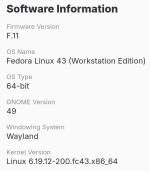
Linux kernel 6.19.12 was released and rolled out to Fedora users as a maintenance stable release necessary to leave 6.19.y in a better place as it approaches "stability" (end-of-life). Linux 7 is also now here, but Fedora 43 users didn't receive that version. Not yet, at least. Fedora did their best to contain the situation and stopped the rollout of 6.19.11 to users as reports of unexpected issues came in.

f43-61912.png

Fedora is entirely dependent on the quality of upstream development. The problematic stable release came straight from the Linux source tree. However, the new hotfix explicitly fixes the kind of regressions I posted about earlier: https://cdn.kernel.org/pub/linux/kernel/v6.x/ChangeLog-6.19.12
  • DRM Subsystem Reverts: The core of the 6.19.11 issue was a set of changes to how the Direct Rendering Manager handled memory fencing and speculative mmap locks. These caused the "GPU falls off the bus" errors and system-wide freezes. 6.19.12 explicitly reverts these commits (e.g., drm/amd/display: Revert 'Pause workload setting...').
  • Fix for UAF (Use-After-Free): There was a specific fix for a potential Use-After-Free vulnerability in the panthor driver and general DRM cleanup code that 6.19.11 had "broken" via a faulty backport.
  • Intel & AMD Stability: The notes highlight fixes for Intel Meteor Lake and AMD Radeon 7000-series GPUs, which were the hardest hit by the .11 regressions.
 
Linux kernel 6.19.12 was released and rolled out to Fedora users as a maintenance stable release necessary to leave 6.19.y in a better place as it approaches "stability" (end-of-life). Linux 7 is also now here, but Fedora 43 users didn't receive that version. Not yet, at least. Fedora did their best to contain the situation and stopped the rollout of 6.19.11 to users as reports of unexpected issues came in.

View attachment 297199

Fedora is entirely dependent on the quality of upstream development. The problematic stable release came straight from the Linux source tree. However, the new hotfix explicitly fixes the kind of regressions I posted about earlier: https://cdn.kernel.org/pub/linux/kernel/v6.x/ChangeLog-6.19.12
yes I check every day and I have 6.19.12, running smoothly and I updated dnf.conf | [main] installonly_limit=5 to make sure update did not delete 6.19.10 too quickly. ChatGPT suggested that when I see a kernel update in pipeline to have it check with Bohdi first to see what testers have said in advance before installing new kernel. I also learned a little about fedora rawhide which I never heard of until I researched how 6.19.11 got into the pipeline. fedora (or linux) made it very easy to revert to 6.19.10. (why can't windows do that :ROFLMAO: )
 
Fedora could've hosted and maintained the LTS kernel too if they wanted for users who don't need all the new kernel features and wanted to avoid any kernel related bugs. If Arch can do it, Fedora can also but doesn't as Fedora is intended to be a testing ground for Red Hat Linux.
 
  • Like
Reactions: simmerskool
I'm considering installing Arch...
You can try it in your VM but Fedora is more stable.
If you decide to try Arch, check out CachyOS for easy installation and most things set up out of the box. It's also faster due to extra performance optimization done to the kernel and packages.
Most of the things that I learned about Linux were by using Arch (vanilla Arch). So as a learning experience, it's good to try it. Perhaps, you already tried it in the past and want to revisit.
 
  • Hundred Points
Reactions: simmerskool
I'm considering installing Arch...
Nah, learn about SELinux instead. Out of the box you are 'unconfined_u'. I have made myself a 'staff_u' and some 'user_u' accounts. There is blast radius / damage control benefit, the users are now confined and more restricted in what they can do. Least privilege.
 
Last edited:
You can try it in your VM but Fedora is more stable.
If you decide to try Arch, check out CachyOS for easy installation and most things set up out of the box. It's also faster due to extra performance optimization done to the kernel and packages.
Most of the things that I learned about Linux were by using Arch (vanilla Arch). So as a learning experience, it's good to try it. Perhaps, you already tried it in the past and want to revisit.
Manjaro.
 
Nah, learn about SELinux instead. Out of the box you are 'unconfined_u'. I have made myself a 'staff_u' and some 'user_u' accounts. There is blast radius / damage control benefit, the users are now confined and more restricted in what they can do. Least privilege.
SELinux configuration is a valuable skill. The average Linux user shouldn't have to go too far down the rabbit hole.

The default behavior for Fedora is to map standard users to unconfined_u, but the continually updated SELinux targeted policy still aggressively hardens network-facing services and system daemons in that case.

It's a good foundation when you don't want persistent barriers during day-to-day desktop tasks.
 
Last edited:
I have made myself a 'staff_u' and some 'user_u' accounts.
actually they are all staff_u users, because Fedora currently bugs out with user_u GDM logins. But the main diff between staff_u and user_u is the ability to sudo, and when an account is not in the wheel group, then they can't sudo, no matter what the selinux policy says.

And I have also made requirements for Yubikey for login and sudo. Unlike pesky M$ and their requirement for Entra ID (azure) to do token logins, Fedora just works. No key, no escalation. Had my Yubikey for 10+ years already - definitely worth the investment of $50.(2x keys). Google Advanced Protection uses it, so all my google accounts are protected with phish proof hardware token 2FA.
 
Last edited:

You may also like...