

Advice Request Flash Player - Do you have it enabled or disabled?

Please provide comments and solutions that are helpful to the author of this topic.
Status
Not open for further replies.

Ink

Administrator
Thread author
Verified
Jan 8, 2011
22,318
2
55,055
8,379
Create a POLL to see how many people have Flash Player (inc. Pepper Flash) enabled or disabled on the browser or PC?

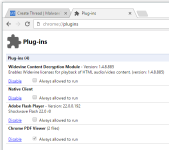
Enable / Disable on Google Chrome (Chromium)
upload_2016-6-24_0-49-2.png

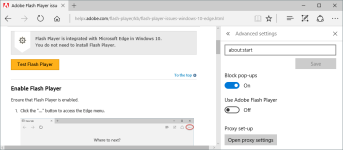
Enable / Disable on Microsoft Edge (Windows 10) - See how
upload_2016-6-24_0-58-24.png

If you are not sure if you have Flash Player installed, click here and ORANGE button.
 
Enabled. i need to for some sites to see videos in vivaldi. but i am pretty sure i am safe from exploits and other malware that came true flash with hitmanpro alert and voodooshield. :) so no need to uninstall it. on my family pcs i have uninstalled it on all machines. they only use chrome and the build in flash player.
 
  • Like
Reactions: XhenEd
I have no Flash installed. Opera has no flash plugin. On Chrome, it is "click to play"
appcontainer enabled, win32 lockdonw enabled.
My Chrome is beta and it updates flash with chrome releases. anyway, I hope flash will die soon..
I am stopping to use websites that use flash on their site.
 
I have disabled Flash by default in Chrome.I don't really need it unless I am watching Live TV Streaming,and for those sites I have Flash Enabled but run "Flash Control" as I have found that sometimes multiple instances of Flash on one page can result in Chrome's "Click to Play" rule being breached.I have seen sites that load 100+ instances of Flash in under 20 seconds for no other reason than to attempt to breach Chromes Click to Play.
I have found that having Flash disabled by default in Chrome has also proved to be an advantage on sites that contain pre-recorded video,as every one that I have used has then automatically reverted to HTML5 instead,(which did not always happen when Flash was enabled as a viable option)...
In addition,I also run "Disable HTML5 Autoplay" which gives me the same level of control over HTML5 as I have with Flash,which is especially useful on YouTube.
 
  • Like
Reactions: DardiM
I have Flash disabled in FireFox / enabled in Vivaldi.
I read somewhere that at the end of year, Chrome will block Flash by default to promote content in HTML 5 and Apple has configured the same way in macOS Sierra Safari. But when it comes to advertisement videos, the benefits of HTML5 are not so obvious.
An interesting pdf about : Security Aspects of Flash,HTML5, and Video in the Ad Tech Industry

N.B. : The fact is that it's not Flash that should be eliminated, but adds :rolleyes: !?
 
Last edited:
@RoboMan
Are you sure you have Silverlight enabled, if so what OS & browser are you running ?
I am wondering because Edge does not support Silverlight, niether does Firefox or Chrome
and it was discontinued by MS.
Most other browsers (that are up to date) do not support Silverlight either.
so I am curious as to which browser still allows the use of Silverlight.
PeAcE
 
I have Flash disabled in FireFox / enabled in Vivaldi.
I read somewhere that at the end of year, Chrome will block Flash by default to promote content in HTML 5 and Apple has configured the same way in macOS Sierra Safari. But when it comes to advertisement videos, the benefits of HTML5 are not so obvious.
An interesting pdf about : Security Aspects of Flash,HTML5, and Video in the Ad Tech Industry

N.B. : The fact is that it's not Flash that should be eliminated, but adds :rolleyes: !?

As HTML5 becomes the default (for playing pre-recorded video) it will attract more attacks as a consequence...
Similar to the level of increase beginning to happen regarding attacks aimed at Apple users,who may have previously considered their platform safe.
I consider that whichever format (HTML5 or Flash) is the norm,that by having both disabled by default and "Guarded" by extensions such as Flash Control & Disable HTML5 Autoplay that a user will be unaffected either way.
Regarding the issue related to site adverts potentially switching from Flash to HTML5...
Due to the possibilty that adverts injected using HTML5 as opposed to Flash Could be considerably larger, I will be curious to find out if the customisable "Blocking of Large Media Elements" option in uBlock Origin could begin to play a greater role in ad-blocking in addition to the page-loading speed time that currently benefits from its existence.
 
  • Like
Reactions: frogboy and DardiM
Status
Not open for further replies.