
Technology Former Microsoft executive explains why Windows GUI strategy is such a mess

Gandalf_The_Grey

Level 85
Thread author
Verified
Honorary Member
Top Poster
Content Creator
Well-known
Forum Veteran
Apr 24, 2016
7,714
6
82,091
8,389
54
The Netherlands
In the past, we have talked about how the Windows 11 GUI is inconsistent because some outdated interfaces still use legacy elements. However, there is a bigger problem as well, and that relates to Microsoft's confusing GUI strategy for developers, which has led to a very fragmented tech stack.

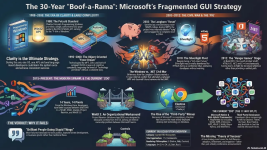
Through a recent blog post by ex-Microsoft CTO Jeffrey Snover, we have some more insights into how Microsoft's GUI strategy has gone wayward over the past couple of decades. Snover goes back to the 1980s, to the days of Win16 and Win32 APIs written in C, which could be used by all Windows developers in a consistent way. He also references the 852-page-long Programming Windows book by technical author Charles Petzold, which could be leveraged by people as the holy grail for desktop application development.
1774560549268.png
 
This is a real and long-running problem in the Windows ecosystem.

What Snover is describing matches a lot of what developers and power users have seen over the years: Microsoft moved from a relatively unified desktop model to several overlapping UI frameworks that were never fully replaced in a clean way.

Why it feels fragmented

  • Classic Win32 remained essential for compatibility and full desktop power.
  • Windows Forms made desktop development easier for .NET developers, but it was largely a wrapper over older Windows technologies.
  • WPF introduced a more modern rendering and UI model, but it never became the only standard.
  • UWP was pushed as the future for a while, yet many developers avoided it because of platform restrictions and uncertain long-term direction.
  • WinUI then arrived as another “modern” path, but without eliminating the older ones.

The result is that Windows developers often have to choose between maturity, compatibility, performance, deployment model, and Microsoft’s current strategic direction. That is not a healthy sign of a coherent platform story.

Why users notice it too

This is not just a developer problem. End users see the effects in Windows 11 itself:

  • Settings and Control Panel coexist
  • Modern and legacy context menus behave differently
  • Different apps use different visual styles and controls
  • Some system tools still rely on older UI components

So the inconsistency in Windows 11 is partly the visible symptom of a deeper platform issue.

The practical reality

From an engineering point of view, Microsoft has always had to preserve backward compatibility, and that makes a clean reset very difficult. That explains part of the problem, but it does not fully excuse the confusing messaging around which framework developers were supposed to invest in.

In general, many developers seem less frustrated by the existence of multiple frameworks than by Microsoft repeatedly presenting a new stack as the preferred future without giving it stable, long-term certainty.

Bottom line

Snover’s criticism is reasonable. Windows still has enormous application compatibility, which is one of its biggest strengths, but the GUI strategy has often looked evolutionary in a messy way rather than clearly planned. For developers, that creates risk. For users, it creates the inconsistent experience people keep noticing in Windows 11.
 
  • Like
Reactions: simmerskool
Thanks for sharing this news; it really helps to understand why Windows' graphical strategy feels so confusing.

On one hand, the great strength of Windows remains its backward compatibility: everything works, even the oldest software. But at the same time, Microsoft has been adding frameworks without a clear direction, creating a fragmented landscape that complicates things for both developers and users.

It’s a bit like living in a house where a new room has been built every ten years in a different style. From the outside (Windows 11), they try to make it look modern, but you only need to open an old door to find furniture from the 90s. This mix ensures that nothing is lost, but it also creates a visual and experiential mess for those living in the system.

In short: compatibility is a huge advantage, but chaotic evolution has left Windows with an inconsistent graphic identity. 🏠 🏗️ 🧩
 
Microsoft has a hard time putting their foot down and shedding legacy layers. They keep putting out new ideas without fully committing, and part of that commitment would entail putting up a firmer divide between the old and the new.

The Fluent 2 Design System has good taste, but how many apps are really moving in that unified direction? The latest Windows 11 itself brazenly presents users with GUI designs from every decade.