

Troubleshoot Getting one Crash popup frequently.

Anupam

Level 21
Thread author
Verified
Well-known
Jul 7, 2014
1,017
2,322
1,968
Briefly explain your current issue(s)
Every hour getting one pop-up with crash report
Steps taken to resolve, but have been unsuccessful
None.
Hi All,

I am getting the below crash report every hour almost.
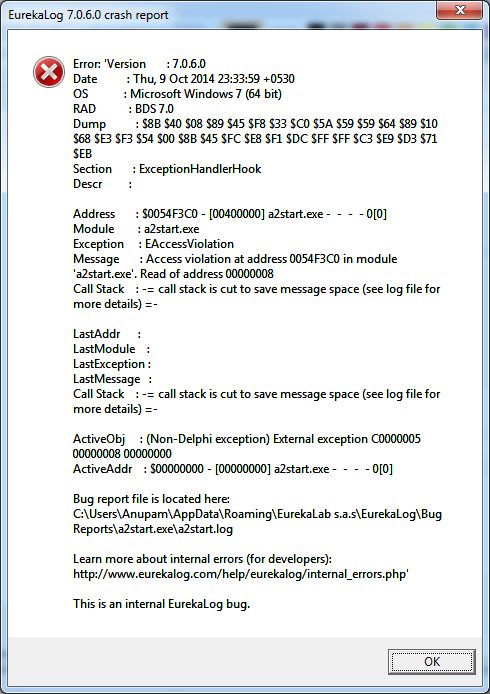
upload_2014-10-9_23-36-42.png


i think it's mostly of Emsisoft antimalware. Any idea how to stop it?
 
hello

i would try to do a clean reinstall

run this after uninstalling or if it will not uninstall there is the Emsisoft Antimalware Cleanup tool
http://tmp.emsisoft.com/fw/emsiclean.exe

then reinstall and make sure you disable your security software so there is no trouble with the install

and you might have to re-enter your license info again after running the cleanup tool so have that handy

:)

James
 
  • Like
Reactions: Anupam and MalwareT
Upvote 0
Hey there Anupam,

Yes, I also believe this is being caused by Emsisoft Anti-Malware. Because they're first product was called a2/a sqaured as in, and they use that as engine name etc, or they used too at least. That's why you see a (A) and not a (E) on they're detections - if you did not already know, but I'm sure you did :D :P

You mentioned that this/these issues are occurring from today and onwards. Have you installed anything which may be conflicting with the application generating this error/crash message?

Not only this, but the screenshot mentions in the message box/error information: "bug report file is located here:" and then a file path. Could you check the file path and the log/s? That may be linked to finding the source of the problem to these errors/crashes, and possibly also a solution on fixing it/them. :)

You could try doing what @jim lin mentioned above, which is attempting to use the Emsisoft Antimalware Cleanup tool. I think you would know how to use it, I'm not quite sure - if you run into any problems whilst attempting to use it, or would like me to help you use it, feel free to PM me and ask and I would be happy to help you there. Although, I'm sure it's just a straight forward auto-thing. I can't be certain, though. I've only used it once and cannot remember it exactly.

I hope you get this all fixed soon Anupam. You could also try contacting Emsisoft over at they're forums or email from they're contact tab on the website. While I know, you could attempt assistance from the kind and knowledgable members here, I would say it's probably best to ask Emsisoft, themselves, who will know more about their own product.
Cheers. ;)

I asked you on Shout box to PM me the other day but you went off too quick and never saw my message :D I have forgiven you!
 
  • Like
Reactions: Anupam and jim lin
Upvote 0
it looks like there was a update for Emsisoft Anti-Malware Kram7750 could be on to something here

Petrovic post says Beta for Emsisoft Anti-Malware 9.0.0.4546 from yesterday

Emsisoft Anti-Malware & Emsisoft Internet Security 9.0.0.4546 – with BETA updates
http://malwaretips.com/threads/emsi...ecurity-9-0-0-4546-–-with-beta-updates.34797/

but MajorGeeks posted Emsisoft Anti-Malware 9.0.0.4546 as not Beta from today

Emsisoft Anti-Malware 9.0.0.4546
http://www.majorgeeks.com/files/details/emsisoft_anti_malware.html


it could be a bad update


:)

James
 
  • Like
Reactions: Anupam
Upvote 0
Thank you guys for the reply.

I am not getting any more crash report pop-ups from today. Let see if I am still getting then I will uninstall Emsisoft and will do a clean install.
 
Upvote 0
@Anupam Can you please send me a PM with a attachment to the file in the location you get given on the error/crash message? It may have clues to what is causing this exact issue, and possibly how to fix it depending on what the issue is once discovered.

Cheers! :)
 
Upvote 0
@Anupam Can you please send me a PM with a attachment to the file in the location you get given on the error/crash message? It may have clues to what is causing this exact issue, and possibly how to fix it depending on what the issue is once discovered.

Cheers! :)


I opened that folder. It has text file with very little info.

below is the content of the file.


Code:
Version       : 7.0.6.0
Date          : Thu, 9 Oct 2014 23:33:59 +0530
OS            : Microsoft Windows 7 (64 bit)
RAD           : BDS 7.0
Dump          : $8B $40 $08 $89 $45 $F8 $33 $C0 $5A $59 $59 $64 $89 $10 $68 $E3 $F3 $54 $00 $8B $45 $FC $E8 $F1 $DC $FF $FF $C3 $E9 $D3 $71 $EB
Section       : ExceptionHandlerHook
Descr         :

Address       : $0054F3C0 - [00400000] a2start.exe -  -  -  - 0[0]
Module        : a2start.exe
Exception     : EAccessViolation
Message       : Access violation at address 0054F3C0 in module 'a2start.exe'. Read of address 00000008
Call Stack    : 00 $0054F3C0 - [00400000] a2start.exe
                01 $0054F3C0 - [00400000] a2start.exe


LastAddr      :
LastModule    :
LastException :
LastMessage   :
Call Stack    :

ActiveObj     : (Non-Delphi exception) External exception C0000005 00000008 00000000
ActiveAddr    : $00000000 - [00000000] a2start.exe -  -  -  - 0[0]

Bug report file is located here:
C:\Users\Anupam\AppData\Roaming\EurekaLab s.a.s\EurekaLog\Bug Reports\a2start.exe\a2start.log

Learn more about internal errors (for developers):
http://www.eurekalog.com/help/eurekalog/internal_errors.php
 
Upvote 0

You may also like...