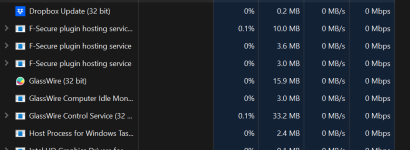
I used to use it back in 2019ish? During that time it was very resource intensive to a point where it gave no benefit over what ESET already comes with...besides having a nice GUI deliminating the processes.


Open MalwareTips from your Home Screen or desktop. Follow discussions, find answers and pick up where you left off.
If you cannot find an install option, update your browser or use its bookmark option to keep MalwareTips close.
After installation, open the app and sign in. Enable push notifications in Preferences if you want alerts. On iPhone and iPad, push requires a Home Screen web app and iOS or iPadOS 16.4 or later.
Sign in to manage notificationsInstallation is optional. Your notification settings stay under your control.
 Thread starter
JoeN
Thread starter
JoeN



 www.glasswire.com
 www.glasswire.com

- Added new search feature to the following sections:
- Traffic Monitor.
- Log Analysis.
- Network Scanner.
- Improved existing search feature on GlassWire Protect section: it is now possible to search for other attributes in addition to the application name.
- Added new columns on GlassWire protect section.
- Fixed minimum window size to contain the remote connection state.
- Fixed Chinese translations.
- Fixed Network Scanner columns translations.
- Fixed various bugs.
www.glasswire.com
www.glasswire.com
Version 3.6.859 - (July 17, 2025)
Download GlassWire 3.6.859
Hash SHA-256: 3DCD8764E6DB4F15033789E3308907A35F1B3B05CBE12ACA39EC63F0C9CF87A9
- Added directional firewall blocking for applications (incoming/outgoing).
- Removed GlassWire Score from the GlassWire Protect section.
- Restricted blocking of GlassWire components to prevent app issues.
- GlassWire Protect firewall access limited to Premium users.
- Fixed translations across multiple languages.
- UI Improvements:
- Standardized colors across the app.
- Fixed column order and resizing behavior.
- Adjusted text size for consistency.
- Resolved issues with installation and network scans.
- Fixed an issue where apps in Ask to Connect mode could become blocked without showing a prompt.
- Added new Hardware Resource feature for usage monitoring with per-app breakdown.
- Improved handling of apps without network activity (apps without traffic are now hidden in GlassWire Protect).
- Restored the Inactive Apps group in GlassWire Protect.
- Added a “Traffic” column label to GlassWire Protect.
- Updated digital signature.
- Updated copyright to 2026.
- Updated to the latest Windows Kernel Driver API.
- Fixed an issue with missing Ask to Connect notifications if the UI is still loading.
- Fixed an issue with missing Ask to Connect notifications after deleting an app in GlassWire Protect.
- Fixed an issue where GlassWire components appear blocked in GlassWire Protect.
- Fixed an issue where applications blocked at startup did not appear in GlassWire Protect list.
- Fixed an issue that prevented the UI from starting due to plugin loading errors.
- Fixed a service crash when stopping GlassWire.
- Fixed a crash that could occur on reboot.
- Fixed a crash when changing firewall rules in GlassWire Protect.
- Fixed a crash when the primary display changes.
- Fixed a crash on exit when the search bar is focused.
- Fixed an issue where GlassWire does not launch after disconnecting an external monitor.
- Fixed an issue where Incognito mode appears disabled after restarting the service.
- Fixed a service startup issue on localized versions of Windows.
- Fixed an issue where an unknown application appears in GlassWire Protect.
- Fixed unexpected device monitor alerts after a clean install or system restart.
- Fixed an issue where firewall profiles could not be deleted if the profile name was too long.
- Fixed an issue where column order resets after restarting the UI.
- Fixed an issue with incorrect IP location mapping.
- Fixed an issue with allowing unchecking of legacy installation on 32-bit Windows.
- Various translation and minor UI fixes and improvements.
www.glasswire.com
- Fixed an issue where GlassWire fails to connect at startup on Windows 10 devices.
- Fixed a rare crash related to certain disk volume configurations.
www.glasswire.com

Version 3.8.1033 - (March 3, 2026)
GlassWire Software Version Changes List
See what's new or changed in GlassWire's firewall & network security monitor software versions & updates.
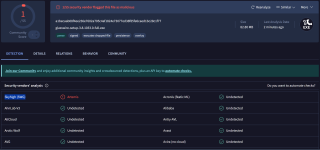
Which is now just being flagged by 1 vendor.false positives
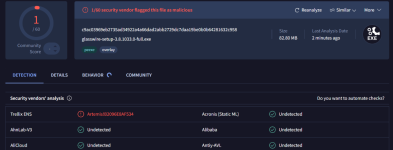
albeit it's a different hash avast was earlier reporting evo gen now saying filerepmalware

Still labeled by all the four vendors

What's the difference between your submission than mine?
apparently glasswire website is giving different hashes for same installer version which could indicate supply chain compromise hahaWhat's the difference between your submission than mine?
That's the only thing I could think of, as I noticed the hash difference, and downloaded mine from their website 30 minutes ago.apparently glasswire website is giving different hashes for same installer version which could indicate supply chain compromise haha
Not a different submission; I have used you own link.What's the difference between your submission than mine?
A1BECAAB08F4EE236E7602A705C4AF1824E73077ED38F85FE6CAED1BC28C1F77
The one with 4 detections has a different hash:Out of curiosity, I downloaded the new GlassWire installer and uploaded to to VT.
SHA256 hashes are a match between GlassWire's site and the one calculated by VT:A1BECAAB08F4EE236E7602A705C4AF1824E73077ED38F85FE6CAED1BC28C1F77
Only one detection from Skyhigh's reliance on Trellix File Reputation that shares the McAfee Global Threat Intelligence (GTI) network.
The file with that hash and four detections also doesn't indicate that it's signed. VT recognized that the installer I uploaded is verifiably signed.The one with 4 detections has a different hash:
e92bb5e5a49cdddea25cf1da2042b06d7b826fe9447e757f7dee23bc696d2804

Members who viewed this thread in the last 5 minutes