Google Chrome 34

Status
Not open for further replies.

BoraMurdar

Super Moderator
Thread author
Verified
Staff Member
Well-known
Forum Veteran
Aug 30, 2012
6,595
28,354
7,479
Serbia
banner.png


Chrome 34.0.1847.116 contains a number of fixes and improvements, including:


  • Responsive Images and Unprefixed Web Audio
  • Import supervised users onto new computers
  • A number of new apps/extension APIs
  • A different look for Win8 Metro mode
  • Lots of under the hood changes for stability and performance
Flash Player has been updated to 13.0.0.182, which is included w/ this release.
You can read more about these changes at the Chrome blog.

Download: Google Chrome 34.0.1847.116 | 800 KB (Freeware)
Download: Google Chrome portable | 1.4 MB
View: Chrome Website | Release Notes
 
Thanks, Bora..!:) My next step is figuring how to download & install Chrome on lubuntu, but first I need sleep.;):D
You can just install it via Google website, you simply choose Ubuntu 32 or 64 bit (deb package) (lubuntu is a derivative of Ubuntu so it will be ok), and the repository will be installed along with the package for future updates via update manager. :)
 
Nikos, :) my uncertainty,:confused: dispersed as clouds now thanks to your knowing advice, has been replaced by sunlight whilst sailing on board the tiny swift vessel called lubuntu!;):D
Hahaha, I like your simile! For any other concerns/questions on Lubuntu, you can ask me here or by pm, I am not a Linux expert but I have some experience on mainstream Linux distros.
 
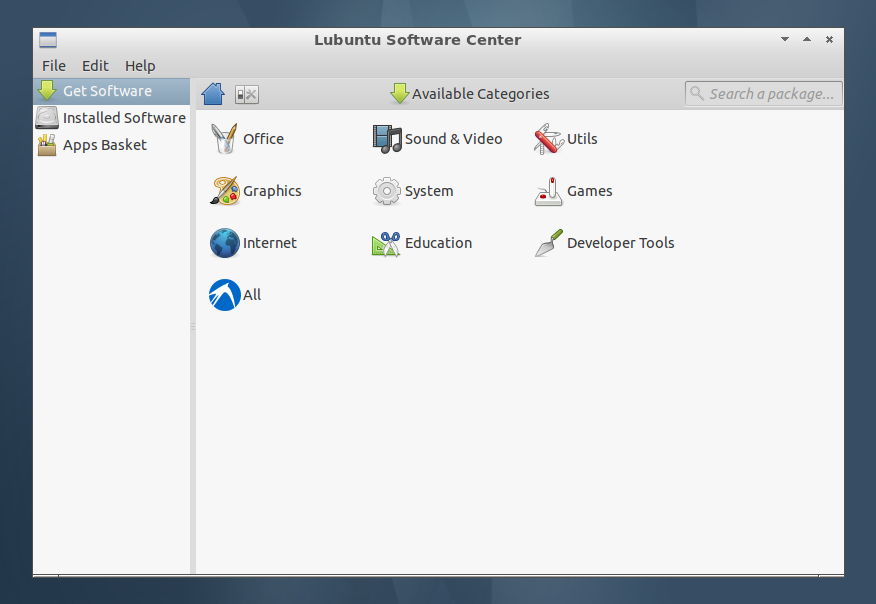
Just go to Lubuntu Software Center and search for "Chromium" or "Google Chrome"
the rest you'' figure it out ;)

lubuntu-software-center.png
From what I know, Google Chrome is not in the ubuntu repos, you should install it manually.
Chromium is practically the same with Google Chrome (it's the same project), BUT it does not offer flash player packed with it, so you should have flashplugin-nonfree installed. You can do that via the software center.
 
I saw somewhere (maybe on Ubuntu Software Center) that Google Chrome is available, but not sure.
If there's not, here you can download it
https://www.google.com/intl/en/chrome/browser/?platform=linux
  1. Find and Double-Click On the .deb Chrome Package
    The GDebi Package Manager will Provide to Install the Package with All his Dependencies…

    chromeGDebiInstalling.png


  2. Chrome in Lxde Applications >> Internet:

    chromeOnLubuntuMainMenu.jpg
 
Google Chrome #1.
It was the very 1st ('#1') download I'd done for lubuntu ...followed by 4 more of my personal must have security extensions ..plus one new one, Disconnect Search https://disconnect.me/search :p
I notice that now Chrome launch time is shorter than before the update.
It initially launched quicker than lubuntu's native browser (Firefox).
Chrome seems worth trying now... it seems faster overall.
So far I'm impressed!:)
Just go to Lubuntu Software Center and search for "Chromium" or "Google Chrome"
the rest you'' figure it out ;)

lubuntu-software-center.png
Thanks Bora! From the site (maybe it had lots of traffic..:oops:) I'd had an incomplete download, <clicked> 'Try Again', & ended up with :eek:four!:rolleyes: It might have been a bit smoother going your recommended route. I found x64 was the 'incorrect architecture..'o_O;)
As you can see, I 'do' like the new(-est) version Chrome!:cool:
 
From what I know, Google Chrome is not in the ubuntu repos, you should install it manually.
Chromium is practically the same with Google Chrome (it's the same project), BUT it does not offer flash player packed with it, so you should have flashplugin-nonfree installed. You can do that via the software center.
I 'did' get Chrome manually,:) and happily (for lots more than just me..) it has flash player built in. *I'm on www.neopets.com playing flash games*;) The ubuntu forums mentioned an announcement which the following article illustrates:
Use Chromium on Linux? Adobe Flash Will Stop Working From April
BY JOEY-ELIJAH SNEDDON UNDER NEWS JANUARY 9, 2014
"Flash content will stop working in Chromium on Linux from this April, it has been announced.

Google are to drop support for the ‘Netscape Plugin API’ (NPAPI) – used by Adobe Flash – on Linux builds of Chrome/ium far sooner than was originally planned.

The ageing plugin architecture, which allows for unrestricted access to a computer, is considered inefficient and insecure, with Google calling it ‘the leading cause of hangs, crashes, and security incidents’.

In its place comes a securer, sandboxed and more performant standard in the shape of the ‘Pepper Plugin API’ (PPAPI).

An Adobe Flash plugin using PPAPI comes bundled with Google Chrome on Windows, Mac, Chrome OS and Linux."
Read more: http://www.omgubuntu.co.uk/2014/01/chromium-npapi-flash-dropped-april-2014
 
I 'did' get Chrome manually,:) and happily (for lots more than just me..) it has flash player built in. *I'm on www.neopets.com playing flash games*;) The ubuntu forums mentioned an announcement which the following article illustrates:
Use Chromium on Linux? Adobe Flash Will Stop Working From April
BY JOEY-ELIJAH SNEDDON UNDER NEWS JANUARY 9, 2014
"Flash content will stop working in Chromium on Linux from this April, it has been announced.

Google are to drop support for the ‘Netscape Plugin API’ (NPAPI) – used by Adobe Flash – on Linux builds of Chrome/ium far sooner than was originally planned.

The ageing plugin architecture, which allows for unrestricted access to a computer, is considered inefficient and insecure, with Google calling it ‘the leading cause of hangs, crashes, and security incidents’.

In its place comes a securer, sandboxed and more performant standard in the shape of the ‘Pepper Plugin API’ (PPAPI).

An Adobe Flash plugin using PPAPI comes bundled with Google Chrome on Windows, Mac, Chrome OS and Linux."
Read more: http://www.omgubuntu.co.uk/2014/01/chromium-npapi-flash-dropped-april-2014
Yes, this is good and bad as Google Chrome will be neccessary for Linux users while open source alternatives to flash are not ok (and will never be).
 
Status
Not open for further replies.