Hackers Abuse Windows File Explorer and WebDAV for Stealthy Malware Delivery

Status
Not open for further replies.

Parkinsond

Level 62
Thread author
Verified
Well-known
Dec 6, 2023
5,187
14,807
6,069
Cybercriminals are increasingly abusing a legacy feature within Windows File Explorer to distribute malware, bypassing traditional web browser security and endpoint detection controls.

According to a threat report by Kahng An of the Cofense Intelligence Team, threat actors are leveraging Web-based Distributed Authoring and Versioning (WebDAV) to trick victims into executing malicious payloads.

WebDAV is an older HTTP-based network protocol originally designed for remote file management.

Although Microsoft formally deprecated native WebDAV support in Windows File Explorer in November 2023, the functionality remains accessible on most systems.

Attackers exploit this legacy support by sending malicious links that force File Explorer to connect directly to remote WebDAV servers.

Because this connection bypasses web browsers entirely, victims do not receive standard browser-based security warnings or download prompts.

 
Executive Summary

Confirmed Facts

Threat actors are utilizing .url and .lnk shortcut files to silently mount remote directories via Cloudflare Tunnels using Windows File Explorer's native WebDAV client.

Assessment
This constitutes a "Living off the Land" (LotL) evasion technique designed to bypass traditional web browser security warnings and endpoint detection controls by disguising remote servers as local folders.

Technical Analysis & Remediation

MITRE ATT&CK Mapping

T1105

(Ingress Tool Transfer)

T1071.001
(Application Layer Protocol: Web Protocols)

T1218
(System Binary Proxy Execution)

CVE Profile
[CVSS 8.8]
[CISA KEV Status: Active]

Note
While the core mechanism is an architectural abuse of legacy features, recent similar vulnerabilities (like CVE-2025-33053) reflect active exploitation of WebDAV protocol handling.

Telemetry

Domains

tiny-fixtures-glossary-
advantage[.]trycloudflare[.]com
nasdaq-aged-sf-cheers[.]trycloudflare[.]com

Payloads
XWorm RAT
Async RAT
DcRAT.

This suggests the deployment of secondary command-and-control capabilities post-execution.

Delivery
.url and .lnk shortcuts utilizing UNC paths (e.g., \\exampledomain[.]com@SSL\DavWWWRoot\). File sizes and container types outside of these parameters are Unknown.

Remediation - THE ENTERPRISE TRACK (NIST SP 800-61r3 / CSF 2.0)

GOVERN (GV) – Crisis Management & Oversight

Command
Issue a flash advisory regarding Cloudflare Tunnel abuse and the risk of unmonitored WebDAV protocol execution.

DETECT (DE) – Monitoring & Analysis

Command
Implement SIEM rules to detect anomalous DNS queries for *.trycloudflare.com originating from standard user endpoints.

Command
Hunt for abnormal svchost.exe (WebClient service) network connections over ports 80/443 pointing to unknown external IP addresses.

RESPOND (RS) – Mitigation & Containment

Command
Isolate endpoints exhibiting outbound WebDAV traffic to unauthorized external domains.

RECOVER (RC) – Restoration & Trust

Command
Validate the complete removal of any identified RAT payloads (XWorm, Async, DcRAT) before reconnecting the affected endpoint to the enterprise domain.

IDENTIFY & PROTECT (ID/PR) – The Feedback Loop

Command
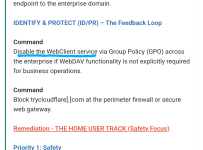
Disable the WebClient service via Group Policy (GPO) across the enterprise if WebDAV functionality is not explicitly required for business operations.

Command
Block trycloudflare[.]com at the perimeter firewall or secure web gateway.

Remediation - THE HOME USER TRACK (Safety Focus)

Priority 1: Safety

Command
Disconnect from the internet immediately if you accidentally open a shortcut file that mounts a folder resembling a local drive.

Command
Do not log into banking/email until verified clean.

Priority 2: Identity

Command
Reset passwords and MFA parameters using a known clean device (e.g., phone on 5G), as RATs actively harvest keystrokes and session tokens.

Priority 3: Persistence

Command
Check Scheduled Tasks, Startup Folders, and Browser Extensions for suspicious entries.

Command
Run a full system scan with Microsoft Defender or a reputable anti-malware solution.

Hardening & References

Baseline

CIS Benchmarks for Windows 10/11 (Guidance: Disable WebClient Service).

Framework
NIST CSF 2.0 / SP 800-61r3.

Reference
Microsoft advisory on deprecation of native WebDAV support in Windows File Explorer (November 2023).

Source

Cofense Blog

Cyber Security News
 
  • Like
Reactions: harlan4096
Consider disabling the WebClient service.
Already mentioned.

1000014129.png
 
  • Like
Reactions: Khushal
From an incident response and threat-modeling perspective, this distinction is irrelevant. Any user-level interaction with a WebDAV-formatted UNC path will dynamically trigger the service to start, meaning the attack vector is fully viable on default installations without requiring administrative privileges to enable the service.
 
  • Like
Reactions: Khushal
From an incident response and threat-modeling perspective, this distinction is irrelevant. Any user-level interaction with a WebDAV-formatted UNC path will dynamically trigger the service to start, meaning the attack vector is fully viable on default installations without requiring administrative privileges to enable the service.
You suggest disabling the service, even if not set to automatic and not running?
 
You suggest disabling the service, even if not set to automatic and not running?
The Windows WebClient service defaults to Manual (Trigger Start), meaning it remains dormant to save system resources but will instantly execute when any standard user or process requests a WebDAV protocol handler (e.g., interacting with a malicious shortcut file).

Leaving the service in a Manual state leaves the attack vector fully exposed. To eliminate the Living off the Land (LotL) threat, the service must be explicitly shifted to Disabled, severing the operating system's ability to trigger it on-demand.
 
  • Like
Reactions: Khushal
Cannot the attacker change its status from disabled to automatic or manual?
If an attacker has sufficient privileges to change a disabled service to manual/automatic, they already have full administrative control of the machine, rendering the stealthy WebDAV execution technique entirely redundant.

Is is one of them?
The statement "Some Disabled critical services can still start" is technically false at the kernel level. A service with a Start value of 4 (Disabled) will always throw an Error 1058 if invoked. When critical services appear to "bypass" this, it is because a highly privileged process (like Windows Update or Defender) has systematically changed the registry key back to an active state before starting it.
 
  • Like
Reactions: Khushal
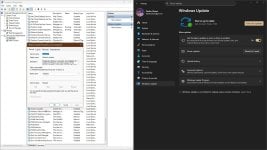
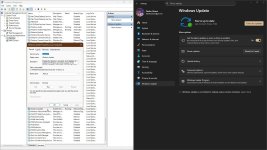
you can easily check. Disable and stop Windows Update.
Check Windows Updates, refresh services.msc, the service will be started and set to Manual.

capture_02282026_134407.jpg capture_02282026_134433.jpg

MS made the change, because people love to disable services, but then complain about the consequences.
 
Last edited by a moderator:
you can easily check. Disable and stop Windows Update.
Check Windows Updates, refresh services.msc, the service will be started and set to Manual.

View attachment 296027 View attachment 296028
If you and @Parkinsond are going to present yourselves as experts on this topic, it would be helpful if you actually read the material first.

It’s hard to take your arguments seriously when it’s obvious neither of you have bothered to read the post.
 
Last edited by a moderator:
  • Like
Reactions: Khushal
@Parkinsond

It would also be possible to block WebDAV as an output rule in the firewall.
The rule below should be used in PowerShell opened as administrator:

Code:
New-NetFirewallRule `
 -DisplayName "Block WebDAV WebClient Outbound" `
 -Direction Outbound `
 -Service WebClient `
 -Action Block `
 -Protocol TCP `
 -RemotePort 80,443

2.png

Obviously, create a rule that you can view (or delete) in the firewall's outgoing connections.
But I suspect that it might not be necessary :unsure: because there are various rules in H_C that block Explorer... we would need to hear @Andy Ful opinion.(y);)
 
Last edited:
You are mentioning me for a stentence which is not mine; just mentioned the sentence owner.
Taking my words out of context to pick an argument isn't productive. Try reading the whole post next time.
 
Status
Not open for further replies.