

Advice Request Hero Cloud Antivirus - New antivirus?
- Thread starter ETC
- Start date
You are using an out of date browser. It may not display this or other websites correctly.
You should upgrade or use an alternative browser.
You should upgrade or use an alternative browser.
Please provide comments and solutions that are helpful to the author of this topic.
- Status
- Not open for further replies.

Never heard of Hero Cloud AV.
Site - https://virustotal.com/en/url/96d23869a83e33b63ba920f04b9f3cc744008737611a11dea07e8aab71207df2/analysis/1476279163/
Zip file download - https://virustotal.com/en/file/5186...0b5384ec767975c2fbc6861c/analysis/1476279167/
Site - https://virustotal.com/en/url/96d23869a83e33b63ba920f04b9f3cc744008737611a11dea07e8aab71207df2/analysis/1476279163/
Zip file download - https://virustotal.com/en/file/5186...0b5384ec767975c2fbc6861c/analysis/1476279167/
Last edited:

The website looks plain.
1) Couple of deadlinks inside.
2) "(adsbygoogle = window.adsbygoogle || []).push({});" - at the bottom of the page.... seriously?
3) And most importantly, there's no contact support or email whatsoever.
That's a red flag for me unfortunately.
1) Couple of deadlinks inside.
2) "(adsbygoogle = window.adsbygoogle || []).push({});" - at the bottom of the page.... seriously?
3) And most importantly, there's no contact support or email whatsoever.
That's a red flag for me unfortunately.
W
Wave
Website needs work & doesn't look trustworthy at all really (not very professional).

just test it nothing to serous to try some not good made UI and at all no Cloud "Connections and etc " i think this is some written in C# and it's little bit fake for me
W
Wave
If you want to check if it's a .NET Assembly (MSIL) and you are running the program (dynamic) then check the imported modules. If it contains clr.dl or clrjit.dll then this is indication it's based on .NET (since those modules (*.DLL - Dynamic Link Library/s) are related to the CLR (Common Language Runtime)/JIT compiler).just test it nothing to serous to try some not good made UI and at all no Cloud "Connections and etc " i think this is some written in C# and it's little bit fake for me
Other modules to look out for:

There are static methods too.
You can also try running the PE through a program like ILSpy or .NET Reflector to see if it can identify if it's a .NET Assembly or not. However they most likely use static analysis away from the IAT scanning for identification first... (e.g. check for byte patterns via HEX to identify strings to identify it as MSIL executable, etc).
- Microsoft.VisualBasic.ni.dll
- mscoree.dll
- mscoreei.dll
- mscorlib.ni.dll
- System.Drawing.dll
- System.Windows.Forms.dll
- System.Core.dll
There are static methods too.
You can also try running the PE through a program like ILSpy or .NET Reflector to see if it can identify if it's a .NET Assembly or not. However they most likely use static analysis away from the IAT scanning for identification first... (e.g. check for byte patterns via HEX to identify strings to identify it as MSIL executable, etc).
L
LabZero
Never heard of it until now, but more that suspect, it looks just a limited product.
W
Wave
Hello everyone, I've just checked this product in a Virtual Environment and then performed some analysis. For anyone who might be shockingly thinking, "Hmm should I install this, is it any good?", the answer is a definitive NO. Why? Because this "product" provides hardly any functionality in terms of identifying/dealing with malware, let alone protect you from a real threat.
Firstly, @Mr.NoName was right, the "product" is entirely based around C#.NET (except the installer which they did not actually make themselves).
Secondly, the functionality is very limited (like @LabZero suspected it might be). Well his suspicion was 100% correct - this product only has the functionality of some basic file enumeration techniques and then obtaining the SHA-1 of these "scanned" files, and then comparing them through a small database of SHA-1 signatures (no real detection names are returned either).
Thirdly, whoever made this product/website is lying. Period. On their website: "Powerful, Reliable And Fast Antivirus" - no, it's really not "Powerful" or "Reliable" and the only reason it is "Fast" is because it's doing little to nothing to protect the user. They also claim they have "Over 1 million virus definition", yet when I checked I could only find a total maximum of 143464... (and that is actually pretty bad considering the product only consists of SHA-1 detection, remember, there are NO other detection methods, period)... Everyone makes mistakes so maybe I just accidentally missed something and didn't find the rest, but that's the maximum I found from some speedy analysis. So not only does it look like they are straight up lying, but it just proves even further that their entire product is useless.
Last but not least, I noticed the User Interface boasting about some special feature called "Force KillTech" or something, I assumed it was meant to be some advanced malware termination (from memory) tool. So what did I do? I did some checking of course and will now present you my findings on that within the below spoiler:
Recommended you stick with a real AV from a real, trusted & ethical vendor (or a genuine, decent Anti-Malware product) than go near this product. If I was you I wouldn't go near it with a barge pole let alone install it on my host system.
Good luck and stay safe,
Wave.
Firstly, @Mr.NoName was right, the "product" is entirely based around C#.NET (except the installer which they did not actually make themselves).
Secondly, the functionality is very limited (like @LabZero suspected it might be). Well his suspicion was 100% correct - this product only has the functionality of some basic file enumeration techniques and then obtaining the SHA-1 of these "scanned" files, and then comparing them through a small database of SHA-1 signatures (no real detection names are returned either).
Thirdly, whoever made this product/website is lying. Period. On their website: "Powerful, Reliable And Fast Antivirus" - no, it's really not "Powerful" or "Reliable" and the only reason it is "Fast" is because it's doing little to nothing to protect the user. They also claim they have "Over 1 million virus definition", yet when I checked I could only find a total maximum of 143464... (and that is actually pretty bad considering the product only consists of SHA-1 detection, remember, there are NO other detection methods, period)... Everyone makes mistakes so maybe I just accidentally missed something and didn't find the rest, but that's the maximum I found from some speedy analysis. So not only does it look like they are straight up lying, but it just proves even further that their entire product is useless.
Last but not least, I noticed the User Interface boasting about some special feature called "Force KillTech" or something, I assumed it was meant to be some advanced malware termination (from memory) tool. So what did I do? I did some checking of course and will now present you my findings on that within the below spoiler:
As expected it's also developed within the .NET framework and it will actually download in the background, it's not directly integrated into the "product" by default after installation.
It is just as useless as Task Manager when it comes to terminating malware... Nothing special. If you cannot use Task Manager to kill a process then this tool won't be able too either.
It is just as useless as Task Manager when it comes to terminating malware... Nothing special. If you cannot use Task Manager to kill a process then this tool won't be able too either.
It's probably made by some .NET beginner who thinks they know what they are doing but don't. What they don't realise is that by advertising this program as an "Antivirus", they may potentially mislead people into believing it really does what it is meant to do (help protect the user), except this product will be completely useless and do little to nothing to do that... I would say it matches Fake AV (at max) and Potentially Unwanted Software (at minimum). We need to take into account that there is a SHA-1 database and it does have the potential to pick out files with a SHA-1 match from the database via the basic scanner it has, however I would still class it as a Fake AV (at max) since it is just purely useless and reaches no where near the level that any other proper AV products on the market are at...
Apologies if I sounded too rough on this product in this post but I'm just trying to set you all straight on the facts. It's not an opinion this product is useless, it's a fact. Don't believe me? Install it in a VM and perform some analysis (and by that I am not referring to scanning some samples - I really mean analyse it, and you'll see all you need to know within minutes!).
Useful for analysing this useless product:
http://processhacker.sourceforge.net/
http://ilspy.net/
http://ollydbg.de/ OR https://www.hex-rays.com/products/ida/
Apologies if I sounded too rough on this product in this post but I'm just trying to set you all straight on the facts. It's not an opinion this product is useless, it's a fact. Don't believe me? Install it in a VM and perform some analysis (and by that I am not referring to scanning some samples - I really mean analyse it, and you'll see all you need to know within minutes!).
Useful for analysing this useless product:
http://processhacker.sourceforge.net/
http://ilspy.net/
http://ollydbg.de/ OR https://www.hex-rays.com/products/ida/
Recommended you stick with a real AV from a real, trusted & ethical vendor (or a genuine, decent Anti-Malware product) than go near this product. If I was you I wouldn't go near it with a barge pole let alone install it on my host system.
Good luck and stay safe,
Wave.
L
LabZero
Thanks for the analysis! No other doubts I thinkHello everyone, I've just checked this product in a Virtual Environment and then performed some analysis. For anyone who might be shockingly thinking, "Hmm should I install this, is it any good?", the answer is a definitive NO. Why? Because this "product" provides hardly any functionality in terms of identifying/dealing with malware, let alone protect you from a real threat.
Firstly, @Mr.NoName was right, the "product" is entirely based around C#.NET (except the installer which they did not actually make themselves).
Secondly, the functionality is very limited (like @LabZero suspected it might be). Well his suspicion was 100% correct - this product only has the functionality of some basic file enumeration techniques and then obtaining the SHA-1 of these "scanned" files, and then comparing them through a small database of SHA-1 signatures (no real detection names are returned either).
Thirdly, whoever made this product/website is lying. Period. On their website: "Powerful, Reliable And Fast Antivirus" - no, it's really not "Powerful" or "Reliable" and the only reason it is "Fast" is because it's doing little to nothing to protect the user. They also claim they have "Over 1 million virus definition", yet when I checked I could only find a total maximum of 143464... (and that is actually pretty bad considering the product only consists of SHA-1 detection, remember, there are NO other detection methods, period)... Everyone makes mistakes so maybe I just accidentally missed something and didn't find the rest, but that's the maximum I found from some speedy analysis. So not only does it look like they are straight up lying, but it just proves even further that their entire product is useless.
Last but not least, I noticed the User Interface boasting about some special feature called "Force KillTech" or something, I assumed it was meant to be some advanced malware termination (from memory) tool. So what did I do? I did some checking of course and will now present you my findings on that within the below spoiler:
As expected it's also developed within the .NET framework and it will actually download in the background, it's not directly integrated into the "product" by default after installation.
It is just as useless as Task Manager when it comes to terminating malware... Nothing special. If you cannot use Task Manager to kill a process then this tool won't be able too either.
It's probably made by some .NET beginner who thinks they know what they are doing but don't. What they don't realise is that by advertising this program as an "Antivirus", they may potentially mislead people into believing it really does what it is meant to do (help protect the user), except this product will be completely useless and do little to nothing to do that... I would say it matches Fake AV (at max) and Potentially Unwanted Software (at minimum). We need to take into account that there is a SHA-1 database and it does have the potential to pick out files with a SHA-1 match from the database via the basic scanner it has, however I would still class it as a Fake AV (at max) since it is just purely useless and reaches no where near the level that any other proper AV products on the market are at...
Apologies if I sounded too rough on this product in this post but I'm just trying to set you all straight on the facts. It's not an opinion this product is useless, it's a fact. Don't believe me? Install it in a VM and perform some analysis (and by that I am not referring to scanning some samples - I really mean analyse it, and you'll see all you need to know within minutes!).
Useful for analysing this useless product:
http://processhacker.sourceforge.net/
http://ilspy.net/
http://ollydbg.de/ OR https://www.hex-rays.com/products/ida/
Recommended you stick with a real AV from a real, trusted & ethical vendor (or a genuine, decent Anti-Malware product) than go near this product. If I was you I wouldn't go near it with a barge pole let alone install it on my host system.
Good luck and stay safe,
Wave.
D
Deleted member 2913
On what basis threads are "Featured"?
Why this thread was "Featured"?
Why this thread was "Featured"?

First of all, we offer a fully functional antivirus and all of the functionalities offered are actually 100% true.
Wave, you were wrong about what you said: "Thirdly, whoever made this product/website is lying. Period. On their website: "Powerful, Reliable And Fast Antivirus" - no, it's really not "Powerful" or "Reliable" and the only reason it is "Fast" is because it's doing little to nothing to protect the user." Hero Cloud Antivirus identifies files using their hashes and if it matches with the virus hash that file will be flagged by the antivirus and it will give you the ability to neutralize it. Unfortunately the button didn't popup in the virus tab and we are fixing that.
You Also said that the only reason it was "Fast" is because it's doing little and that's totally wrong.
The real reason it was scanning fast because either you didn't connect to the internet on first launch so it didn't save the database "uxdata.hdb" and the second reason is because the virus hash didn't match with the file hash so it automatically skips it.
And it is a "Reliable" scanning tool if you use it right and you don't exceed it's capabilities.
You also said: " this "product" provides hardly any functionality in terms of identifying/dealing with malware, let alone protect you from a real threat."
WRONG we tested it and you can test it too and it works 100% so don't talk about something you don't know.
YES it is based on c# and yes we didn't make the installer. Why waste time making a whole new installer instead of just using a program we have already bought.
And ForceKill Tech is a simple tool that allows you to terminate programs that are running in the foreground.
THE REASON BEHIND IT HAS SO MANY VIRUS HASHES BECAUSE IT INCLUDES MALWARE, SPYWARE, PUP AND MORE NOT ONLY REGULAR VIRUSES.
We have a question for you: HOW CAN A FAKE ANTIVIRUS HAVE 5000+ LINES OF CODE, EVEN THE LOADING SCREEN HAS 500+ LINES OF CODE.
We are a new company in this industry but that doesn't mean we are a bunch of scammers.
Third picture is an example of how hash scanning work in Hero.
Thank You For Understanding.
Here Are some pictures attached bellow(Includes developement pictures):
Wave, you were wrong about what you said: "Thirdly, whoever made this product/website is lying. Period. On their website: "Powerful, Reliable And Fast Antivirus" - no, it's really not "Powerful" or "Reliable" and the only reason it is "Fast" is because it's doing little to nothing to protect the user." Hero Cloud Antivirus identifies files using their hashes and if it matches with the virus hash that file will be flagged by the antivirus and it will give you the ability to neutralize it. Unfortunately the button didn't popup in the virus tab and we are fixing that.
You Also said that the only reason it was "Fast" is because it's doing little and that's totally wrong.
The real reason it was scanning fast because either you didn't connect to the internet on first launch so it didn't save the database "uxdata.hdb" and the second reason is because the virus hash didn't match with the file hash so it automatically skips it.
And it is a "Reliable" scanning tool if you use it right and you don't exceed it's capabilities.
You also said: " this "product" provides hardly any functionality in terms of identifying/dealing with malware, let alone protect you from a real threat."
WRONG we tested it and you can test it too and it works 100% so don't talk about something you don't know.
YES it is based on c# and yes we didn't make the installer. Why waste time making a whole new installer instead of just using a program we have already bought.
And ForceKill Tech is a simple tool that allows you to terminate programs that are running in the foreground.
THE REASON BEHIND IT HAS SO MANY VIRUS HASHES BECAUSE IT INCLUDES MALWARE, SPYWARE, PUP AND MORE NOT ONLY REGULAR VIRUSES.
We have a question for you: HOW CAN A FAKE ANTIVIRUS HAVE 5000+ LINES OF CODE, EVEN THE LOADING SCREEN HAS 500+ LINES OF CODE.
We are a new company in this industry but that doesn't mean we are a bunch of scammers.
Third picture is an example of how hash scanning work in Hero.
Thank You For Understanding.
Here Are some pictures attached bellow(Includes developement pictures):
Attachments
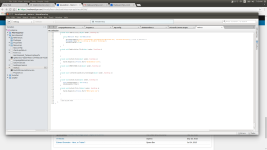
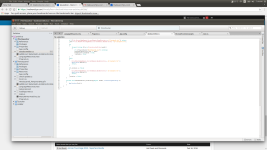
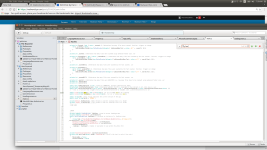
Last edited:
Also for god's sake we are opening a part of the Hero's Code if you're having a hard time believing us:
Should Be Up in minutes
Here is the company's profile:
Linecommander (LineCommander, Inc) · GitHub
Should Be Up in minutes
Here is the company's profile:
Linecommander (LineCommander, Inc) · GitHub
Last edited:
Anyway we appreciate the hard work you've done.
Have a great day.
-LINECOMMANDER .Net developer n1
Have a great day.
-LINECOMMANDER .Net developer n1
R
Ramona
@HeroCloudAntivirus The main issue here is that a lot of people don't know what they are doing or what they are saying. They don't test the products in virtual box for a few days and then do a little review, they just act as experts.
I don't wanna call the people out but they are more then 10
I don't wanna call the people out but they are more then 10
W
Wave
@HeroCloudAntivirus Hello,
You're wasting your time signing up to this forum to respond to me, since I already know the facts based off the analysis and I happily shared them with everyone. I'm not going to sit here and be told that I am lying or that I am wrong because I know I am right based off reverse engineering the product. As you said, the product is 'based on C#' (the main components at least, and I know this based off the analysis), and therefore I can actually decompile the .NET components from the MSIL byte-code back to readable C#.NET code. Therefore, I can technically already see how your product works, just by reading the code generated from the decompilation... You barely tried to protect any of it up (or you did nothing to protect it, e.g. obfuscation - I cannot remember if you obfuscated it or not) and therefore it's not even tricky to do. Anyone can download a product like ILSPY or .NET Reflector and open up the .NET assemblies, decompile them, and then learn how your product works from top-to-bottom based on the generated source code.
You're not a "fully functional antivirus" and the product is completely useless, period. I do not need to see you post pictures of your development because it's nothing I cannot already see... If I want I can decompile your product again and read the code from top-to-bottom or I can just monitor the API calls and perform other reversing techniques to understand how it works.
If you are interested in making a real "process killing" tool with some added potential, I will help you and give you some advice in a spoiler below:
Now I am going to try and give you some advice on the path to making a real AV product... I think it might help you, because clearly you think checksum scanning is godly in the AV industry... Hmm... Yes, because it's worth millions! (sarcasm). (check the spoiler below).
[QUOTE="HeroCloudAntivirus, post: 554624, member: 56189"]We have a question for you: HOW CAN A FAKE ANTIVIRUS HAVE 5000+ LINES OF CODE, EVEN THE LOADING SCREEN HAS 500+ LINES OF CODE.
We are a new company in this industry but that doesn't mean we are a bunch of scammers.
[/QUOTE]
Easy... Bad optimisation, useless junk code. Most of it is GUI. I checked, remember?... It's not hard to have 5000+ lines of code, have you seen how much code goes into a real AV product?
All in all conclusion, your product is what to be expected of a .NET "antivirus" - completely useless, unreliable and a waste of time... How about you try an "anti-malware", you can see some other project examples by searching: Xvirus Personal Guard, Crystal Security. The former at least has a start to heuristics (HEX analysis) and the latter has a start to heuristics and utilises VirusTotal (with consent of course) to help it... They have been developed over years and are respected, and the developers do not claim the product is an "antivirus" on top, and they know their limits within the .NET framework. It's time you woke up and smelt the coffee, regardless, .NET is NOT a language for security development, period. If you want to make a REAL Anti-Virus then I suggest you start studying x86/x64 ASM & C/C++. If you called the product an "anti-malware" instead of trying to defend it like it's some top next-big Avast product, then there wouldn't be a problem at all. But you have signed up to the forums to tell me it is a "fully functional antivirus" when all it is, is a checksum scanner... Which is not even mediocre for that.
I apologise if I came off as rude in any of my posts because that is not the intention, but do not come here and claim I am lying (you did not use those words however you said I was wrong and therefore that is the same thing) because I already understand how your product works based off the reverse engineering. However without that being said, I have tried to provide some advice/tips to help you improve and focus on a real security software product, so hopefully that does help you. Instead of claiming I am wrong, take the advice and use it to help you...
If I were you I would stop calling your product an "antivirus", it's more of a basic checksum scanner which was probably based off some online tutorial. Looks like a fake AV, behaves like one... It's pathetic you signed up here to tell me I was wrong, without even knowing the real facts. Your entire product is probably based off some online forum code from some script kiddie forum. How do I know? Because I remember a few years back when I first got into security development and was a .NET developer, while I never released anything, I used to think it was perfect... checksum scanning. Therefore, I kind of expected that sort of response from you when I saw you browsing the thread earlier. I know what it is like to be a .NET developer wanting to make security products. Eventually, you will wake up and smell the coffee and realise you are wrong and you will start studying more lower-level languages, analysing malware and learning about the internals and studying concepts like API hooking, device driver development, networking... And then you will make something real. It will happen one day.
You might think I am talking complete crap now but one day you will realise and you will be thankful for this post because trust me, it can take you a long time to realise how things are really made. Back when I was a .NET developer I always wondered how Norton had Access Denied on Task Manager... Then when I started realising the truth and studying, I eventually learnt about API hooking and device driver development, and now I can make self-protection just like theirs or any other vendor has. See? One day you will do it. Just wait and you'll find this post useful.
I'm sitting here telling you the facts. If you want a few Likes to feel good then sure, let me know and I can do that. But it is worthless. You want a REAL product at the end of the day. People sitting here telling you your product is amazing will NOT help you when it is useless. So you want me to lie to you then? I told you the truth and set you straight. Use it as an example to help you, not something to be mad at...
I expect you to be angry or fuming and in denial from the truth. But you'll get there. Be grateful.
Stay safe and good luck,
Wave.
You're wasting your time signing up to this forum to respond to me, since I already know the facts based off the analysis and I happily shared them with everyone. I'm not going to sit here and be told that I am lying or that I am wrong because I know I am right based off reverse engineering the product. As you said, the product is 'based on C#' (the main components at least, and I know this based off the analysis), and therefore I can actually decompile the .NET components from the MSIL byte-code back to readable C#.NET code. Therefore, I can technically already see how your product works, just by reading the code generated from the decompilation... You barely tried to protect any of it up (or you did nothing to protect it, e.g. obfuscation - I cannot remember if you obfuscated it or not) and therefore it's not even tricky to do. Anyone can download a product like ILSPY or .NET Reflector and open up the .NET assemblies, decompile them, and then learn how your product works from top-to-bottom based on the generated source code.
You're not a "fully functional antivirus" and the product is completely useless, period. I do not need to see you post pictures of your development because it's nothing I cannot already see... If I want I can decompile your product again and read the code from top-to-bottom or I can just monitor the API calls and perform other reversing techniques to understand how it works.
You've already proved my quote about your product not being "Powerful" or "Reliable" because a product which only has the capability of basic checksum hash scanning is useless these days. You need a lot more components to really protect the user, and you don't even have any real static heuristics... It takes one line of code to change the checksum hash of malware, and it isn't enough to catch up with new threats. As for checksum hash databases, even if you did have 1 million signatures (which I still doubt - the VM was connected to the internet at the time of testing and I assume this "bug" was made up on the spot which is an pathetic excuse), that would still be useless... Real AV vendors have MILLIONS of signatures, literally millions. And what happens? They are still crap for usage, because malware easily bypasses it via packers/obfuscation methods. Real AV vendors are aware of this, they know what they are doing and have years of experience in the field... Why do you think vendors are integrating sandboxing mechanisms, Behaviour Blockers/HIPS systems, dynamic heuristics (which will do things such as hook functions so the AV product can monitor when a monitored process dynamically loads a new DLL, attempts to check for VM existence, etc)? It's because the checksum scanning ISN'T ENOUGH to really protect the user and if you really think you have a top product because it can do some checksum scanning then I am at a loss for words. You don't even have basic static heuristic analysis (e.g. scanning the IAT for imported functions and the respected functions - which is limited in itself).Hero Cloud Antivirus identifies files using their hashes and if it matches with the virus hash that file will be flagged by the antivirus and it will give you the ability to neutralize it. Unfortunately the button didn't popup in the virus tab and we are fixing that.
It's a pile of rubbish. This isn't an opinion, it's a fact. It has no more potential than the standard Windows Task Manager - in fact I would rather use Task Manager, as it directly calls TerminateProcess and isn't based on .NET, therefore it'll execute faster. You're "ForceKill Tech" is simple process killing in .NET which anyone can do, which eventually traces down to a call to TerminateProcess (from kernel32.dll).And ForceKill Tech is a simple tool that allows you to terminate programs that are running in the foreground.
If you are interested in making a real "process killing" tool with some added potential, I will help you and give you some advice in a spoiler below:
If you want to stay with user-mode then you are always going to be limited since there is only so much you can do from user-mode, however I advise you call NTAPI functions via system calls. If you call NTAPI functions via system calls (such as NtTerminateProcess) then you will essentially be able to evade hooks being set by malware which may have injected into your process and hooked said functions to protect it against termination (help evade rootkit techniques controlling your product). However to call NtTerminateProcess you'll need a handle, and thus you can call NtOpenProcess via a system call also - evading any user-mode hooks.
I should note that on x86 systems if malware is working with kernel-mode patching techniques the method of calling via a system call will not work.
If you do not want to work with system calls you can attempt to copy the said functions from the Windows ntdll.dll and map it into memory and then call that version as opposed to getting the address of the functions from the Windows ntdll.dll as a lot of rootkits are developed by inexperienced malware authors who are knew to API hooking and therefore they won't think to enumerate through all loaded modules and hook the functions, but will only target the Windows ntdll.dll for the function hooks. (you can even copy ntdll.dll from the Windows folder and paste it at your own installation directory, rename it, and then use it via P/Invoke as an easier alternate).
If you wish to make a really powerful tool which has capabilities like most top AV products then you can use a device driver. On x86 systems you may have to make a kernel-mode hooks scanner (and then repair them) say on case malware has hooked APIs to prevent it's termination, however on x64 systems you can literally terminate any process (regardless of the protection applied to it) via using functions like ObOpenObjectByPointer, which avoid the access checks.
I should note that on x86 systems if malware is working with kernel-mode patching techniques the method of calling via a system call will not work.
If you do not want to work with system calls you can attempt to copy the said functions from the Windows ntdll.dll and map it into memory and then call that version as opposed to getting the address of the functions from the Windows ntdll.dll as a lot of rootkits are developed by inexperienced malware authors who are knew to API hooking and therefore they won't think to enumerate through all loaded modules and hook the functions, but will only target the Windows ntdll.dll for the function hooks. (you can even copy ntdll.dll from the Windows folder and paste it at your own installation directory, rename it, and then use it via P/Invoke as an easier alternate).
If you wish to make a really powerful tool which has capabilities like most top AV products then you can use a device driver. On x86 systems you may have to make a kernel-mode hooks scanner (and then repair them) say on case malware has hooked APIs to prevent it's termination, however on x64 systems you can literally terminate any process (regardless of the protection applied to it) via using functions like ObOpenObjectByPointer, which avoid the access checks.
Obviously you didn't test it properly. Obviously if you test it with the samples it has the checksum hashes for it will detect it... Anyone can go through malware sample providing websites and get the checksum hashes for them so the product appears to be good in the own tests or on those YouTube reviews, but all in all it won't change the fact that your product is one of the most limited (next up from a Fake AV) that I've ever seen and is useless in terms of really protecting the user. Without that being said, nothing can provide 100% protection, so I think you might want to re-think a bit before claiming I am the one who is talking about something I don't know about.WRONG we tested it and you can test it too and it works 100% so don't talk about something you don't know.
No, I am totally right. You even proved my point already... Your product capabilities includes checksum scanning, does it even incorporate any sort of real-time protection? Checksum scanning is kind of obsolete and it's been this way for years now.. Static heuristics is becoming a bit obsolete these days also without a good dynamic memory scanner (ESET are an example with a great one). Therefore, the product is only "Fast" because all it can really do is load a database of checksum hashes, compute the hash of the target binary and compare that hash to a database... Welcome to GCSE computer science tutorials at school!...You Also said that the only reason it was "Fast" is because it's doing little and that's totally wrong.
Basically what you are telling me is that the product is useless when it comes to detecting any malware you didn't add the checksum hashes too. Well, you'd be right if that is what you are trying to tell me!And it is a "Reliable" scanning tool if you use it right and you don't exceed it's capabilities.
Now I am going to try and give you some advice on the path to making a real AV product... I think it might help you, because clearly you think checksum scanning is godly in the AV industry... Hmm... Yes, because it's worth millions! (sarcasm). (check the spoiler below).
1. Self-protection (for processes - I can give you information on registry/file protection too if you want but you'll have to ask nicely): you can take a few different approaches for this one. I will give you some methods (some better than others):
Method one:
The first method is by far the easiest and it works by altering the security descriptors of your process... Through this you can actually prevent any non-administrator processes from opening a handle to your own process, leaving it an Access Denied error as response. This is good to prevent any malware running on the system which has not been granted administrator privileges from attacking your process, however it's one of the worst methods I can think of since it's not very good in terms of protection.
Method two:
This second method I will briefly explain used to be used by a lot of vendors however now most vendors have moved to using method four. This method evolves around user-mode hooking, therefore injecting into all processes running on the system (either a DLL (Dynamic Link Library) or code via codecave injection) and then you will hook various functions to prevent the target processes from attacking your process.
As an example, within the DLL you are injecting, you may hook NtOpenProcess. NtOpenProcess is an Native API function which is eventually called once OpenProcess has been called (OpenProcess is a Win32 API function). To use functions like NtTerminateProcess (or TerminateProcess which will call this), NtSuspendProcess, NtAllocateVirtualMemory, NtWriteVirtualMemory, CreateRemoteThread, etc (or the functions to attack the process directly) you'll require a handle to the target process. Therefore, blocking access to open a handle will solve your problems... A callback to the function hook would look similar to this:
The above callback code will check the process a handle is attempting to be opened too and if it is the process with the PID 5555 (e.g. the process we want to protect) it will return STATUS_ACCESS_DENIED. If the process a handle is being opened too is not the process we want to protect, it will return with the trampoline (therefore the original function is called without triggering the hook and causing a loop, therefore the handle opening is allowed).
Method three:
This third method will evolve via kernel-mode patching. From Windows Vista and on-wards Microsoft introduced something called PatchGuard/KPP which will prevent kernel-patching on x64 editions of Windows, however you can still do it for x86 systems. Kernel-mode patching would be kernel-mode hooking (e.g. System Service Dispatch Table hooking) for example. Through this you can hook functions like PsLookupProcessByProcessId, ObOpenObjectByPointer, NtTerminateProcess, NtOpenProcess, NtSuspendProcess, thread functions as well if you want to protect those also (which is also very important).
Method four:
This method is compatible with both x86 and x64 systems regardless of PatchGuard/KPP and is documented by Microsoft themselves. This method is also the EXACT same method that most popular and top AV products will use... Kernel-mode callbacks! For process protection, the callback ObRegisterCallbacks is utilised. It provides a pre and post operation. On the Pre operation function you can check the process being targeted and if it is the one you want to protect you can remove the access rights from the handle being generated which will result in Access Denied. You can also protect the process' threads via this method (and prevent duplicating handles). The only way to bypass this method (if it is implemented correctly and all flaws are patched up) would be to execute code from kernel-mode itself, calling functions like ObOpenObjectByPointer to bypass the access checks, or to remove the callback for example...
2. BB/HIPS
This is usually developed via user-mode API hooking. This will work by injecting code into all running processes (e.g. via DLL) which will then hook various functions (such as CreateRemoteThread, NtWriteVirtualMemory, RtlCreateUserThread, NtCreateKey, NtSetValueKey, NtDeleteKey, NtLoadDriver, NtSetSystemInformation (some rootkits will attempt to load device drivers silently via this method), service functions, GetProcAddress (or go lower than this), Ldr functions if necessary, etc). If you really want to go much more lower-level, you can hook functions like KiFastSystemCall (on older OS versions like Windows 7) or X86SwitchTo64BitMode and take even more control... Or if not, you can hook the actual Nt/Zw function stubs as opposed to simple IAT/EAT hooking methods which can be bypassed more easily.
If you are on x86 you can use SSDT hooking for some things like NtLoadDriver hooks... And then call IoGetCurrentProcess() to trace the actions back to the caller process.
3. Static heuristics
You can implement this via the use of generic signatures (e.g. HEX detection based on the bytes of malicious code/parts of HEX only found in multiple malicous samples), scanning of the IAT/EAT (Import Address Table/Export Address Table), checking the PE File Header for information on detecting signs of packing/calculating the Entropy level, checking digital signature and checking validation of it, etc. Study malware analysis and this will be much easier.
4. Dynamic Heuristics
Hooking dependant again really... You can also make an advanced memory scanner to improve detection since you'll be able to use some static analysis methods dynamically (e.g. trace when malware unpacks itself in memory, then utilise the static scanning methods).
5. Anti-Executable
This is very important for people who want default deny... You can learn how to develop your own Anti-Exe via my thread: Developing your own Anti-Exe (C - Device Driver Development)
I recommend you make a real engine in C/C++/ASM and if you do not have experience with Win32 GUI development in another language (e.g. Native C++) then you may as well stick with C#.NET for it. You can work with IPC (Interprocess Communication) between C/C++ and .NET MSIL processes. An example would be via shared memory (memory mapped files) or pipes. As for device drivers, you can send data to them via IOCTls for example.
Method one:
The first method is by far the easiest and it works by altering the security descriptors of your process... Through this you can actually prevent any non-administrator processes from opening a handle to your own process, leaving it an Access Denied error as response. This is good to prevent any malware running on the system which has not been granted administrator privileges from attacking your process, however it's one of the worst methods I can think of since it's not very good in terms of protection.
Method two:
This second method I will briefly explain used to be used by a lot of vendors however now most vendors have moved to using method four. This method evolves around user-mode hooking, therefore injecting into all processes running on the system (either a DLL (Dynamic Link Library) or code via codecave injection) and then you will hook various functions to prevent the target processes from attacking your process.
As an example, within the DLL you are injecting, you may hook NtOpenProcess. NtOpenProcess is an Native API function which is eventually called once OpenProcess has been called (OpenProcess is a Win32 API function). To use functions like NtTerminateProcess (or TerminateProcess which will call this), NtSuspendProcess, NtAllocateVirtualMemory, NtWriteVirtualMemory, CreateRemoteThread, etc (or the functions to attack the process directly) you'll require a handle to the target process. Therefore, blocking access to open a handle will solve your problems... A callback to the function hook would look similar to this:
Code:
NTSTATUS NTAPI NtOpenProcess_CB(PHANDLE ProcessHandle, ACCESS_MASK DesiredAccess, POBJECT_ATTRIBUTES ObjectAttributes, PCLIENT_ID  ClientId)
{
    if (ClientId->UniqueProcess == (HANDLE)5555) { return 0xC0000022; }
    return NtOpenProcessTramp(ProcessHandle, DesiredAccess, ObjectAttributes, ClientId);
}
The above callback code will check the process a handle is attempting to be opened too and if it is the process with the PID 5555 (e.g. the process we want to protect) it will return STATUS_ACCESS_DENIED. If the process a handle is being opened too is not the process we want to protect, it will return with the trampoline (therefore the original function is called without triggering the hook and causing a loop, therefore the handle opening is allowed).
Method three:
This third method will evolve via kernel-mode patching. From Windows Vista and on-wards Microsoft introduced something called PatchGuard/KPP which will prevent kernel-patching on x64 editions of Windows, however you can still do it for x86 systems. Kernel-mode patching would be kernel-mode hooking (e.g. System Service Dispatch Table hooking) for example. Through this you can hook functions like PsLookupProcessByProcessId, ObOpenObjectByPointer, NtTerminateProcess, NtOpenProcess, NtSuspendProcess, thread functions as well if you want to protect those also (which is also very important).
Method four:
This method is compatible with both x86 and x64 systems regardless of PatchGuard/KPP and is documented by Microsoft themselves. This method is also the EXACT same method that most popular and top AV products will use... Kernel-mode callbacks! For process protection, the callback ObRegisterCallbacks is utilised. It provides a pre and post operation. On the Pre operation function you can check the process being targeted and if it is the one you want to protect you can remove the access rights from the handle being generated which will result in Access Denied. You can also protect the process' threads via this method (and prevent duplicating handles). The only way to bypass this method (if it is implemented correctly and all flaws are patched up) would be to execute code from kernel-mode itself, calling functions like ObOpenObjectByPointer to bypass the access checks, or to remove the callback for example...
2. BB/HIPS
This is usually developed via user-mode API hooking. This will work by injecting code into all running processes (e.g. via DLL) which will then hook various functions (such as CreateRemoteThread, NtWriteVirtualMemory, RtlCreateUserThread, NtCreateKey, NtSetValueKey, NtDeleteKey, NtLoadDriver, NtSetSystemInformation (some rootkits will attempt to load device drivers silently via this method), service functions, GetProcAddress (or go lower than this), Ldr functions if necessary, etc). If you really want to go much more lower-level, you can hook functions like KiFastSystemCall (on older OS versions like Windows 7) or X86SwitchTo64BitMode and take even more control... Or if not, you can hook the actual Nt/Zw function stubs as opposed to simple IAT/EAT hooking methods which can be bypassed more easily.
If you are on x86 you can use SSDT hooking for some things like NtLoadDriver hooks... And then call IoGetCurrentProcess() to trace the actions back to the caller process.
3. Static heuristics
You can implement this via the use of generic signatures (e.g. HEX detection based on the bytes of malicious code/parts of HEX only found in multiple malicous samples), scanning of the IAT/EAT (Import Address Table/Export Address Table), checking the PE File Header for information on detecting signs of packing/calculating the Entropy level, checking digital signature and checking validation of it, etc. Study malware analysis and this will be much easier.
4. Dynamic Heuristics
Hooking dependant again really... You can also make an advanced memory scanner to improve detection since you'll be able to use some static analysis methods dynamically (e.g. trace when malware unpacks itself in memory, then utilise the static scanning methods).
5. Anti-Executable
This is very important for people who want default deny... You can learn how to develop your own Anti-Exe via my thread: Developing your own Anti-Exe (C - Device Driver Development)
I recommend you make a real engine in C/C++/ASM and if you do not have experience with Win32 GUI development in another language (e.g. Native C++) then you may as well stick with C#.NET for it. You can work with IPC (Interprocess Communication) between C/C++ and .NET MSIL processes. An example would be via shared memory (memory mapped files) or pipes. As for device drivers, you can send data to them via IOCTls for example.
[QUOTE="HeroCloudAntivirus, post: 554624, member: 56189"]We have a question for you: HOW CAN A FAKE ANTIVIRUS HAVE 5000+ LINES OF CODE, EVEN THE LOADING SCREEN HAS 500+ LINES OF CODE.
We are a new company in this industry but that doesn't mean we are a bunch of scammers.
[/QUOTE]
Easy... Bad optimisation, useless junk code. Most of it is GUI. I checked, remember?... It's not hard to have 5000+ lines of code, have you seen how much code goes into a real AV product?
All in all conclusion, your product is what to be expected of a .NET "antivirus" - completely useless, unreliable and a waste of time... How about you try an "anti-malware", you can see some other project examples by searching: Xvirus Personal Guard, Crystal Security. The former at least has a start to heuristics (HEX analysis) and the latter has a start to heuristics and utilises VirusTotal (with consent of course) to help it... They have been developed over years and are respected, and the developers do not claim the product is an "antivirus" on top, and they know their limits within the .NET framework. It's time you woke up and smelt the coffee, regardless, .NET is NOT a language for security development, period. If you want to make a REAL Anti-Virus then I suggest you start studying x86/x64 ASM & C/C++. If you called the product an "anti-malware" instead of trying to defend it like it's some top next-big Avast product, then there wouldn't be a problem at all. But you have signed up to the forums to tell me it is a "fully functional antivirus" when all it is, is a checksum scanner... Which is not even mediocre for that.
I apologise if I came off as rude in any of my posts because that is not the intention, but do not come here and claim I am lying (you did not use those words however you said I was wrong and therefore that is the same thing) because I already understand how your product works based off the reverse engineering. However without that being said, I have tried to provide some advice/tips to help you improve and focus on a real security software product, so hopefully that does help you. Instead of claiming I am wrong, take the advice and use it to help you...
If I were you I would stop calling your product an "antivirus", it's more of a basic checksum scanner which was probably based off some online tutorial. Looks like a fake AV, behaves like one... It's pathetic you signed up here to tell me I was wrong, without even knowing the real facts. Your entire product is probably based off some online forum code from some script kiddie forum. How do I know? Because I remember a few years back when I first got into security development and was a .NET developer, while I never released anything, I used to think it was perfect... checksum scanning. Therefore, I kind of expected that sort of response from you when I saw you browsing the thread earlier. I know what it is like to be a .NET developer wanting to make security products. Eventually, you will wake up and smell the coffee and realise you are wrong and you will start studying more lower-level languages, analysing malware and learning about the internals and studying concepts like API hooking, device driver development, networking... And then you will make something real. It will happen one day.
You might think I am talking complete crap now but one day you will realise and you will be thankful for this post because trust me, it can take you a long time to realise how things are really made. Back when I was a .NET developer I always wondered how Norton had Access Denied on Task Manager... Then when I started realising the truth and studying, I eventually learnt about API hooking and device driver development, and now I can make self-protection just like theirs or any other vendor has. See? One day you will do it. Just wait and you'll find this post useful.
I'm sitting here telling you the facts. If you want a few Likes to feel good then sure, let me know and I can do that. But it is worthless. You want a REAL product at the end of the day. People sitting here telling you your product is amazing will NOT help you when it is useless. So you want me to lie to you then? I told you the truth and set you straight. Use it as an example to help you, not something to be mad at...
I expect you to be angry or fuming and in denial from the truth. But you'll get there. Be grateful.
Stay safe and good luck,
Wave.
Last edited by a moderator:
@Wave First of all i am not angry or fuming and in denial from the truth.
Second of all i gave a small part for my project yeah go ahead and use that we don't really care.
Third you're under estimating C# so do your researches before replying to me, if you did i respect your opinion.
Forth i signed up here to protect my product not to prove you're wrong.
Fifth, i am both a .Net, C++ and Web developer.
I will invest time programming in c++ and thank you for giving me your time.
- LineCommander .NET developer n1
Second of all i gave a small part for my project yeah go ahead and use that we don't really care.
Third you're under estimating C# so do your researches before replying to me, if you did i respect your opinion.
Forth i signed up here to protect my product not to prove you're wrong.
Fifth, i am both a .Net, C++ and Web developer.
I will invest time programming in c++ and thank you for giving me your time.
- LineCommander .NET developer n1
Y
yigido
Nice answer @Wave I hope he/she understands your helpful post here. Your testing is not VM testing..and we are not waiting for detection tests videos..
and The main issue here is that a lot of people don't know who they are talking with. They don't even know how products and features work and they can post like experts.
I don't wanna call their names but they are more then thousands here @Wave
I hope he/she understands your helpful post here. Your testing is not VM testing..and we are not waiting for detection tests videos..and The main issue here is that a lot of people don't know who they are talking with. They don't even know how products and features work and they can post like experts.
I don't wanna call their names but they are more then thousands here
@Wave
W
Wave
No, you are in denial from the truth. Go read your first response, proof is all there.@Wave First of all i am not angry or fuming and in denial from the truth.
Second of all i gave a small part for my project yeah go ahead and use that we don't really care.
Third you're under estimating C# so do your researches before replying to me, if you did i respect your opinion.
Forth i signed up here to protect my product not to prove you're wrong.
Fifth, i am both a .Net, C++ and Web developer.
I will invest time programming in c++ and thank you for giving me your time.
- LineCommander .NET developer n1
I'm not "under estimating C#". It's still a bunch of crap for real security and you'll never make a real AV anywhere near anything on the market with it.. Even if you developed the product for 10+ years. If you want to make a real security product then drop .NET entirely or use it for the GUI only. But then again it seems you have no real experience with security software development so it might help you to understand this instead of believing you're right when you're not. But no worries, we've all done that before over something..
You signed up to "protect" your product AND to prove I am wrong. Go read your first reply. You claimed I was wrong and tried to explain why, except the entire post you made was flawed and pathetic.
I'm actually done. You cannot help someone who doesn't want to be helped. Take the post I wrote for granted then, but if you invest time in reading it and doing some real studying you might actually GET SOMEWHERE and make a REAL PRODUCT...
remind me to never post about a .NET project again. what is the point

Again, one more thread going in the wrong direction.
There a lot of lines that needs to be moderated but hardly without wiping out the whole context.
I will need to ask, again, for members not to jump into rushly made conclusions. And everybody to respect each other no matter the level of knowledge or the level of experience concerning the certain theme.
I will also need to ask developers to accept any positive and/or negative comments, critics.
The thread is closed for now.
There a lot of lines that needs to be moderated but hardly without wiping out the whole context.
I will need to ask, again, for members not to jump into rushly made conclusions. And everybody to respect each other no matter the level of knowledge or the level of experience concerning the certain theme.
I will also need to ask developers to accept any positive and/or negative comments, critics.
The thread is closed for now.
- Status
- Not open for further replies.
You may also like...
-

-
 Hot Take Intego Antivirus new best antivirus?
- Started by HydraDragonAntivirus
- Replies: 8
