Hi,
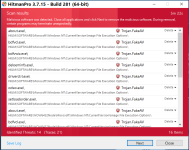
Hitmanpro detects these keys as trojan/fakeAV
Malware remnants ____________________________________________________________
HKLM\SOFTWARE\Microsoft\Windows NT\CurrentVersion\Image File Execution Options\about.exe\ (Trojan.FakeAV)
HKLM\SOFTWARE\Microsoft\Windows NT\CurrentVersion\Image File Execution Options\bdfvcl.exe\ (Trojan.FakeAV)
HKLM\SOFTWARE\Microsoft\Windows NT\CurrentVersion\Image File Execution Options\bdfvwiz.exe\ (Trojan.FakeAV)
HKLM\SOFTWARE\Microsoft\Windows NT\CurrentVersion\Image File Execution Options\deloeminfs.exe\ (Trojan.FakeAV)
HKLM\SOFTWARE\Microsoft\Windows NT\CurrentVersion\Image File Execution Options\driverctrl.exe\ (Trojan.FakeAV)
HKLM\SOFTWARE\Microsoft\Windows NT\CurrentVersion\Image File Execution Options\odsw.exe\ (Trojan.FakeAV)
HKLM\SOFTWARE\Microsoft\Windows NT\CurrentVersion\Image File Execution Options\setloadorder.exe\ (Trojan.FakeAV)
HKLM\SOFTWARE\WOW6432Node\Microsoft\Windows NT\CurrentVersion\Image File Execution Options\about.exe\ (Trojan.FakeAV)
HKLM\SOFTWARE\WOW6432Node\Microsoft\Windows NT\CurrentVersion\Image File Execution Options\bdfvcl.exe\ (Trojan.FakeAV)
HKLM\SOFTWARE\WOW6432Node\Microsoft\Windows NT\CurrentVersion\Image File Execution Options\bdfvwiz.exe\ (Trojan.FakeAV)
HKLM\SOFTWARE\WOW6432Node\Microsoft\Windows NT\CurrentVersion\Image File Execution Options\deloeminfs.exe\ (Trojan.FakeAV)
HKLM\SOFTWARE\WOW6432Node\Microsoft\Windows NT\CurrentVersion\Image File Execution Options\driverctrl.exe\ (Trojan.FakeAV)
HKLM\SOFTWARE\WOW6432Node\Microsoft\Windows NT\CurrentVersion\Image File Execution Options\odsw.exe\ (Trojan.FakeAV)
HKLM\SOFTWARE\WOW6432Node\Microsoft\Windows NT\CurrentVersion\Image File Execution Options\setloadorder.exe\ (Trojan.FakeAV)
But after delete and a restart from Hitman, these are still present/redetected
I believe some of these files refer to Bitdefender. Are they false positives?
In Windows 10 safe mode, hitman doesnt detect any of the above.
I also ran bitdefender, emsisoft emergency kit, zemana and malwarebytes all came out negative but I just want to make sure.
Thanks for your help!
Hitmanpro detects these keys as trojan/fakeAV
Malware remnants ____________________________________________________________
HKLM\SOFTWARE\Microsoft\Windows NT\CurrentVersion\Image File Execution Options\about.exe\ (Trojan.FakeAV)
HKLM\SOFTWARE\Microsoft\Windows NT\CurrentVersion\Image File Execution Options\bdfvcl.exe\ (Trojan.FakeAV)
HKLM\SOFTWARE\Microsoft\Windows NT\CurrentVersion\Image File Execution Options\bdfvwiz.exe\ (Trojan.FakeAV)
HKLM\SOFTWARE\Microsoft\Windows NT\CurrentVersion\Image File Execution Options\deloeminfs.exe\ (Trojan.FakeAV)
HKLM\SOFTWARE\Microsoft\Windows NT\CurrentVersion\Image File Execution Options\driverctrl.exe\ (Trojan.FakeAV)
HKLM\SOFTWARE\Microsoft\Windows NT\CurrentVersion\Image File Execution Options\odsw.exe\ (Trojan.FakeAV)
HKLM\SOFTWARE\Microsoft\Windows NT\CurrentVersion\Image File Execution Options\setloadorder.exe\ (Trojan.FakeAV)
HKLM\SOFTWARE\WOW6432Node\Microsoft\Windows NT\CurrentVersion\Image File Execution Options\about.exe\ (Trojan.FakeAV)
HKLM\SOFTWARE\WOW6432Node\Microsoft\Windows NT\CurrentVersion\Image File Execution Options\bdfvcl.exe\ (Trojan.FakeAV)
HKLM\SOFTWARE\WOW6432Node\Microsoft\Windows NT\CurrentVersion\Image File Execution Options\bdfvwiz.exe\ (Trojan.FakeAV)
HKLM\SOFTWARE\WOW6432Node\Microsoft\Windows NT\CurrentVersion\Image File Execution Options\deloeminfs.exe\ (Trojan.FakeAV)
HKLM\SOFTWARE\WOW6432Node\Microsoft\Windows NT\CurrentVersion\Image File Execution Options\driverctrl.exe\ (Trojan.FakeAV)
HKLM\SOFTWARE\WOW6432Node\Microsoft\Windows NT\CurrentVersion\Image File Execution Options\odsw.exe\ (Trojan.FakeAV)
HKLM\SOFTWARE\WOW6432Node\Microsoft\Windows NT\CurrentVersion\Image File Execution Options\setloadorder.exe\ (Trojan.FakeAV)
But after delete and a restart from Hitman, these are still present/redetected
I believe some of these files refer to Bitdefender. Are they false positives?
In Windows 10 safe mode, hitman doesnt detect any of the above.
I also ran bitdefender, emsisoft emergency kit, zemana and malwarebytes all came out negative but I just want to make sure.
Thanks for your help!