


How to automatically bypass Windows 10's login screen
Hit the Start button, or press the Windows key, type netplwiz and then click the entry at the top of the list of search results. If you're feeling old-school, press the Windows key and R to bring up the Run dialog and execute the same command.
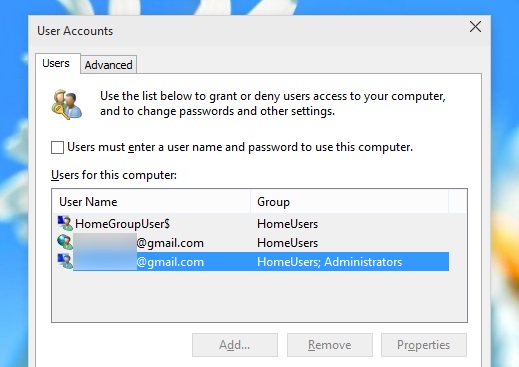
In the list of usernames that's displayed, select the entry for your account (if you see more than one that appears to be yours, opt for the one that's an Administrator). Uncheck the option labelled 'Users must enter a user name and password to use this computer'.
screenshots:
When prompted, enter your password -- for what will be the last time -- confirm it, and then click OK. That's it. Once you restart your computer, you'll be automatically logged into your chosen account. Simple!
Source:http://betanews.com/2015/02/08/how-to-automatically-bypass-windows-10s-login-screen/
Hit the Start button, or press the Windows key, type netplwiz and then click the entry at the top of the list of search results. If you're feeling old-school, press the Windows key and R to bring up the Run dialog and execute the same command.
In the list of usernames that's displayed, select the entry for your account (if you see more than one that appears to be yours, opt for the one that's an Administrator). Uncheck the option labelled 'Users must enter a user name and password to use this computer'.
screenshots:
When prompted, enter your password -- for what will be the last time -- confirm it, and then click OK. That's it. Once you restart your computer, you'll be automatically logged into your chosen account. Simple!
Source:http://betanews.com/2015/02/08/how-to-automatically-bypass-windows-10s-login-screen/


