

Guide | How To How to Disable Logon Screen in Windows 8 & 7

The associated guide may contain user-generated or external content.

MrExplorer

Level 28
Thread author
Verified
Nov 15, 2012
1,765
3,059
2,667
Many user who had used windows 7 don't put password in the user account now if they are using windows 8 they also want to remove the logon screen so that the pc start without asking the password.

Steps:
1. Start Run.
2. Type netplwiz
3. Under User tab select the user then untick the checkbox as mentioned in the image.
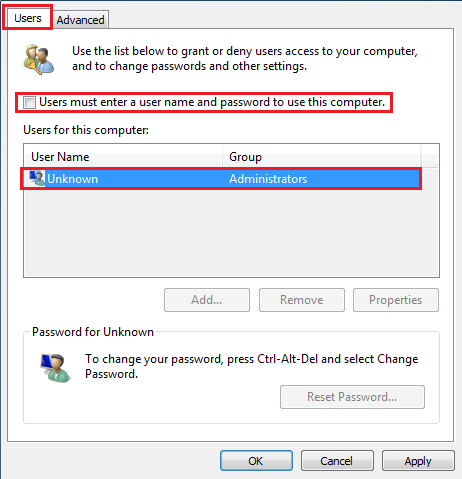
Pass.png
 
Disabling this though will raise the risk of people getting into your machine. I prefer to always have to type a password even if it might be 35-100 characters long I like to be safe than sorry.

Nice guide none the less. :)
 
McLovin said:
Disabling this though will raise the risk of people getting into your machine. I prefer to always have to type a password even if it might be 35-100 characters long I like to be safe than sorry.

Nice guide none the less. :)

i know Disabling will increase the risk of of people getting into your machine but then also many users who are living i joint family and use single computer they don't use to put a password this guide are for them
 
McLovin said:
Disabling this though will raise the risk of people getting into your machine. I prefer to always have to type a password even if it might be 35-100 characters long I like to be safe than sorry.

Nice guide none the less. :)


Unknown said:
i know Disabling will increase the risk of of people getting into your machine but then also many users who are living i joint family and use single computer they don't use to put a password this guide are for them

Trust no one even your family in matter of computer security, they are the second main vectors of infection.
 
Unknown said:
i know Disabling will increase the risk of of people getting into your machine but then also many users who are living i joint family and use single computer they don't use to put a password this guide are for them

True, but having so many users on one account (well I would) would get things/files mixed up, so having 2 accounts or more there would be good. Also a good idea to have it enabled so that if you have a child in the house that likes to get around sites and what not then he/she has the perfect opportunity to do so.
 
McLovin said:
True, but having so many users on one account (well I would) would get things/files mixed up, so having 2 accounts or more there would be good. Also a good idea to have it enabled so that if you have a child in the house that likes to get around sites and what not then he/she has the perfect opportunity to do so.

Yes right
 
Stranger said:
People who are lazy enough to password protect their desktop/laptop are same who forget to put keys on locker/house.

Thanks Unknown for share

Most Welcome
 
tapoo said:
i knew, how to do thatin Win XP, but had no idea about Win 7/8.....
BTW, i would like to use my pc with password
Thanx for the tip :)

welcome yes even prefer to protect my laptop with password
 

You may also like...