Guide | How To How to Enable Windows 10 GodMode

The associated guide may contain user-generated or external content.

Exterminator

Level 85
Thread author
Verified
Top Poster
Well-known
Oct 23, 2012
12,527
48,602
8,380
USA
To enable GodMode in Windows 10
  • Right Click on the desktop
  • Create a new folder and name it by copying & Pasting the below code
  • Code:
    GodMode.{ED7BA470-8E54-465E-825C-99712043E01C}
  • Once you have pasted the name press enter
  • You need to have an Administrstor account
 
same old same old but still good :D
I agree but I think this is good for Windows 10 since they seem to be moving to replace the control panel with the settings app.If anything it might be a good tool to learn your way around and find where the settings for everything are located.I am sure it will save a lot of frustration for some people.
I never really used it in Windows 7 as I found it easier without it.Same thing for Windows 8.1 once you learned your way around it.
 
  • Like
Reactions: scot
What is God Mode ?
It is like the Control Panel however every setting is listed in one place.This is more useful on Windows 10(Windows 8.1 also) as some settings that were in the control panel are now in the settings app such as Update & Recovery.

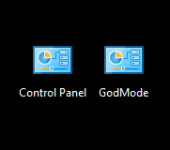
This shows them side by side.GodMode does not replace the control panel,as you can see I still have both icons on my desktop.In Windows 10 as well as other versions it puts all your settings in one place.In Windows 10 it will make it a little less stressful as you learn your way around the new OS.

Ashampoo_Snap_2015.08.03_10h09m09s_001_.png

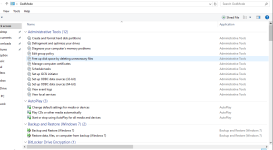
Below is a screenshot of Windows 10 GodMode when I click on it from my desktop

Ashampoo_Snap_2015.08.03_10h11m04s_003_.png
 
Last edited:
  • Like
Reactions: Purshu_Pro
is it possible to use GodMode as the default control panel
No but you can remove the control panel from your desktop and keep GodMode as your control panel.In windows 10 Pro you can pin it to the start menu as well as file explorer
 
Last edited:
Any words will be registered except for those critical names like 'com' which it should turn out to be error, since it considered as a unique name for Windows components. ;)
 
Once you have created the "God Mode" folder, move to the C:\ directory and customise on how you want to use it.

For example;

Right-click to Pin to Quick Access
upload_2015-8-4_18-57-31.png


Drag'n'Drop over File Explorer
upload_2015-8-4_19-3-5.png


Right-click File Explorer to launch God Mode
upload_2015-8-4_19-2-52.png