

How to protect your registry?

shmu26

Level 85
Thread author
Verified
Honorary Member
Top Poster
Content Creator
Well-known
Forum Veteran
Jul 3, 2015
8,148
1
31,237
8,388
Middle Earth
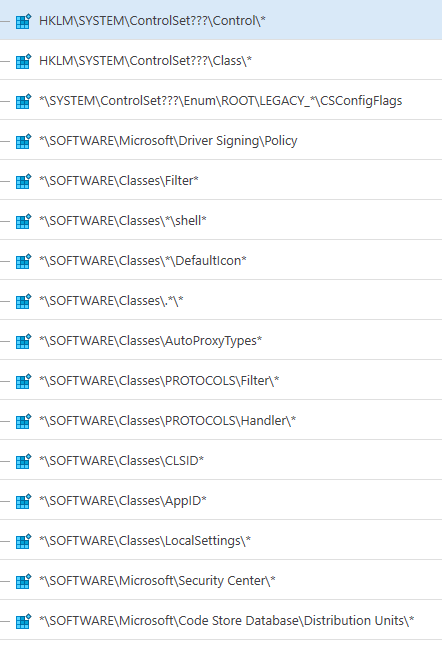
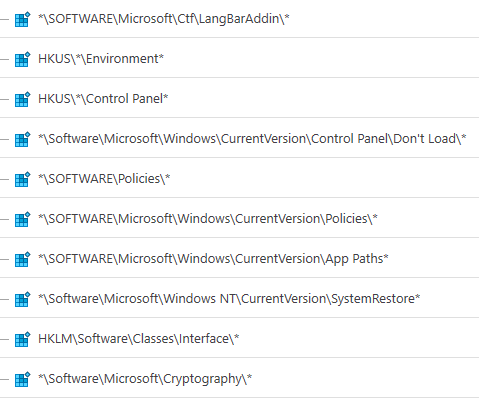
Which, if any, of these registry areas would you consider critical? I mean, which keys would you want to keep malware far away from.
If you want to do it the other way around, which keys would you remove from your critical list?
Screenshots taken from Comodo Firewall HIPS.
Capture.PNG
Capture.PNG
Capture2.PNG
 
I was going to say, that I have come to the conclusion that most of the choices of Comodo seem pointedly purposeful and meaningful when it comes to HIPS. So I would echo @BoraMurder's comment. This would also apply to the other areas of "Protected Objects" too.

I get the reasons for hating the registry alerts especially with Comodo. If, as you stated in another thread, Comodo whitelists all registry activity based on a single alert choice, then I would say Qihoo's BB approach is better for registry protection, although I can't say that the coverage is anywhere nearly as deep. I doubt so honestly.

All this aside and the driver app issue you have on boot also aside (another thread), the sandbox having you covered in the first place does seem to me to give you the added leverage to tailor and refine the registry selections Comodo has made the defaults. It would be great if Comodo would explain each of their choices in detail someplace. I have looked but have found no documentation to speak of on this although I suppose it could be in the help. I didn't find it if so. If not, it should be there. It's really bothersome on an alert when you can't make heads or tails of what's happening, and you end up Googling around for 10 or 15 precious minutes...o_O
 
Last edited:
I think the “zones” of the registry from which start the programs: HKEY_LOCAL_MACHINE\ SOFTWARE\Microsoft\Windows\CurrentVersion\Run applies to all users who log on to the computer, while HKEY_CURRENT_USER\ SOFTWARE\Microsoft\Windows\CurrentVersion\Run start programs only for the user currently logged in.

But I'm with @BoraMurdar: all registry keys are important and many of them are critical.
 
Thanks, guys. Just for the record, Comodo has another set of keys, which I did not screenshot, called Automatic Startup. That's the area that I would think is REALLY important, so I didn't even bother to ask about it.