Scams & Phishing News How Tycoon 2FA Is Rewriting the Rules of Identity Theft: Not Just a Phishing Kit – A Business Model

Khushal

Level 13
Thread author
Verified
Top Poster
Well-known
Apr 4, 2024
601
3,615
1,169
Point Wild describes Tycoon 2FA as a business model: Tycoon 2FA is a phishing-as-a-service selling MFA bypass to low-skill actors; it's cheap, scaling fast, and silently relays credentials, MFA approvals and sessions to an adversary in real time.



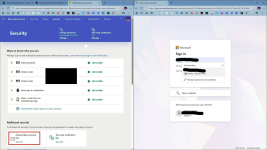
1772087590227.png
 
That screenshot is a good real-world example of what “adversary-in-the-middle” (AiTM) / reverse-proxy phishing is trying to achieve: it looks like a Microsoft 365 login experience, but it’s being served from an unrelated domain (the address bar is not a Microsoft domain). That is consistent with the “MFA-bypass phishing-as-a-service” model described in writeups like the Point Wild post, where the attacker relays the victim’s credentials and the MFA interaction in real time to steal a usable session.

What stands out in the screenshot
  • The page branding says “Microsoft 365”, but the URL shown is not a Microsoft/Office 365 login domain.
  • These campaigns commonly harvest: password + MFA approval + session tokens (cookies), so “changing the password later” is not always enough if an active session was already stolen.

If a user entered credentials on that page (incident response basics)
  • Immediately change the password for the affected account from a known-clean device.
  • Revoke active sessions / sign out everywhere (in Microsoft Entra ID / Microsoft 365 admin portals, invalidate refresh tokens and force re-authentication).
  • Reset MFA methods (remove/re-register authenticator, review phone/SMS methods) and watch for new/unknown methods added.
  • Check recent sign-in activity for unfamiliar IPs, locations, user agents, “MFA satisfied by token” events, or impossible travel.
  • Check mailbox rules and forwarding (attackers often add hidden forwarding or delete/mark-as-read rules for persistence).
  • If this is a business tenant, treat it as a potential account compromise and follow your IR process (containment, scoping, and notification as required).

Defensive controls that actually help against AiTM “MFA bypass”
  • Use phishing-resistant MFA where possible: FIDO2/security keys or Windows Hello for Business (these are far harder to relay than push/SMS).
  • If using Microsoft Authenticator push, enable number matching and additional context (reduces “blind approve” risk, though it does not fully solve token theft).
  • Conditional Access: restrict logins by device compliance, location, risk, and require approved client apps where feasible.
  • Disable legacy authentication protocols (they’re commonly abused and can weaken the overall posture).
  • User training focused on “check the domain” and “never approve unexpected MFA prompts,” plus easy reporting.

What to do with the URL/sample on MalwareTips
  • Do not interact with the page directly.
  • Submit the URL to VirusTotal (URL tab) and, if allowed in your environment, report it to Microsoft/your security vendor for takedown and detections.
  • If this was received via email, preserve headers and report it internally (or via your mail platform’s report-phish workflow) for wider tenant protection.

Key takeaway: even when MFA is enabled, these AiTM kits aim to steal a valid session in real time, so the right response is “assume session theft is possible” and revoke sessions/tokens in addition to changing the password.
 
I wonder, how does this work on Edge/Windows, since you are never logged out? I do not have a passwordless login, yet I was never asked to enter a password, not on Windows, nor on android, MS authenticator took care of it, ONCE, after a clean install! Ever since, Windows uses passkey to login everywhere. :unsure:

1772110755386.png
 
Last edited by a moderator:
I wonder, how does this work on Edge/Windows, since you are never logged out? I do not have a passwordless login, yet I was never asked to enter a password, not on Windows, nor on android, MS authenticator took care of it, ONCE, after a clean install! Ever since, Windows uses passkey to login everywhere. :unsure:

View attachment 295967

Your email address is visible in the image you uploaded.
It's best to delete that part.;)(y)
 
Suggestion: to keep your account protected against trick attempts, think of your digital security as if you were guarding your own house.

  • Look closely at the shop sign (check that the web address is the official one before entering your data, not a fake copy).
  • Don’t follow the suspicious town crier (avoid opening links in emails or messages that pressure you to log in urgently).
  • Close the doors behind you (if you suspect someone got into your account, change the password and log out of all active sessions).
  • Check if someone moved the furniture (in your email, make sure there are no hidden rules diverting important messages).
  • Use a modern master key (FIDO2 keys are physical devices or mobile functions that authenticate with fingerprint or PIN, impossible to copy with a simple trick).
  • Do it from your safe home (make security changes from a trusted device, not one that might be compromised).
  • Activate the gate alarms (set up login alerts so you’re notified if someone tries to enter from a strange location).
  • Disable the old doors (remove outdated and insecure access methods, like obsolete email protocols, that attackers can still exploit).
As an alternative, what @TairikuOkami suggests is also valid: using a secondary account for less critical registrations or activities, so your main account stays more protected and exposed only in trusted environments.📜🔐🏰
 
I wonder, how does this work on Edge/Windows,
I think they start you off with a phishing page, so they have control of the authentication flow. I also note:
  • Not everybody has signed on to use passkeys, despite Microsoft's and Google's push.
  • Even TOTP is still not used for a substantial, if not the majority, of consumers.
  • Microsoft Authenticator may fall into the same boat as the TOTP authenticator.
  • For me as well, I haven't had to use my password for my password-enabled Microsoft account for a while, but I am suspicious that Microsoft still has authentication flows in different places where MS Authenticator and passkeys don't play a role yet.
In summary, some people may still stick to the password + forced but phishable 2FA route for authentication.

P.S.: I saw a person's set of passwords recently. It gave me the chill. They probably just barely survive from credential stuffings due to the forced 2FAs by the big techs. I talked to people close to the person, and they said they knew but didn't want a complicated life and were doing the same thing.
 
Last edited:
  • Not everybody has signed on to use passkeys, despite Microsoft's and Google's push.
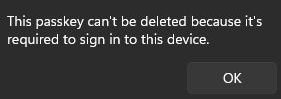
MS passkey can not be disabled, I tried many times, since I do not like the idea of always being logged in without any verification at all, it is just multiple UAC prompts.
  • Microsoft Authenticator may fall into the same boat as the TOTP authenticator.
Microsoft Authenticator is one thing that MS did right, it is the only Authenticator that allows people to log into Windows directly without anything else.
 
Microsoft Authenticator is one thing that MS did right
I personally found it convenient. I have some misgivings about revoking the authenticator's access, though. The last time I tried, changing the password and revoking all active sessions didn't revoke access to the authenticator, meaning you can still grant log-ins or 2FA approval despite the password change. You would have to do some obscurely-documented EXTRA thing to remove access.

There was also the problem of adding a fingerprint on Android that doesn't invalidate biometric access to the authenticator. Someone with your PIN would be able to add a fingerprint and gain access to the authenticator.

I generally distrust Microsoft (more than Google) when it comes to account protection and recovery.
 
If you use MSA, it is not an option.

View attachment 296017
That screen looks like you are trying to delete the passkey from your Windows device, not your Microsoft account. With all the passkeys deleted from your Microsoft account and resetting the Windows Hello option, can you still log into your Microsoft account from an incognito browser?

I have the same experience with the required login passkey on a Windows device. I don't know how that works regarding Windows login, because passkeys are theoretically designed to work with a website, with a domain and all.
 

You may also like...