I cannot re-install Chrome, please help!!

Status
Not open for further replies.

Ellie Otani

New Member
Thread author
Verified
Dec 3, 2014
32
1
7
45
Chrome had BuyNsave extension and it kept coming back on Chrome. It is my son's PC and he has been having this issue for a month.

I ran MalwareBytes, SuperAntiSpyware, but it did not help. I run a scan with ADWCleaner and deleted item, then Chrome still had BuyNSave. I could not uninstall Chrome with Property menu, so I used Geek uninstaller and forced removal. Then, I found I cannot re-install Chrome.

After facing the Chrome issue, I rolled back the PC, to the point before running ADW Cleaner. But, even after I went back to the restore point and undo ADW Cleaner scan, Chrome is not working.

Now, Chrome is still in the program list, but it does now work. I can probably uninstall it, but re-installation always rails with a message "cannot connect to internet" or "HTTP 403 forbidden error."

How can I reinstall Chrome??
 
Thank you for your advice Donetao, but I can uninstall Chrome now. I actually forced uninstall using Geek Uninstaller, but I guess I made some reversible change??? I cannot roll back to make the Chrome work. Anyway, my problem now is I cannot re-install Chrome. Installer gives me an error and stop working. Please help.
 
Hi I'm not sure I'm supposed to be in this section, but sense it's letting me post here try this free ware program to remove all left over files and folders. Some times software won't install when there are files left behind after a uninstall. Do not be afraid of this program. It's great for finding left over files that prevent you from reinstalling software!
http://www.voidtools.com/downloads/

http://www.voidtools.com/faq/
 
Hi Google Chrome installs a ton files on your PC. Search Everything will find them. Then you can delete them by right clicking in Search Everything! Hopefully then you can reinstall Chrome. Just Type Google Chrome in the search bar at the top of Search Everything and it will find all the left over files!
Cheers!
 
I cleaned up all the left over files (with Geek Installer) and try a clean install. I think I messed up some necessary component. Since it did not work, I rolled the system back, but Chrome does not work still. Thanks anyway.
 
Hi! I can not help if you don't follow my advise! I do know (Geek installer.) I know I use REVO and Search Everything when ever I uninstall a program and it always works for me. I also use regedit but if you're not familiar with the registry, don't go there.
Good luck! This is all I know after 10 years of helping on forums like MT;)
PS The world will not end if you can't install Google Chrome.;)
 
I thought you were suggesting what I have already did. If you are willing to help me, I will follow your direction. Now, do you want me to uninstall Chrome from control panel and clean up the remaining with Revo Uninstaller? Should I show you the error message from Chrome installer?
 
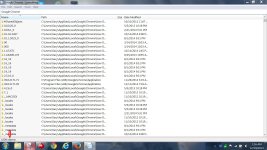
I just used Search Everything for Google Chrome. There are 1,008 files for Google Chrome!
That's a lot of files! If you think Geek uninstaller found all 1,008,then you should be able to reinstall Google Chrome!
 

Attachments

  • Capture48.JPG
    Capture48.JPG
    365 KB · Views: 67
Will you stay there for me while I follow your advice? The error I am getting from Chrome installer is HTTP403 Forbidden error, though. Is it caused by left over files?
 
I thought you were suggesting what I have already did. If you are willing to help me, I will follow your direction. Now, do you want me to uninstall Chrome from control panel and clean up the remaining with Revo Uninstaller? Should I show you the error message from Chrome installer?
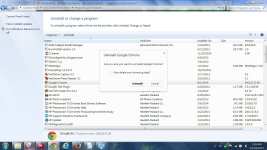
If Google Chrome shows up in programs and features; yes remove it there. Yes you can use REVO uninstaller to uninstall Chrome. Then clean up left over files with Search Everything.
 
Hi do you see this ?? If you do place a check mark in "Also delete your browsing data!
 

Attachments

  • Capture48.JPG
    Capture48.JPG
    203.1 KB · Views: 72
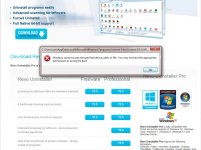
I think I messed up the internet setting or something. I cannot download Revo Uninstaller. See the error message. I think this is the same reason I cannot install Chrome.
 

Attachments

  • Capture.JPG
    Capture.JPG
    103.6 KB · Views: 76
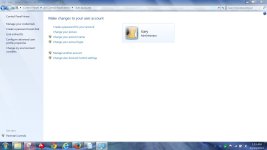
How can I find the current log in privilege? I could download and install anything before. Some thing might have changed my privilege level. Can you show me how to check it?
 
Go into control panel and check user accounts!
 

Attachments

  • Capture48.JPG
    Capture48.JPG
    98.1 KB · Views: 67
Status
Not open for further replies.