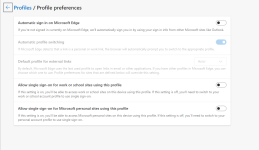
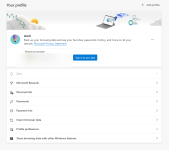
Advice Request I decided not to have online profile, synching in the Edge.

Please provide comments and solutions that are helpful to the author of this topic.

amirr

Level 27
Thread author
Verified
Top Poster
Well-known
Jan 26, 2020
1,614
1
5,545
2,569
42
Some people do not like to syn, and I thought myself to try that:
1681611761697.png 1681611808594.png

I always want to evaluate my needs and adjust settings for better performance and productivity.
Meanwhile, I will read the links below, I wanted to know if any members here also do not like having profile in their browser to sync/save.

 
Not that busy at the moment, taking a long break but I still love my Safari sync and everything is there. My passwords, as well as my codes for 2FA. If I were to use Edge, I’d sync that too.

I’ve enabled Advanced Data Protection for iCloud though.
 
For syncing you have to login, this makes it far easier to track you and track you using different devices (all with the honest and only intent to increase the convenience and provide you with better and more relevant product suggestions).

Using two browsers for different purposes, is a good idea because not all settings can be altered using a profile. In the past I used two profiles in Edge, but since I used policies to lock Edge down, I am keeping a vanilla Chrome at hand to check whether my settings block something.
 
Syncing is a must for me, but Edge's sync has some issues in my experience. I already knew and tested on my own PC, but this time tested on a different PC to be sure.
I stayed at a relative's house for two days more than a week ago and logged into my Edge, Chrome and Firefox on their rarely used PC. Later I logged out, but on my PC and Android's Edge that device info is still shown. I see it right now in "Sent to you devices" option as well as in Device info in sync-internals logs. For Chrome and Firefox, the device info was immediately deleted after I logged out. Now the solution for Edge is to Reset sync, which in the past broke history syncing many times for me.
So yeah, multi device syncing is for convenience, and it helps me in many cases. I don't like to use multiple browsers. I'm happy with the privacy that my adblocking DNS and adblocker provide. The only case where I use another browser is when I download malware/browser malicious site for testing, and I have portable Chrome and Firefox for that. Chrome is the best in syncing, followed by Firefox. I should add that Brave, Opera, Vivaldi, can not sync full history. They say they do, but outright lie to you. False marketing. Edge is almost the same as Chrome, but still has bugs. Firefox has one benefit that you can just copy your profile folder into another PC's Firefox profile, and you'll have all your settings, customization and cookies. You don't have to use Firefox sync for this.
 
I do not see reason to use Edge without sync, then I would just use Firefox instead.
I like MSA integration. Edge syncs to MS authenticator and can use UAC for autofill.
Not to mention that if you use MSA, you can simply remove history/searches online.
In your case these are excellent reasons to use it.
 
Signing into your browser is always optional.

Microsoft doesn't have a clear method, it is worth checking out both options.
Edge: Microsoft privacy dashboard and Reset Sync
This will delete your browsing sync data from Microsoft servers and stop sync on all your devices. Browsing data on your devices will not be deleted.

Google let users delete their Sync data.
Chrome: Chrome data in your account
This will clear your Chrome data from your Google Account. This won't clear any data from your devices.

Firefox and Opera also require an account for data sync. Brave uses a Sync Chain instead.
 
Brave’s sync is unreliable and thus been unusable in my experience.
Would that be V1 or V2, or both?

I haven't used either, I prefer to manually backup my Bookmarks and import specific folders. The rest I have no reason to sync. For sharing links between devices, could be useful.
 
Last edited:
  • Like
Reactions: roger_m and amirr
Would that be V1 or V2, or both?

I haven't used either, I prefer to manually backup my Bookmarks and import specific folders. The rest I have no reason to sync. For sharing links between devices, could be useful.
I only used V2 for about a month after they launched it. It just didn’t always sync. I grab tabs back and forth between my phone and pc during the workweek. Edge, Firefox, and Chrome have all worked with no issues for me.
 
  • Like
Reactions: roger_m and amirr