Battle Internet Security for Online banking Computer

Status
Not open for further replies.

Spirit

Level 2
Thread author
May 17, 2012
1,832
59
63
36
www.malwaretips.com
Hi,
I have asked you few question before about my friend computer.He had one more query.
He do online banking work and he want to buy a security suite for him
Please suggest one:

He have windows 7 pro 32 bit on his pc and using avast free and mbam free but now he want to buy security suite as he feel unsafe with free setup :D
 
Emsisoft Security Suite because it has:

EAM and its super detection rate.
Online Armor Premium with its Banking mode & Anti-Keylogger features.
 
All you need is a clean malware-free computer. Here are some tips, more can be found on the Internet.

1. Be aware of Phishing sites.
2. Check for HTTPS.
3. Use IE, FF or Chrome in Private/Incognito mode with ALL extensions disabled.
4. KeyScrambler Personal for IE or FF - (for piece of mind).

Don't forget that websites can track you, even with an anti-logger installed.

So don't believe that these software will protect you/your friend.

Some software for banking; Trusteer Rapport, Prevx SafeOnline.
 
i think every product mentioned above is good for online banking.....i would prefer Avast for its web filter and also it has safezone in AIS which creates virtual environment for online shopping....
 
You don't need a special security setup for online banking.
Just a basic free antivirus and Windows Firewall is sufficient.

I have been doing online banking for many years and never had a problem.

As long as you always make sure that you are on your banking sites correct address and use a secure password manager like LastPass or Roboform that encrypts your log on info, so if you happen to get a keylogger malware it can't detect what the password manager fills in.

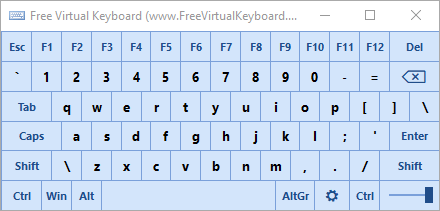
If you have to manually log on to your banking site, use a virtual keyboard, they are free ones available. Keylogging malware can't detect the keys entered by a virtual keyboard.

Most web browsers today already have phishing protection, but it doesn't always detect everything.

The best protection is manually checking the url address and making sure that it is your online banking site.

The major form of identify theft is fake online banking sites, keep your online banking site bookmarked for easy access and never click any other links claiming to be your banking site.

Enjoy!!:D
 
  • Like
Reactions: Exterminator
I agree with Earth,ZOU1 and Littlebits...I have keyscrambler just for that reason so even if I had malware on my laptop it couldn't record my REAL info :)
Plus I also have very secure passwords
 
  • Like
Reactions: Gnosis
Not sure about this, but will have to go with Sandboxie. Reason, well you can close the browser and terminate it without any trouble, but since I don't have that installed it will have to be Trend Micro.
 
you could always create a VM just for internet banking, delete it and re-create it as many times as you would like. I know there are certain malwares that can jump into VM's but they seem to be very rare.
 
freevkb.png


Free Virtual Keyboard

Run it from your portable USB flash drive
Free Virtual Keyboard is a totally portable application, meaning that you can put it on any USB stick and run it directly from there. In this way, your interactive keyboard will always be with you.
The settings are stored in the FreeVK.ini file located in the program installation folder. If it's impossible, settings are stored in the registry.

Homepage
Download (portable executable)

Keylogging malware can not detect info used on a virtual keyboard when logging onto your banking site. This is just one of many freeware virtual keyboards that can help you safely log on to your banking site.

Enjoy!!:D
 
Status
Not open for further replies.