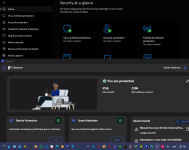
Can registering F-secure be selected during setup? never used before.run F-Secure unregistered


Open MalwareTips from your Home Screen or desktop. Follow discussions, find answers and pick up where you left off.
If you cannot find an install option, update your browser or use its bookmark option to keep MalwareTips close.
After installation, open the app and sign in. Enable push notifications in Preferences if you want alerts. On iPhone and iPad, push requires a Home Screen web app and iOS or iPadOS 16.4 or later.
Sign in to manage notificationsInstallation is optional. Your notification settings stay under your control.
Can registering F-secure be selected during setup? never used before.run F-Secure unregistered

HypersecurityI recently decided to increase the security on my primary windows pc by making MS Defender the registered AV, DeepInstinct is now unregistered but continues to work in real-time, and Cyberlock. The response time on that pc slowed just a tad in this confg, I notice it but not annoying, (yet) meanwhile, my VM(s) continue to run normally fast. But MSD with Cyberlock is probably enough, but I have the license for DeepInstinct and its website encourages you to run it with MSD.

I use F secure in combination with Windows Defender and it works great so far!
Yes, both work and they work perfectly... I think F secure has the advantage, although for example Defender catches it just as well! They have no disagreements, I haven't noticed any slowdowns in my PC. I've been using it for a long time.. And sandboxie too!


"Security is always excessive until it's not enough." - Robbie Sinclair, Country Energy, NSW AustraliaHypersecurity

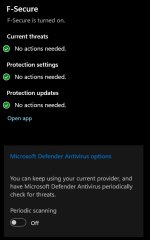
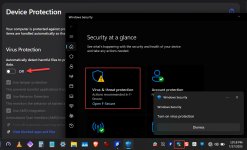
Yes, here you go... It does everything perfectly...How are you doing that? F-Secure on install takes over Windows Security, with the possible option of running the Periodical scan?
By the way, I use it with GlassWire free, it's my favorite combination
View attachment 289852
View attachment 289853


"Security killed the Windows""Security is always excessive until it's not enough." - Robbie Sinclair, Country Energy, NSW Australia
Acadia


I lose data by hdd failure before malware manages to touchI still prefer a 3rd part AV + additions, maybe because Defender was all but useless for years & maybe old habits die hard? Actually as I remember Windows 3 & 3.11 had a basic AV scan that was not updatable but you could do a scan with it - Have I dreamt this??


I second this. Defender may be alright for an advanced user, since it should be paired with hardening software. Usually, regular users don't want to deal with these tools, so a solid third-party AV is usually the better choice.It may be enough for MalwareTips members but it's absolutely not enough for a regular consumer that knows nothing about computers or technology. It lacks web protection no regular person is going to be like "ohh yeah" lets pair it with Malwarebytes browser guard, or osprey browser protection, or Bitdefender traffic light, a regular consumer isn't going to know what's effective and what's not.


I use F secure in combination with Windows Defender and it works great so far!
Yes, both work and they work perfectly... I think F secure has the advantage, although for example Defender catches it just as well! They have no disagreements, I haven't noticed any slowdowns in my PC. I've been using it for a long time.. And sandboxie too!
Yes, here you go... It does everything perfectly...
"Security is always excessive until it's not enough." - Robbie Sinclair, Country Energy, NSW Australia
Acadia
Windows defender settings are all enabled by default.. And F-Secure is on a 6 month license, everything is turned on from the engine.. And it works perfectly. I haven't touched the system for 2 years! Believe it or not people!I'm still "vague" on using both. You left MSD as registered AV and run F-Secure unregistered, or visa versa, in which case MS Defender usually turns off.
Members who viewed this thread in the last 5 minutes