Troubleshoot Kaspersky IS and Google Chrome

jackuars

Level 28
Thread author
Verified
Top Poster
Well-known
Forum Veteran
Jul 2, 2014
1,730
6,046
2,669
36
I started using Kaspersky IS, and the issue that I'm facing with is in Google Chrome. Am unable to access any Google site: Search, Youtube, GMail, whereas other sites like DuckDuckGo etc works fine. What is the issue? And can someone tell me a possible solution.

By the way the same problem doesn't happen with Opera or Cent Browser.
 
Can you elaborate what exactly do you face (or what message do you get) when you try to access google sites on Chrome?
Also, make sure that the google sites are actually google sites, and not malicious duplicates (in case kaspersky warns about it).
Do they have the green 'https' indicator on the navigation bar to the left of the link?
Kaspersky shouldn't block that way (UNLESS YOU'VE DROPPED CHROME TO LOW TRUST OR SO!
 
Upvote 0
@XhenEd The issue happens only with Google Chrome, but not on any other browser. Yes it should be a Kaspersky certificate problem. But since am new to the software I've no idea how to resolve it.

@harlan4096 Am using KIS 2017. The date and time are right. The issue also happens with Facebook, Yahoo but not all HTTPs sites since DuckDuckGo works without any issue.

@Parsh Obviously not a malicious URL: https://www.google.com/gmail/

This is the message that I get.

This site can’t be reached
www.google.com unexpectedly closed the connection.

Try:

ERR_CONNECTION_CLOSED
 
Upvote 0
Ok, so I fixed the problem by turning off Private Browsing feature of Kaspersky that's automatically turned on while installation by the Kaspersky Protection extension added to Google Chrome.

But what protection do I lose? Can I turn it on somehow and yet exclude these sites from Private Browsing settings? What's the optimal measure.

What I dont' understand is that, even when Allowing data collection after turning on Private Browsing, the sites fail to load.

VrkIYF1.png
 
Upvote 0
It seems to be a known issue with Kaspersky and they are working on it.:)
Kaspersky> Settings > Additional > Network > Traffic Processing > uncheck Inject Script > reboot
Kaspersky > Settings > Additional > Network > Do not scan encrypted connections > reboot.

Problems with the internet with version 17 - Kaspersky Lab Forum
 
Upvote 0
It seems to be a known issue with Kaspersky and they are working on it.:)
Kaspersky> Settings > Additional > Network > Traffic Processing > uncheck Inject Script > reboot
Kaspersky > Settings > Additional > Network > Do not scan encrypted connections > reboot.
Problems with the internet with version 17 - Kaspersky Lab Forum

Is disabling script injection and and scanning encrypted connections the more safer measure, as it affects various other components Secure data input, Safe money, Private Browsing and various other features, or simply disabling Private Browsing the better option as it solves the problem too?
 
Upvote 0
Is disabling script injection and and scanning encrypted connections the more safer measure, as it affects various other components Secure data input, Safe money, Private Browsing and various other features, or simply disabling Private Browsing the better option as it solves the problem too?
Disabling "private browsing" would seem to be the safer option.
harlan4096 would be better at answering this;):)

PS.
You could go back to the 2016 version which doesn't have these issues and wait for the fix from Kaspersky;)
 
Upvote 0
Disabling "private browsing" would seem to be the safer option.
harlan4096 would be better at answering this;):)

PS.
You could go back to the 2016 version which doesn't have these issues and wait for the fix from Kaspersky;)

Thanks for you input. Guess he's already watching the thread.
 
Upvote 0
Last edited:
Upvote 0
Before disabling "Kaspersky Protection" add-on and/or the injection of the script or scan of encrypted connections completely, I will check this:

1.- Check if is there some suspicious extensions/add-ons installed in Chrome, and/or run a re-set of Chrome settings.

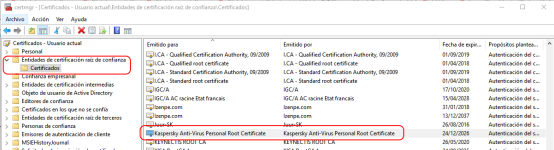
2.- Check if is installed or not the "Kaspersky Root Certificate" (and if there is more than 1) in Windows Certificates Manager:
Sin título.png
 
Upvote 0
Is disabling script injection and and scanning encrypted connections the more safer measure, as it affects various other components Secure data input, Safe money, Private Browsing and various other features, or simply disabling Private Browsing the better option as it solves the problem too?
this happened to me when I tried KIS 2016, I couldnt open those sites, but it's different when I tried KTS 2016, with Private Browsing enabled, I could visit those sites with no problem, bug on KIS?
 
Upvote 0
Before disabling "Kaspersky Protection" add-on and/or the injection of the script or scan of encrypted connections completely, I will check this:

1.- Check if is there some suspicious extensions/add-ons installed in Chrome, and/or run a re-set of Chrome settings.

2.- Check if is installed or not the "Kaspersky Root Certificate" (and if there is more than 1) in Windows Certificates Manager:

1. It's newly installed Chrome, and there are no extensions, except Kaspersky Protection addon. I even tried Incognito mode, it still doesn't work with Privacy Protection enabled.

2. Kaspersky Root Certficate is installed.
 
Upvote 0