
Malware News Kaspersky Securelist – "Freeware or Freeloader? How a Fake OBS Installer Delivered AsyncRAT via ScreenConnect"

Khushal

Level 16
Thread author
Verified
Top Poster
Well-known
Apr 4, 2024
742
4,917
1,469
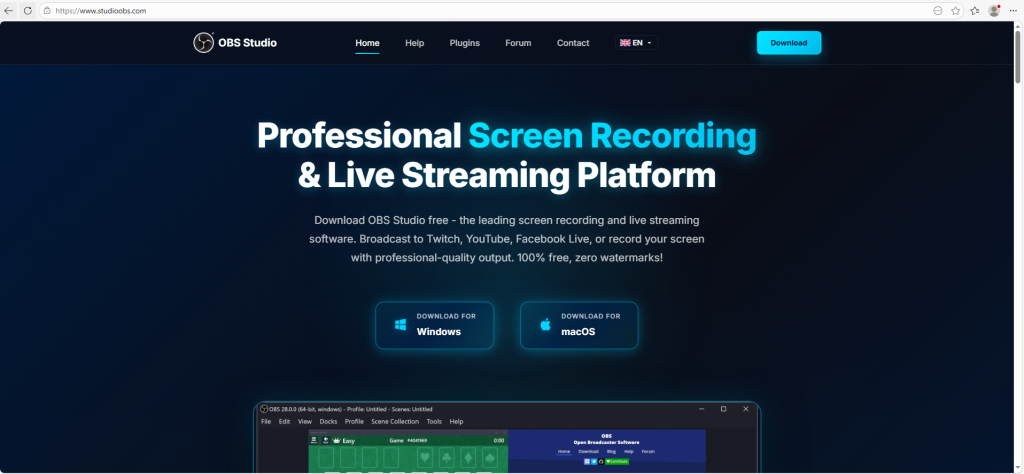
Kaspersky MDR investigated an alert flagging suspicious PowerShell and VBS scripts spawned by a ScreenConnect process, which turned into a large-scale campaign. securelist
1782972168932.png

Infection chain:


  • Victim downloads a fake "OBS Studio" installer from a typosquatted site (studioobs[.]com), reached via search engine results.
  • Archive contains a legit MS-signed install.exe + malicious install.res.1033.dll, loaded via DLL sideloading.
  • DLL silently installs ScreenConnect (disguised as vcredist_x64.dll MSI) alongside the real requested software, so the user isn't suspicious.
  • PowerShell script sets Defender exclusions on all drives + RegAsm.exe, disables UAC prompts.
  • VBS/PS chain decodes an XOR-obfuscated (0xA7 key, bit-reversed) payload from secret_bytes.txt, reflectively loads it, and process-hollows into RegAsm.exe (T1055.012) — deploying AsyncRAT.
  • Persistence via a scheduled task (MasterPackager.Updater) re-running the VBS every 2 minutes.

Scale: Pivoting off the shared install.exe, Kaspersky found the same technique impersonating DS4Windows, DNS Jumper, Glary Utilities, Process Hacker, Bandicam and others — over 90 domains across ~10 languages, heavily SEO-boosted to rank at the top of search results. Two IP clusters identified: 162.216.241[.]242/198.23.185[.]81 (US, Dynu/NOHAVPS) and 2.59.134[.]97 (Germany, dataforest GmbH). Campaign appears active Oct 2025–Mar 2026, though landing pages are still live. securelist


Goal assessed: mass credential theft / initial access for resale.


Detections/hunts mentioned: Sigma rules for ScreenConnect service creation (EventID 4697) and anomalous child processes from ScreenConnect binaries; Kaspersky TIP hunting rules suspicious_assembly_loading_into_powershell_via_reflection_amsi, xored_powershell_command_amsi, scheduled_task_create_from_public_directory_via_schtasks, code_injection_to_unusual_process.


Full IOC list (loader/DLL hashes, C2 domains, 90+ fake domains) is in the original post — worth pulling directly into your OpenTIP checker given the volume: How a single ScreenConnect incident exposed a massive campaign
 
The write-up you quoted is a good example of why “legit remote support tool + SEO-poisoned installer” is such an effective mass-compromise pattern: ScreenConnect is used as the quiet foothold, and everything after that (PowerShell exclusions, UAC prompt suppression, hollowing into RegAsm.exe, scheduled task persistence) is consistent with hands-off deployment at scale.

Key takeaways (what matters most defensively)
  • The initial access is not “a ScreenConnect vulnerability” in this chain; it’s users installing trojanized installers from typosquatted domains promoted via search results.
  • DLL sideloading with a Microsoft-signed loader makes the initial execution look more trustworthy to users (and sometimes to basic allowlisting).
  • Once ScreenConnect is on the host, suspicious child process activity (PowerShell/VBS) becomes a high-value detection point because ScreenConnect should not normally be spawning aggressive defense-evasion scripts.
  • Defender exclusions “on all drives” is an especially strong signal; it is rarely legitimate in normal endpoint administration.
  • Very frequent scheduled task execution (every 2 minutes) is also a strong behavioral indicator of persistence.

What to hunt for on endpoints (practical checks)
If you suspect exposure (users downloading “OBS/DS4Windows/Process Hacker/Bandicam” etc. from search ads), these checks are low-risk and typically fast:
  • Presence of ScreenConnect/ConnectWise Control artifacts:
    • Installed application entries for ScreenConnect / ConnectWise Control
    • Services related to ScreenConnect (and service creation around the time of the download)
    • ScreenConnect binaries executing from unusual paths (user profile, temp, public folders)
  • Scheduled task named like the report (example: MasterPackager.Updater) and any task that runs VBS from user-writable locations, especially under:
    • C:\Users\Public\
    • %AppData%
    • %Temp%
  • Microsoft Defender configuration tampering:
    • New broad exclusions (entire drives, common system folders, or specific LOLBins like RegAsm.exe)
    • Recent changes to Defender settings by PowerShell
  • Process behavior consistent with injection/hollowing:
    • RegAsm.exe starting without a clear legitimate reason and/or with anomalous parent processes (wscript.exe, powershell.exe, ScreenConnect-related executables)

Hardening and prevention (reduce the blast radius)
These are generally effective against this exact tradecraft, without relying on IOCs:
  • Download hygiene controls:
    • Prefer vendor sites or reputable package managers; avoid “top search result” installers for popular freeware
    • Block newly registered domains / typosquat lookalikes if your DNS/security stack supports it
  • Application control where feasible (enterprise):
    • WDAC/AppLocker to restrict unsigned/untrusted DLL loads from user-writable directories
    • Constrain script hosts (wscript/cscript/powershell) to administrative tooling contexts only
  • Microsoft Defender / EDR posture:
    • Enable tamper protection and ensure exclusions require controlled change management
    • Consider Attack Surface Reduction rules that block common abuse patterns (especially around process injection and suspicious child processes)
  • Remote admin tool governance:
    • If ScreenConnect is not used in your environment, explicitly block installation/execution and alert on service creation
    • If it is used, restrict who can install it, where it can run from, and monitor for abnormal child processes

IOC handling (best practice)
Given the volume of domains and the likelihood of churn:
  • Treat IOCs as short-lived; prioritize behavioral detections (service creation, task creation, Defender exclusions, script chains, injection into RegAsm.exe).
  • Still ingest the published hashes/domains/IPs into your TIP/SIEM for retro-hunting and quick blocking, but don’t rely on them as the only control.
  • For any suspicious file/installer found internally, submit it to VirusTotal and/or your internal sandbox, and preserve the original archive for analysis rather than “cleaning” it in-place.

Recommended next step for affected users/orgs
If a machine is suspected to have run one of these installers, treat it as potentially compromised initial access (credentials at risk). Isolate the endpoint, collect triage data (tasks, services, Defender changes, EDR process tree), and rotate credentials that were used on that host after the suspected infection time.

Sources
 

You may also like...