Kaspersky slows down videos

Status
Not open for further replies.

motox781

Level 10
Thread author
Verified
Well-known
Apr 1, 2015
483
1,746
869
USA
KTS 2018. Windows 10 x64 1703. Chrome x64 ver. 60

Problem: I noticed a slow down on videos. Stops loading video. I have to close Kapsersky and video will load fine. I tried to disable "scan encrypted connections". Didnt work. Also tried to re-install Kapsersky. Didn't work. Any ideas?
 
  • Like
Reactions: AnonMan
Hello mate,

Sometimes, only on Windows, i experience the same thing (KIS18). No slow downs, but when i try to load the video, it's just a black screen. Usually refreshing the page is the solution, but if i were you i'd try disabling the web component first. If this works, then we can focus on disabling little options on the web component until we realise which one is the problem. Tell me how it goes.
 
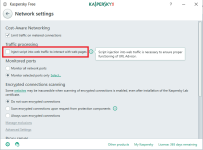
you can try this and please tell us the result
if you are watching youtube on chrome, install the extension: h264ify
it helps a lot to reduce CPU usage

EDIT; also disable anti-banner. It usually causes significant slowdown and incompatibility
 

Attachments

  • Untitled.png
    Untitled.png
    35.8 KB · Views: 594
Last edited:
Status
Not open for further replies.