Battle Free AV: Kaspersky vs Avast

Status
Not open for further replies.
Compare list
Avast free
Kaspersky free
Windows defender is free and has no ads, wouldn't that be a better option?
For a novice user default WD configuration is insufficient. I would rather opt for kaspersky Free because out of the box it offers much better protection especially web based protection and also its low impact on the system performance.
 
For a novice user default WD configuration is insufficient. I would rather opt for kaspersky Free because out of the box it offers much better protection especially web based protection and also its low impact on the system performance.
I am interested in this discussion too. Between Kaspersky Free and Avast Free, which one has lower system impact, in your experience? I have trust in the protection of both.
 
For a novice user default WD configuration is insufficient. I would rather opt for kaspersky Free because out of the box it offers much better protection especially web based protection and also its low impact on the system performance.
What be this insufficient configuration? it would be the ransomware option unchecked? Apart from that detail, I don't see anything that a third-party antivirus does, in fact, the third-party antivirus usually has useless things like cleaning the pc.

Finally, I agree about the system impact, Defender consumes a lot of hard disk.
 
Last edited:
Kaspersky for sure, I've known it for 24 years, from when it was AVP (AntiViral Toolkit Pro) I remember it blocked even destructive MS-DOS commands like del *./y and deltree if they were used to delete files from Windows systems, for me that was impressive at the time. If a friend was going to try to harm you, if you had Kaspersky installed, you were protected. Which AV had that capability? None of them. That's when I got interested in using it. And to this day it is always first or second, always guarantees a place on the podium every year among the best AVs.;)
 
Between Kaspersky Free and Avast Free, which one has lower system impact
It's system depending I got a mix of older laptops that me and my other family members use for daily light duty on some laptop Avast is lighter but on other it's the reverse.
Avast will bombard you with upselling popups.
It's not just upselling popup it's also scaremongering popups that makes it look like you got a issue, if do dns level filtering e.g Nextdns, pihole, adguard etc you get get rid of most the ads in the gui blocking this domain "ipm-provider.ff.avast.com"
 
I tried KSC recently, and it upgraded me to KFA. For some reason, KFA doesn't have "existing virus removal" listed the comparison chart. Also, popups for upgrades still show up once in a while even though any notification I can think of related to that has been unchecked.

For Avast, I tried Avast One, and it has similar performance score as KFA using Novabench free (no GPU test). I also could not uninstall modules that I don't need, like the firewall and VPN. Finally, I don't think it has dark mode.

Finally, I tried Avast free, and it's the lightest of the three using Novabench. I could also choose not to install unneeded modules, and no popups occur when I use silent mode and check boxes in the do not disturb mode settings.
 
I tried KSC recently, and it upgraded me to KFA. For some reason, KFA doesn't have "existing virus removal" listed the comparison chart. Also, popups for upgrades still show up once in a while even though any notification I can think of related to that has been unchecked.
I don't know if You already saw my answer about that matter of "Existing Virus Removal" in KFA, in Wilders:


Anyway, I will post again here, for any user is also interested in that:

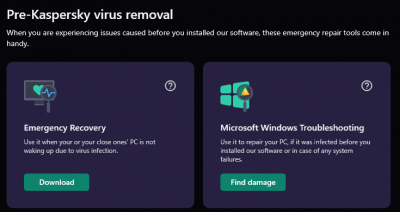
About this matter, I think that chart is referring to these 2 tools:

Pre-Kaspersky virus removal
upload_2023-1-31_9-33-11.png


Emergency Recovery, You can manually download the iso and burn it in a USB device.

Microsoft Windows Troubleshooting Wizard, usually checks some registry keys system for modifications.

Does that means KFree can't remove preinstalled malware in a system? Totally false...

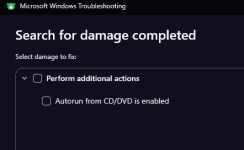
In conclusion, that "Existing Virus Removal" is just a "marketing words" referring to 2 features, one of them is K. RESCUE DISK, that You can download manually, and the other is just a Windows Registry scanning for modifications in the system:
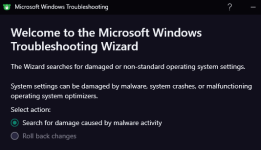
1675500205626.png

1675500237221.png

This last one does not perform any malware removal, but restore some changes that malware could change in the system.
 
Avast will bombard you with upselling popups.
Only when you keep performing the smart scan. Without that Avast FREE will show you once a week a popup. I have Avast free on my wife's laptop and like it a lot, because of all the extra's it has.

I agree with @legendcampos Microsoft Defender with Configure Defender on MAX is IMO the best free option (when applicable add secondary partitions and disk devices to the protected folders list). Downside of MD is that it shows notifications of things blocked which people can ignore 99,99 % of the time. From novice user interface perspective, those low risk popups of MD are very confusion. I have no idea why it is impossible to prevent those irritating MD pop-ups appearing (have an option to log them only as notifications).

I like Kaspersky Free also, but because my son's girlfriend is Ukranian, it is a bit sensitive to use Russian software at home (I showed my wife that AdGuard is Cyprus based ;))
 
Last edited by a moderator:
I tried KSC recently, and it upgraded me to KFA. For some reason, KFA doesn't have "existing virus removal" listed the comparison chart. Also, popups for upgrades still show up once in a while even though any notification I can think of related to that has been unchecked.

For Avast, I tried Avast One, and it has similar performance score as KFA using Novabench free (no GPU test). I also could not uninstall modules that I don't need, like the firewall and VPN. Finally, I don't think it has dark mode.

Finally, I tried Avast free, and it's the lightest of the three using Novabench. I could also choose not to install unneeded modules, and no popups occur when I use silent mode and check boxes in the do not disturb mode settings.
This happened to me, I used KSC which had no notifications, so it became KFA, I didn't like the interface, I found it confusing and also many ad notifications even unchecking it, I ended up uninstalling it.
 
Let the Avast alone, Kaspersky without of doubt is much better.
Avast = Trash

PS: Coming from a company that buys similar products that add nothing and keeps them, what's the point? Isn't it better to unite everything than to pretend they are different companies? How ridiculous this is.

This is just a comment regarding me calling it "rubbish", it's my point of view and opinion. I hardly change it.
 
Status
Not open for further replies.

