


Advanced Plus Security Kongo's Computer Security Config 2026
- Thread starter Kongo
- Start date
You are using an out of date browser. It may not display this or other websites correctly.
You should upgrade or use an alternative browser.
You should upgrade or use an alternative browser.
- Last updated
- Apr 29, 2026
- How it's used?
- For home and private use
- Operating system
- Windows 11
- On-device encryption
- BitLocker Device Encryption for Windows
- Log-in security
- Hardware security key
- Security updates
- Allow security updates and latest features
- Update channels
- Allow stable updates only
- User Access Control
- Always notify
- Smart App Control
- On
- Network firewall
- Enabled
- About WiFi router
- AiProtection Pro by TrendMicro (ASUS ROG Rapture GT-AXE11000)
- Real-time security
- Deep Instinct Endpoint Protection
CyberLock (AutoPilot)
- Firewall security
- Microsoft Defender Firewall with Advanced Security
- About custom security
- Hardening tools:
- Cyberlock with Intelligent Firewall set to "Aggressive"
- Cyberlock with Security Posture set to "Aggressive"
- Run by SmartScreen (forces SmartScreen to scan files of choice)
- O&O ShutUp10 (recommended settings)
- O&O AppBuster (removed unecessary Windows 11 apps)
- Windows Sandbox
System settings:
- Reputation Based Protections (all modules enabled)
- Smart App Control enabled
- Data Execution Prevention set to AlwaysOn
- Core Isolation: Memory Integrity enabled
- Kernel-mode Hardware-enforced Stack Protection enabled
- Local Security Authority Protection enabled
- Microsoft Vulnerable Driver Blocklist enabled
- Memory Access Protection enabled
- Secure Boot enabled
- Drives encrypted via TPM (BitLocker)
- Windows Update Delivery Optimization disabled
- AutoPlay disabled
- Network Discovery disabled (Public Firewall profile)
- PowerShell --> Constrained Language Mode
- Hide extensions for known file types --> disabled
- Show hidden files --> enabled
- Virtualization enabled
ㅤ
- Periodic malware scanners
- ESET Online Scanner, X-Sec
- Malware sample testing
- I do participate in malware testing. See details about my testing environment below.
- Environment for malware testing
- ㅤㅤㅤ
VMware Workstation Player + Mozilla VPN on host machine while connected to the guest network.
Online Malware Analysis Platforms that I use:
- FileScan.iO
- Intenzer Analyze
- Hybrid Analysis
- VirusTotal
- Sophos Intelix
- ANY.RUN
- Triage
- Kaspersky Threat Intelligence Portal
- UnpacMe
- Qianxin Online Sandbox
--> Currently I am barely testing
- Browser(s) and extensions
- ㅤ
Mozilla Firefox
Extensions:
- JShelter
- Ghostery
- Bitwarden
Browser privacy and security settings:
- Tracking protection: Strict (enables Total Cookie Protection)
- Enable secure DNS using: Max Protection (ControlD)
- HTTPS-only-mode enabled
- DuckDuckGo set as search engine
- Clearing browsing data on exit
- Search suggestions disabled
- Websites overview disabled
- Blocking incoming location, camera and microphone requests
- AutoPlay for audio and video disabled
- Firefox telemetry disabled
- Blocking pop-ups and third-party redirects
- Warn when websites try to install addons enabled
- Protection against fraudulent content and dangerous software enabled
- AI features are blocked
ㅤㅤ
- Secure DNS
- ㅤ
- ControlD with balanced native-blocklists + OISD-big (Network-Wide)
- ControlD with strict native-blocklists + Ai Malware Filter (Aggressive) + Hagezi Ultimate + Hagezi TIFs + Automatic IP redirect over Proxy (Only browser)
ㅤ
- Desktop VPN
- /
- Password manager
- ㅤBitwarden Premium
- Maintenance tools
- PatchMyPC, UniGetUI, GeekUninstaller, Process Lasso and Windows built in tools for cleaning and optimization
- File and Photo backup
- ㅤbackup to external drive when necessary
- Subscriptions
- Google One Standard 200GB
- System recovery
- Aomei Backupper
- Risk factors
- Browsing to popular websites
- Browsing to unknown / untrusted / shady sites
- Opening email attachments
- Buying from online stores, entering banks card details
- Downloading software and files from reputable sites
- Gaming
- Streaming audio/video content from shady sites
- Downloading malware samples
- Computer specs
- GPU: Nvidia Geforce RTX 3060 TI
CPU: Intel I5 12600K
RAM: 16 GB DDR4-3200 Crucial
Hard disks: 500 GB Samsung 970 EVO Plus + 1 TB Western Digital Blue
- Notable changes
- - Updated for year 2026
- What I'm looking for?
Looking for maximum feedback.

trying Port Authority, thanks! -- this is the first that I've heard of it.- added Port Authority to Firefox (If one uses uBlock Origin, you can simply enable the filter "Block Outsider Intrustion into LAN")
- removed Firewall Hardening
- removed Osprey Browser Protection
+ added CyberLock
- removed Osprey Browser Protection
+ added CyberLock

and take a look at SiriusLLM (runs with Cyberlock) if you haven't tried it already...- removed Firewall Hardening
- removed Osprey Browser Protection
+ added CyberLock
Oh trust me I did. I really love it but I don't want to add another tool to CyberLock + Deep Instinct. I purchased a lifetime license for CL and will just wait until SiriusGPT will be integrated. For now Deep Instinct + CyberLock is running smoothly.and take a look at SiriusLLM (runs with Cyberlock) if you haven't tried it already...
Integrate it soon @danb . I dare you!

+ added SafeToOpen to Firefox
Now my computer security is mainly based on different kinds of AI
Deep Instinct, CyberLock (SiriusGPT) and SafeToOpen
Ai is truly taking over the world - or at least my computer
Now my computer security is mainly based on different kinds of AI
Deep Instinct, CyberLock (SiriusGPT) and SafeToOpen
Ai is truly taking over the world - or at least my computer

How performs SafeToOpen lately in the detection of phishing sites?
It performs well in my tests.How performs SafeToOpen lately in the detection of phishing sites?
As an example:
phishing site that impersonates a microsoft login:
After a quick analysis of SafeToOpen:
It basically says that the website is trying to impersonate the site live.com and is therefor blocked.
So it really is working well for me here. There is no other extension of this kind that I know of.
Last edited:

It just does not load, without any extensionsIt performs well in my tests.
As an example:
Fresh phishing site that impersonates a microsoft login:
View attachment 291797
After a quick analysis of SafeToOpen:
View attachment 291798
It basically says that the website is trying to impersonate the site live.com and is therefor blocked.
So it really is working well for me here. There is no other extension of this kind that I know of.
Send me a PM and I can share it with you.

Yes, the full address loaded this time; it is quite tricky.Send me a PM and I can share it with you.
However, it was flagged by K portal and NSW.
Full details
 www.ipqualityscore.com
Malicious URL Scanner | Scan URLs for Malware | URL Checker
Scan URLs for malware and phishing with our free malicious URL scanner. Check links in real-time to detect suspicious domains and prevent cyber threats.
www.ipqualityscore.com
Thanks for the info.It performs well in my tests.
As an example:
phishing site that impersonates a microsoft login:
View attachment 291797
After a quick analysis of SafeToOpen:
View attachment 291798
It basically says that the website is trying to impersonate the site live.com and is therefor blocked.
So it really is working well for me here. There is no other extension of this kind that I know of.

Please forgive me if this question is intrusive.
Why are you using the Port Authority extension?
I have enabled this:
dev-platform@mozilla.org - Google Groups
about:config
network.lna.blocking set to true
Today I tried running this test without uBlock Origin:
Redirecting to http://samy.pl/webscan/
I'll insert the test for you (for privacy reasons, I've deleted the connections):
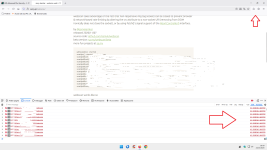
As you can see in the red arrow to the right of the Firefox browser development tools, connections have been blocked.
I can't know if your Firefox has the same settings as mine, so it would be helpful if you could run the same test and check.
Thank you for your attention and for any response.
Why are you using the Port Authority extension?
I have enabled this:
dev-platform@mozilla.org - Google Groups
about:config
network.lna.blocking set to true
Today I tried running this test without uBlock Origin:
Redirecting to http://samy.pl/webscan/
I'll insert the test for you (for privacy reasons, I've deleted the connections):
As you can see in the red arrow to the right of the Firefox browser development tools, connections have been blocked.
I can't know if your Firefox has the same settings as mine, so it would be helpful if you could run the same test and check.
Thank you for your attention and for any response.
Last edited:
Hey @Sampei.NihiraPlease forgive me if this question is intrusive.
Why are you using the Port Authority extension?
I have enabled this:
dev-platform@mozilla.org - Google Groups
about:config
network.lna.blocking set to true
Today I tried running this test without uBlock Origin:
Redirecting to http://samy.pl/webscan/
I'll insert the test for you (for privacy reasons, I've deleted the connections):
View attachment 292236
As you can see in the red arrow to the right of the Firefox browser development tools, connections have been blocked.
I can't know if your Firefox has the same settings as mine, so it would be helpful if you could run the same test and check.
Thank you for your attention and for any response.
I am sorry but I am not quite sure what your question is... Are you wondering why I am using Port Authority as a standalone extension instead of uBlock Origin with the blocklist that does basically the same?
Edit:
I get it now. My bad. So basically both uBlock Origins blocklist and Port Authority are redundant if simply enabling this in about:config? Didn't know about that.. Thank you!
Last edited:
Hey @Sampei.Nihira
I am sorry but I am not quite sure what your question is... Are you wondering why I am using Port Authority as a standalone extension instead of uBlock Origin with the blocklist that does basically the same?
View attachment 292242
Edit:
I get it now. My bad. So basically both uBlock Origins blocklist and Port Authority are redundant if simply enabling this in about:config? Didn't know about that.. Thank you!
Yes, it's the same in Chrome/Edge too.
Have a nice day.
Hello, as always, sorry to bother you (I have no idea what the medium feedback is).
After scanning the HTTP ports, today I ran the WebSocket port test.
I removed uBo + my DNS filtering.
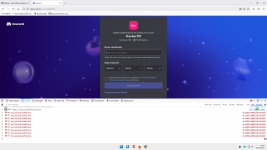
The conclusion is that PA is useless if the LNA setting is enabled.
I also enabled LNA trackers blocking, but I have no documentation on this.
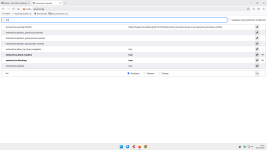
P.S.
Only for the WebSocket test, I ran it again with LNA disabled, and the port scan was still blocked.
The HTTP ports test is also blocked without LNA enabled.
So FF protects, perhaps with the settings I use, without the need for PA.
Best regards.
After scanning the HTTP ports, today I ran the WebSocket port test.
I removed uBo + my DNS filtering.
The conclusion is that PA is useless if the LNA setting is enabled.
I also enabled LNA trackers blocking, but I have no documentation on this.
P.S.
Only for the WebSocket test, I ran it again with LNA disabled, and the port scan was still blocked.
The HTTP ports test is also blocked without LNA enabled.
So FF protects, perhaps with the settings I use, without the need for PA.
Best regards.
Last edited:
Don't worry, you are not bothering me at all. Always looking forward to learning something new.Hello, as always, sorry to bother you (I have no idea what the medium feedback is).
After scanning the HTTP ports, today I ran the WebSocket port test.
I removed uBo + my DNS filtering.
View attachment 292504
The conclusion is that PA is useless if the LNA setting is enabled.
I also enabled LNA trackers blocking, but I have no documentation on this.
View attachment 292505
P.S.
Only for the WebSocket test, I ran it again with LNA disabled, and the port scan was still blocked.
The HTTP ports test is also blocked without LNA enabled.
So FF protects, perhaps with the settings I use, without the need for PA.
Best regards.

- removed Port Authority and set "network.lna.blocking" to "true" in about:config
I reset my PC and decided to play around with Smart App Control a little...
So:
- Smart App Control enabled
- replaced ProtonVPN with IVPN
So:
- Smart App Control enabled
- replaced ProtonVPN with IVPN
You may also like...
-
 Hot Take Software security in 2026 - Practical tips for the mildly paranoid
- Started by lokamoka820
- Replies: 2
-
 App Review F-Secure Internet Security 2026
- Started by Shadowra
- Replies: 29
-
App Review ZOHO Endpoint Managed Antivirus 2026
- Started by Shadowra
- Replies: 7
-
App Review eScan Total Security Suite 2026
- Started by Shadowra
- Replies: 6
-
 Question NPE detects itself has medium risk!
- Started by The_King
- Replies: 24