LabZero War PC Security Config

  • Thread starter Thread starter LabZero
  • Start date Start date
Last updated
Dec 31, 1969
Windows Edition
Pro
User Access Control
Always notify
Real-time security
Windows Defender, VoodooShield free 3.38, Zemana Antilogger Premium real time on (Pandora enabled)
Firewall security
Periodic malware scanners
Zemana Antilogger
Malware sample testing
Browser(s) and extensions
Internet Explorer 11 (unused), Firefox, Edge.
Maintenance tools
Process Lasso Pro, CCleaner, Kerish Doctor, SecureMyBit.
File and Photo backup
Macrium Reflect Free
System recovery
Macrium Reflect Free
Hi my friend! :)

I just suggest Cent Browser. It's really fast, more than Chrome and has a great advantage for non-English speakers (like all Chrome based) it has the translation icon in the toolbar. Much easier and faster to use it than an extension.

Thanks for sharing your War Machine ;)

 
Hi my friend! :)

I just suggest Cent Browser. It's really fast, more than Chrome and has a great advantage for non-English speakers (like all Chrome based) it has the translation icon in the toolbar. Much easier and faster to use it than an extension.

Thanks for sharing your War Machine ;)


Thanks my friend for the tip!
I have tested Cent and It's really fast and use it and Slimjet on the other computer : the Healthy PC ;)
 
I don't use Windows Backup because on Win 7 it's not very practical.
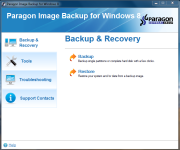
Paragon has an excellent and reliable backup engine and never any problems with it, I'm restoring a full OS image in a dozen of minutes.
So how does it differ from the paid version which is home version? What backups do u manage with the software, any exclusion lists etc..?
So u don't use Windows system restore along with this?
 
So how does it differ from the paid version which is home version? What backups do u manage with the software, any exclusion lists etc..?
So u don't use Windows system restore along with this?
I use Paragon Backup for Windows 8 (works on Win 7 also) that has only the main functions for backing up and restoring the system.
It's an old version hardly available now.
I don't use Windows Restore points because in my case are useless and do not offer a complete clean image recovery and those few times that I used them, they didn't work.

Some steps:

1-clean Windows 7 install
2-full Windows Update
3-first image
4-Installing apps, system optimization (disabling unnecessary services, drivers, etc)
5-second image

In the event of a serious system/malware error I restore the second operational image.
The first image is the only OS up to date and clean
 

Attachments

  • Cattura.PNG
    Cattura.PNG
    125.8 KB · Views: 509
UPDATE 2016/09/11

Removed Paragon Image Backup because it is no longer compatible with the latest Windows 10 builds and added Macrium Reflect Free.
Replaced ZAM with ZAL Premium lifetime.
Removed Wise programs and added Kerish Doctor and SecureMyBit.
Added GlassWire Network Monitor Pro.
 

You may also like...