Battle LibreOffice vs ONLYOFFICE - Which One Is Right For You?

Compare list
LibreOffice
ONLYOFFICE
On Linux

Why Libre Office is better than Only Office
  1. It loads faster.
  2. Can be tweaked to look like Office 2003 (using Office 2003 icons and Office blue theme).
    I prefer the icon bar over the ribbon where you can put all (and more important ONLY) the features and functions you use often.

Why Only Office is better than Libre Office
  1. Better Office format compatibility (because it uses Office format itself).
  2. Using Classic interface looks like recent Office with ribbon out of the box.

Why Libre Office is worse than Only Office
  • Powerpoints wih complex overlays simply don't show all the content (I have never ran into probems with Word and Excell).

Why Only Office is worse than Libre Office
  • The read-only bug still has not been fixed (when opening several documents, Only Office tells you your document is edited by someone else).

Verdict
  • For every day home use I would prefer Lbre Office (chances of running into Office compatibility options are near zero).
  • When you have to interact with others (e.g. for work) using Microsoft Office than Only Office (even with its annoying bug in Flatpak) is the better option.
 
Last edited:
It appears Collabora Office recently released a new edition, Collabora Office Desktop. It's available on the Microsoft Store and is free.
I tried it on Linux, looks more like Microsoft Office than Libre Office, but the Flatpak version I downloaded from their website has some annoying bugs (but it will probably only take some time to solve). For Windows users thinking about switching to Linux or dropping Microsoft Office (used to Micrsoft Office UI) this is certainly a nice new Libre Office based variant to keep an eye on.

Bugs I encountered: they have hidden some Libre Office options (e.g. where you can change user interface of Libre Office) instead included some options to switch in their UI. When you change how Collabra looks, you can't switch back (option is not present in their UI anymore). The permission are not set right in Flatpack. I can start and edit existing documents, but can't create new ones using the templates option. But these are all startup problems. Fair chance these problems are not present in the Windows version.
 
Last edited:
On Linux

Why Libre Office is better than Only Office
  1. It loads faster.
  2. Can be tweaked to look like Office 2003 (using Office 2003 icons and Office blue theme).
    I prefer the icon bar over the ribbon where you can put all (and more important ONLY) the features and functions you use often.

Why Only Office is better than Libre Office
  1. Better Office format compatibility (because it uses Office format itself).
  2. Using Classic interface looks like recent Office with ribbon out of the box.

Why Libre Office is worse than Only Office
  • Powerpoints wih complex overlays simply don't show all the content (I have never ran into probems with Word and Excell).

Why Only Office is worse than Libre Office
  • The read-only bug still has not been fixed (when opening several documents, Only Office tells you your document is edited by someone else).

Verdict
  • For every day home use I would prefer Lbre Office (chances of running into Office compatibility options are near zero).
  • When you have to interact with others (e.g. for work) using Microsoft Office than Only Office (even with its annoying bug in Flatpak) is the better option.

Don't forget that you can edit PDFs with OnlyOffice. You cannot with LibreOffice. Draw can, but it's no where near as effective or convenient.
 
I personally couldn't test compatibility issues with MS Office formats
All can successfully export to MS formats, and all will never reach 100% compatiblity with how the file looks if created by MS Office, especially with more advanced editing.

when opening several documents
Also OnlyOffice can easily crash with opening a large number of files or a solitary, large file; it will not considere trying it again until it moves from a web wrapper to a native installer.

Recently, Nextcloud, IONOS, and a bunch of other European tech companies came together to launch a new open source project called "Euro-Office", described as a "sovereign replacement for Microsoft Office with intuitive interface and strong compatibility backed by European open source community".

Now, ONLYOFFICE has suspended its 8-year-old partnership with Nextcloud, citing license violations after the Euro-Office coalition forked the ONLYOFFICE repo. The partnership between both platforms allowed Nextcloud users to edit and collaborate on office documents right inside their own instance, which made it a big deal for self-hosters.
ONLYOFFICE was favored over LibreOffice/Collabora because of its native Microsoft Office format compatibility (DOCX, XLSX, PPTX) and superior browser performance.

 
This is what AI told me regarding security between both products:

🟢 LibreOffice
Actively developed (The Document Foundation)
Frequent security updates
Fast response to vulnerabilities (short exposure window)
Transparent CVE tracking & advisories
Strong macro protections (safer against malicious docs)
Better adapted to modern Windows 11 security
👉 Result: Safe and up-to-date

🔴 OpenOffice
Very slow development
Rare updates
Vulnerabilities can stay unpatched for long periods
Limited transparency
Older, weaker macro security model
Not well adapted to modern Windows security
👉 Result: Higher risk / borderline outdated

⚖️ Bottom line
👉 LibreOffice = actively secured
👉 OpenOffice = lagging and potentially unsafe
If security matters (especially on Windows 11):
Use LibreOffice, no debate.
 
This is what AI told me regarding security between both products:

🟢 LibreOffice
Actively developed (The Document Foundation)
Frequent security updates
Fast response to vulnerabilities (short exposure window)
Transparent CVE tracking & advisories
Strong macro protections (safer against malicious docs)
Better adapted to modern Windows 11 security
👉 Result: Safe and up-to-date

🔴 OpenOffice
Very slow development
Rare updates
Vulnerabilities can stay unpatched for long periods
Limited transparency
Older, weaker macro security model
Not well adapted to modern Windows security
👉 Result: Higher risk / borderline outdated

⚖️ Bottom line
👉 LibreOffice = actively secured
👉 OpenOffice = lagging and potentially unsafe
If security matters (especially on Windows 11):
Use LibreOffice, no debate.
OpenOffice is already deprecated; LibreOffice was created based on the old OpenOffice code.
OpenOffice is occasionally receiving security updates, but no new features.

Capture.JPG
 
ffs, I apologize! I haven't had my morning coffee yet :ROFLMAO:
☕🤖 This is why I gave up on chasing the latest bestest software. New ones pop up like mushrooms after the rain and it is hard to tell them apart, they are all alike.
As long the app works and it is updated, I am not changing everything to get accustomed to it, it is not worth the time to change something for the sake of a change.
 
I tried Collabra Office again (based on Libre Office) with some loser flatseal permissions. It now creates new documents and can switch back to different views, but does not remember the window position (always opens in near maximized windows).

Besides this annoying UX it also creates new documents in libre office formats (although it saves documents opened in M$ Office formats in M$ formats)
On the plus side it does open documents in view mode and not in edit mode, this prevents running large powerpoints out of memory and not rendering any more (a problem with Libre office which only is a problem when opening several large powerpoints with lots of embedded visuals and pictures).

So I lose some user friendliness, but gain functionality (Libre Office problem with rendering Powerpoints ann Only Office read only bug). I have to say when you enable the side bar (which is context specific) it really offers most (all?) fucntionality you need. I switched from ribbon to iconbar because of that. That part of the user interface is really innovative (I hope it gets adopted by Libre Office also).
 
I've abandoned LibreOffice and switched to OnlyOffice. I was amazed by how similar the GUI is to MS Office, the great compatibility with MS Office extensions, and the best part, it's even more FLUID and FAST regarding document opening/saving than MS Office (at least on my PC). I love it! :love:
 
I've abandoned LibreOffice and switched to OnlyOffice. I was amazed by how similar the GUI is to MS Office, the great compatibility with MS Office extensions, and the best part, it's even more FLUID and FAST regarding document opening/saving than MS Office (at least on my PC). I love it! :love:
LibreOffice is faster on my side; OnlyOffice has a better UI but is slower as it is a web wrapper.
 
LibreOffice is faster on my side; OnlyOffice has a better UI but is slower as it is a web wrapper.
For me the same (libre office faster than OnlyOffice), both have show stopper bugs for me (libre office chookes with large powerpoints, Only Office has an old unresolved "read only" bug when opening several large powerpoints).

Collabra Office (based on Libre Office) does not has the Libre Office powerpoint problem and looks more like Microsoft Office similar to Only Office. On the useability side it opens documents in read only mode, requiring an extra click to enter edit mode. On the plus side the contextual awre side bar works very pleasant (better than any other Office package) and intuitive.
 
I setup a new deck PC for a friend last week who for years had used MS Office, I suggested he try OnlyOffice before we thought about a new MS License as he had some work related documents & letterheads done on MS so there was some concern if they would format OK - He is so far delighted with OnlyOffice, his PC has 32 Gig RAM & .docx open almost instantly so I'm was pleased he is happy & we also don't need to use MS Office :)
 
I setup a new deck PC for a friend last week who for years had used MS Office, I suggested he try OnlyOffice before we thought about a new MS License as he had some work related documents & letterheads done on MS so there was some concern if they would format OK - He is so far delighted with OnlyOffice, his PC has 32 Gig RAM & .docx open almost instantly so I'm was pleased he is happy & we also don't need to use MS Office :)
Ask him as a trial to open 20-30 small pdf files with both OnlyOffice and another pdf viewer such as PDF X-change and to find out if one of them will crash.
 
Ask him as a trial to open 20-30 small pdf files with both OnlyOffice and another pdf viewer such as PDF X-change and to find out if one of them will crash.

Why would anyone realistically do that? That's not a real-world situation, but one designed to cause problems. If you're going to go looking for problems you'll find them. But I rather focus on actually standard-use issues.
 
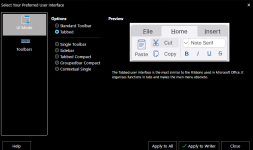
OnlyOffice does have a sleek UI, I will admit that. It's a pretty good drop-in replacement for Office, especially with the Microsoft-style ribbon UI. It does come at the performance cost of running copious amounts of JavaScript instead of machine code. LibreOffice's UI is actually quite modular and flexible, though, and you can enable a tabbed ribbon layout (NotebookBar) that looks more like Office/OnlyOffice.

To give LibreOffice some credit for keeping up, 2026 releases have improved OOXML (docx, etc.) format compatibility to rival OnlyOffice.

Microsoft's OOXML formats have obviously become a widespread standard, but it's still a travesty. It's technically governed by ISO, but it's really just Microsoft:
the Office Open XML Document is a ~7,000 page spec that even large, skilled development teams struggle to deal with. When Microsoft applied for ISO standardization that was fast-tracked, they created two versions and stuck to a more proprietary version for themselves.

As Patrick Durusau put it, "Reading the OOXML specification is like reading a recipe for a cake that begins by requiring you to build the oven from scratch, using only a hammer and a bag of sand."

The OpenDocument Format (ODF)—a ~1,200 page spec—is governed by the OASIS Open consortium, which also builds interoperability standards and frameworks in fields like AI and cybersecurity. Notable contributors behind ODF include the Document Foundation, Collabora, Allotropia, Google, IBM, Microsoft, the European Commission and member states (e.g. Germany, France), and Fraunhofer Fokus. They officially ratified ODF 1.4 at the beginning of this year.
 
OnlyOffice does have a sleek UI, I will admit that. It's a pretty good drop-in replacement for Office, especially with the Microsoft-style ribbon UI. It does come at the performance cost of running copious amounts of JavaScript instead of machine code. LibreOffice's UI is actually quite modular and flexible, though, and you can enable a tabbed ribbon layout (NotebookBar) that looks more like Office/OnlyOffice.

To give LibreOffice some credit for keeping up, 2026 releases have improved OOXML (docx, etc.) format compatibility to rival OnlyOffice.

Microsoft's OOXML formats have obviously become a widespread standard, but it's still a travesty. It's technically governed by ISO, but it's really just Microsoft:
the Office Open XML Document is a ~7,000 page spec that even large, skilled development teams struggle to deal with. When Microsoft applied for ISO standardization that was fast-tracked, they created two versions and stuck to a more proprietary version for themselves.

As Patrick Durusau put it, "Reading the OOXML specification is like reading a recipe for a cake that begins by requiring you to build the oven from scratch, using only a hammer and a bag of sand."

The OpenDocument Format (ODF)—a ~1,200 page spec—is governed by the OASIS Open consortium, which also builds interoperability standards and frameworks in fields like AI and cybersecurity. Notable contributors behind ODF include the Document Foundation, Collabora, Allotropia, Google, IBM, Microsoft, the European Commission and member states (e.g. Germany, France), and Fraunhofer Fokus. They officially ratified ODF 1.4 at the beginning of this year.

Where is NotebookBar? I'm not seeing it.

Screenshot 2026-04-10 120920.png