


It can be used for the login screen, the screensaver, as well as for sudo commands and apps that require administrative privileges.
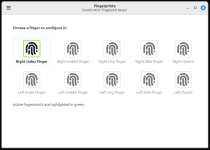
The upcoming Linux Mint 22.2 (Zara) operating system will feature a brand-new app called Fingwit, providing users with fingerprint authentication capabilities.
In the latest monthly newsletter, Linux Mint project leader Clement Lefebvre revealed one of the attractions of the forthcoming Linux Mint 22.2 release: a new in-house application for managing fingerprint authentication and configuration on computers with fingerprint readers.
Fingerprint authentication on Linux Mint 22.2 can be used for the login screen to log into your Linux Mint session, the screensaver when you lock your computer, as well as for sudo commands and apps that require administrative privileges (pkexec).
Under the hood, the Fingwit app relies on the well-known fprintd daemon, but provides a smarter PAM (Pluggable Authentication Modules) module than pam_fprintd.so allowing the application to detect problematic cases and dynamically switch between fingerprint and password authentication.
“For instance if you’re trying to log in but your home directory is encrypted, fingerprint authentication would log you in but your session would crash since ecryptfs requires your password. Fingwit detects that kind of things so you get fingerprint authentication as much as possible, but avoid such issues,” explains Clement Lefebvre.

Linux Mint 22.2 Will Feature Fingerprint Authentication with Fingwit App - 9to5Linux
Linux Mint 22.2 operating system will feature fingerprint authentication capabilities with a brand-new app called Fingwit.
 9to5linux.com


