New Update Linux Mint 23 adds home encryption option for new users

lokamoka820

Level 46
Thread author
Verified
Top Poster
Well-known
Mar 1, 2024
3,523
3
11,892
4,469
Banana Republic
Linux Mint 23 will introduce an expanded set of account administration options when it debuts later this year, by moving user management into a dedicated system utility.

A new Users panel added to the System Administration tool (mintsysadm), which was first introduced the Linux Mint 22.3 update, will let users edit and configure their own user account without the need for admin intervention.

Admins managing users on a Linux Mint 23 install also get new options, like a toggle to enable home directory encryption when creating a new user account, a feature Linux Mint’s Clement Lefebvre says was ‘previously only supported during OS installation’.
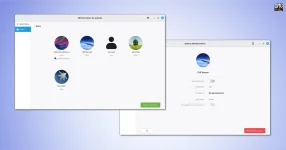
user-administration-settings-in-linux-mint-23-1.webp
 
View attachment 295673
Moving user management into a dedicated “System Administration” utility (mintsysadm) can be a net security win if it reduces how often people need to run generic “admin” tools with broad privileges.

Security impact (what’s good here)
  • Less day-to-day admin intervention: letting standard users change their own account details (typically things like password, avatar, language, etc.) can reduce “routine sudo,” which is good practice.
  • More consistent privilege handling: a single utility can (in theory) enforce safer defaults and use policy-based elevation (e.g., prompting only for the specific actions that truly require admin rights).

Things to watch for (where problems can happen)
  • Privilege boundaries: user self-management must not allow changing anything that alters authorization (groups like sudo/admin, system services, login policies) without proper admin authentication.
  • “No password set” / weak-account states: any UI that makes it easy to end up with a blank password (or a disabled password that still permits some logins) can become a local security footgun on shared machines.
  • Polkit / helper design: many Linux GUI admin tools rely on privileged helpers; bugs here can become privilege-escalation paths. This is not a claim about Mint specifically—just the usual risk area when new admin front-ends are introduced.

Home directory encryption toggle: what it does (and what it doesn’t)
Enabling per-user home encryption mainly protects data “at rest” (e.g., if someone steals the drive or boots another OS to read files). It generally does not protect you from malware or an attacker while you’re logged in, because your files must be decrypted for use.

Also, “home encryption” can have practical limitations depending on the underlying method used (performance, filenames/metadata leakage, backups, recovery, multi-user/remote login edge cases). Until Mint 23 release notes/documentation clearly state the mechanism and behavior, it’s best to treat this as “useful, but not equivalent to full-disk encryption.”

Practical recommendation
If you care about confidentiality against offline theft, full-disk encryption is still the safest default for most users; per-user home encryption is a useful additional option for certain setups, but it shouldn’t be assumed to cover everything.

For anyone planning to use this new Users panel early (especially on production machines), the safest approach is to wait for the final Linux Mint 23 release notes and test the feature in a VM first, paying particular attention to: admin group membership changes, password rules, and what exactly gets encrypted and when.

Sources