Lost Desktop Icons After Virus Removal

thall93

New Member
Thread author
Apr 9, 2012
4
0
2
53
Need help getting back desktop icons and being able to access programs/software after clicking START. Everything obviously cannot be "pinned."
 
Hi this should be able to restore your access back...

  • Download RogueKiller and save it on your desktop.
  • Quit all programs
  • Start RogueKiller.exe.
  • Wait until Prescan has finished ...
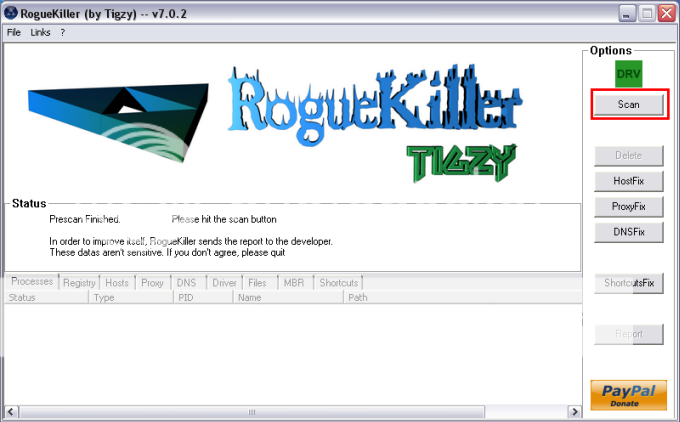
  • Click on Scan
RGKRScan.png

  • Wait for the end of the scan.
  • The report has been created on the desktop.
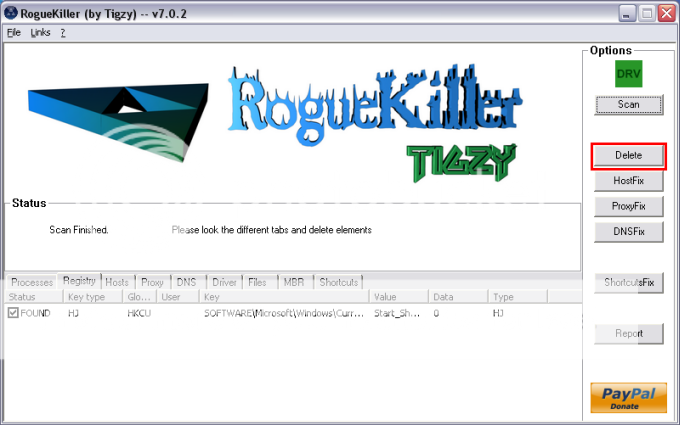
  • Click on the Delete button.
RGKRDelete.png

  • The report has been created on the desktop.

  • Next click on the ShortcutsFix
    RGKRDelete.png
  • The report has been created on the desktop.

Please post:

All RKreport.txt text files located on your desktop.
 
After speaking with Jack this morning, I reran Unhide, and it told me that it cannot restore those files because my c:document/tiffany/locals/temp/smtmp folder no longer exists. I think when I followed that last step of cleaning temp files that I eliminated necessary temp files. I was able to get files back on the desktop but am unable to click START and use those shortcuts. They are all empty. Any idea how I can remove/restore those? And...I really need my computer calculator that used to be under Accessories. Can you give suggestions where to find that file? Thanks in advance.

 
I try to download Roguekiller as instructed, but I keep being directed to a site that says FoxTab and is a .pdf creator. Is this where I am supposed to go?
i just need to be able to click START and get those programs to work. I also can't see my CD/DVD drives. Is this also because of that SMART HDD virus I had? That means I must still have remnants left. Aw man!