Trustless
New Member
Hi Everyone.
About a month ago (not sure the exact date on the dot) I started noticing redirects happening on many websites I visit such as amazon, ebay and etsy. It is extremely annoying because often if I use an external link, for example a link from a google search to the website, the series of redirects will send me to the home page, without the ability to use the back button to try again.
Here is a tracker log of the activity after simply tying in ebay in my search. The sites that I've been getting redirected to are addmitad.com, maso-leo.com and api.cactus-search.com, and there may be any other number of website in the mix depending on what website I was attempting to navigate to.
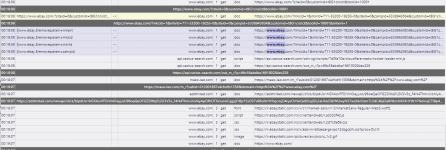
I'd like assistance removing this malware. One thing I will note is that at the same time that this malware became an issue on my desktop computer, it simultaneously became an issue on my laptop, making me think something to do with either chrome or my addons is going on.
I have tried to isolate any particular addons, default web browsers and policies in chrome with no luck, however I can't say for 100% that I've checked everything that I need to yet. Guidance would be greatly appreciated.
Thank you.
About a month ago (not sure the exact date on the dot) I started noticing redirects happening on many websites I visit such as amazon, ebay and etsy. It is extremely annoying because often if I use an external link, for example a link from a google search to the website, the series of redirects will send me to the home page, without the ability to use the back button to try again.
Here is a tracker log of the activity after simply tying in ebay in my search. The sites that I've been getting redirected to are addmitad.com, maso-leo.com and api.cactus-search.com, and there may be any other number of website in the mix depending on what website I was attempting to navigate to.
I'd like assistance removing this malware. One thing I will note is that at the same time that this malware became an issue on my desktop computer, it simultaneously became an issue on my laptop, making me think something to do with either chrome or my addons is going on.
I have tried to isolate any particular addons, default web browsers and policies in chrome with no luck, however I can't say for 100% that I've checked everything that I need to yet. Guidance would be greatly appreciated.
Thank you.